Input functions
122
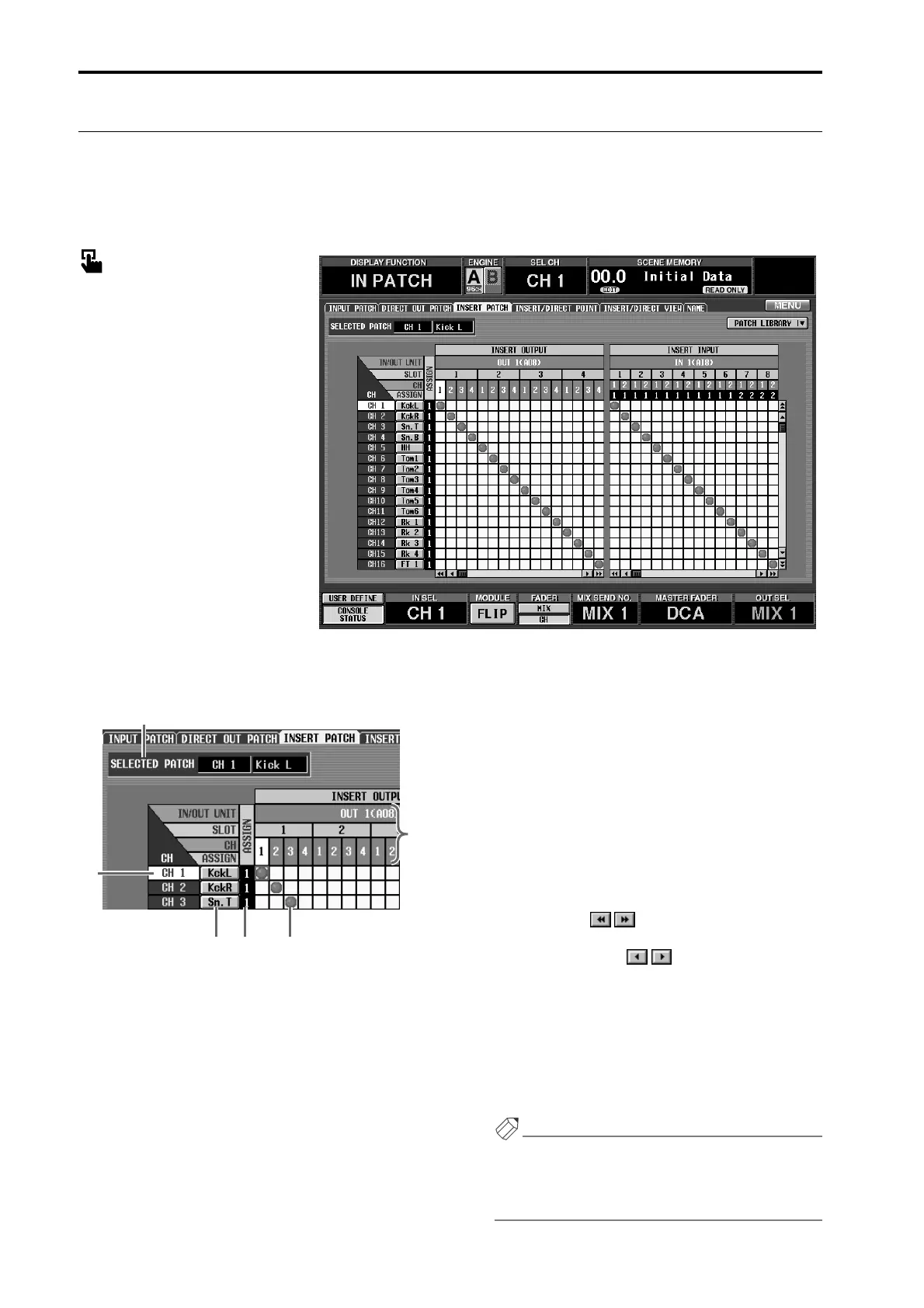
INSERT PATCH
[Function]
For each input channel, patch the input/output jacks used for inserting external devices such as an effect pro-
cessor.
■ Console
In the LCD FUNCTION ACCESS
block, press the INPUT [PATCH]
switch (press repeatedly until the
screen shown at the right appears)
■ Display
MENU button → INPUT PATCH
button → INSERT PATCH tab
[Screen functions]
1 CH (input channel)
This is the number of the input channel for which
the insertion input/output jacks are being patched.
The channel number of the grid where the cursor is
currently located will be highlighted.
2 Short name
The short name assigned to each input channel is
displayed here. You can also click this area to assign a
short name/long name (→p.128).
3 ASSIGN
This shows the number of outputs assigned to each
input channel for insertion output.
4 SELECTED PATCH (currently selected patch)
This shows the input channel number/long name for
the grid location where the cursor is currently
located.
5 OUT UNIT/SLOT/CH (output unit/slot/channel)
In order from the top, these are the type and number
of the output unit, the slot number, and the output
jack channel number. (For the meaning of the abbre-
viations displayed in the output unit line, refer to
→p.121.)
By clicking the buttons at either end of the
output unit/slot line, you can switch the display by
units. By clicking the buttons you can switch
the display by slots.
6 Grid
This grid allows output jacks (horizontal lines) to be
patched to input channels (vertical columns). Cur-
rently-patched grids are indicated by a ● symbol.
Move the cursor to the desired grid, and press the
[ENTER] switch (or click) to set/cancel the patch.
Hint
If PATCH CONFIRMATION is turned on in the
UTILITY function PREFERENCE screen, a popup
window will ask you for confirmation each time you
attempt to change the patch settings.
1
2
3 6
4
5



 To Next Page