Chapter 5. Basic operation for output channels
79
Sending a signal from the STEREO A channel to the MATRIX bus
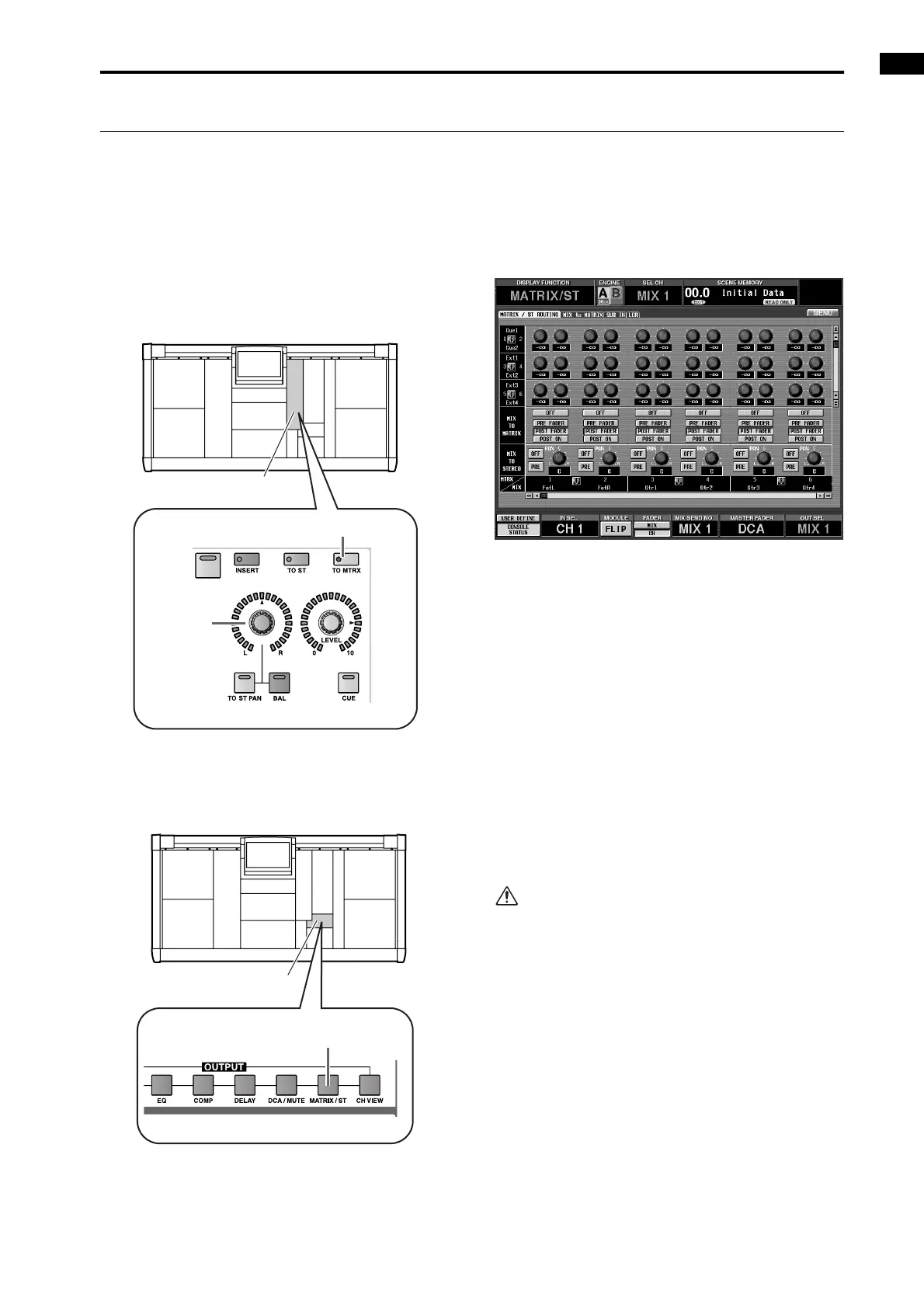
Here’s how to use the SELECTED OUTPUT CHANNEL block to send the signal of the STEREO A channel to a MATRIX
bus.
[Procedure]
1. Use the STEREO A [SEL] switch of the STEREO
OUTPUT block to select the STEREO A channel.
2. In the OUTPUT section of the SELECTED OUT-
PUT CHANNEL block, turn on the [TO MTRX]
switch.
3. In the LCD FUNCTION ACCESS block, press the
OUTPUT [MATRIX/ST] switch several times to
access the following MATRIX/ST ROUTING
screen.
• MATRIX/ST ROUTING screen (MATRIX/ST
function)
4. Scroll the screen to the right so that the ST A [L]
(STEREO A channel L) or ST A [R] (STEREO A
channel R) appears in the horizontal source row.
5. Use the on-screen buttons in the MIX TO MATRIX
section to select one of the following as the point
from which the STEREO A channel signal will be
sent to the MATRIX bus.
• PRE FADER ....... Immediately before the STE-
REO A fader (pre-fader)
• POST FADER .... Immediately after the STEREO A
fader (post-fader)
• POST ON ........... Immediately after the STEREO A
[ON] switch
6. In the OUTPUT section of the SELECTED OUT-
PUT CHANNEL block, turn on the [ON] switch.
If pre-fader is selected as the send point for the sig-
nal, the signal will now be sent to the correspond-
ing bus.
7. In the OUTPUT section, raise the OUTPUT
[LEVEL] encoder.
8. In the OUTPUT section, use the [PAN/BAL]
encoder to adjust the output level balance between
L and R.
If the STEREO A channel is selected in the
SELECTED OUTPUT CHANNEL block, the OUT-
PUT [BAL] switch LED will light. This indicates that
you can use the OUTPUT [PAN/BAL] encoder to
adjust the L/R balance.
ON
SELECTED OUTPUT
CHANNEL block
[PAN/BAL]
encoder
[TO MTRX] switch
LCD FUNCTION ACCESS
block
OUTPUT [MATRIX/ST] switch



 To Next Page