CS1D Reference Manual (Software)
2
Information shown in the display
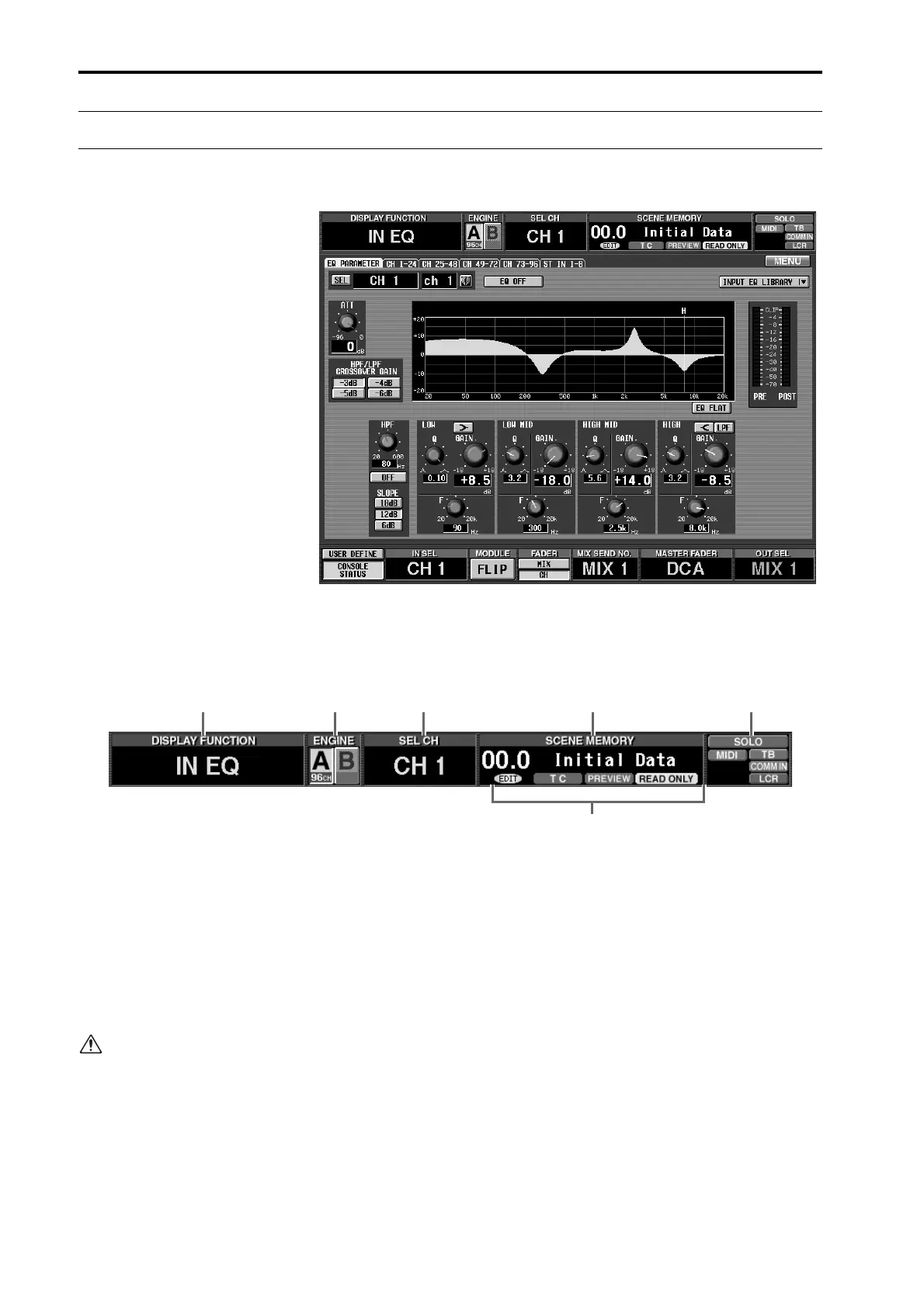
A typical screen of the CS1D
The following information is shown in the display of the
CS1D.
[Upper part of the display (Common to each screen)]
1
DISPLAY FUNCTION
This displays the abbreviation for the currently
selected function.
2
ENGINE
When the PM1D is being used in Mirror mode, this
indicates the currently valid engine (A or B) and the
number of channels that can be used. (The cur-
rently-used button is highlighted.) You can also click
this button to switch between engines A and B.
When the PM1D is being used in Standard mode,
engine A alone will be valid at all times. Engine B
will be shaded, and cannot be selected. When the
PM1D is being used in Mirror mode, engines A/B
will both be valid.
If a valid engine is not functioning correctly, or if
the connection has been broken, an X symbol will
be displayed over the A or B symbol.
3
SEL CH (selected channel)
This shows the currently selected channel. If an input
function screen is accessed, this will show the cur-
rently selected input channel. If an output function
screen is accessed, this will show the currently
selected output channel.
The abbreviations here have the following meanings.
•
CH x
................... Input channel (x will be a num-
ber in the range of 1–96 {1–48})
•
STINx[L]/[R]
..... ST IN channel L or R (x will be a
number in the range of 1–8 {1–
4})
•
MIX x
................. MIX channel (x will be a number
in the range of 1–48)
•
MTRX x
.............. MATRIX channel (x will be a
number in the range of 1–24)
•
ST A[L]/[R]
........ STEREO A channel L or R
•
ST B[L]/[R]
........ STEREO B channel L or R
1 2 3 4 6
5



 To Next Page