CS1D Operating Manual (Basic Operation)
76
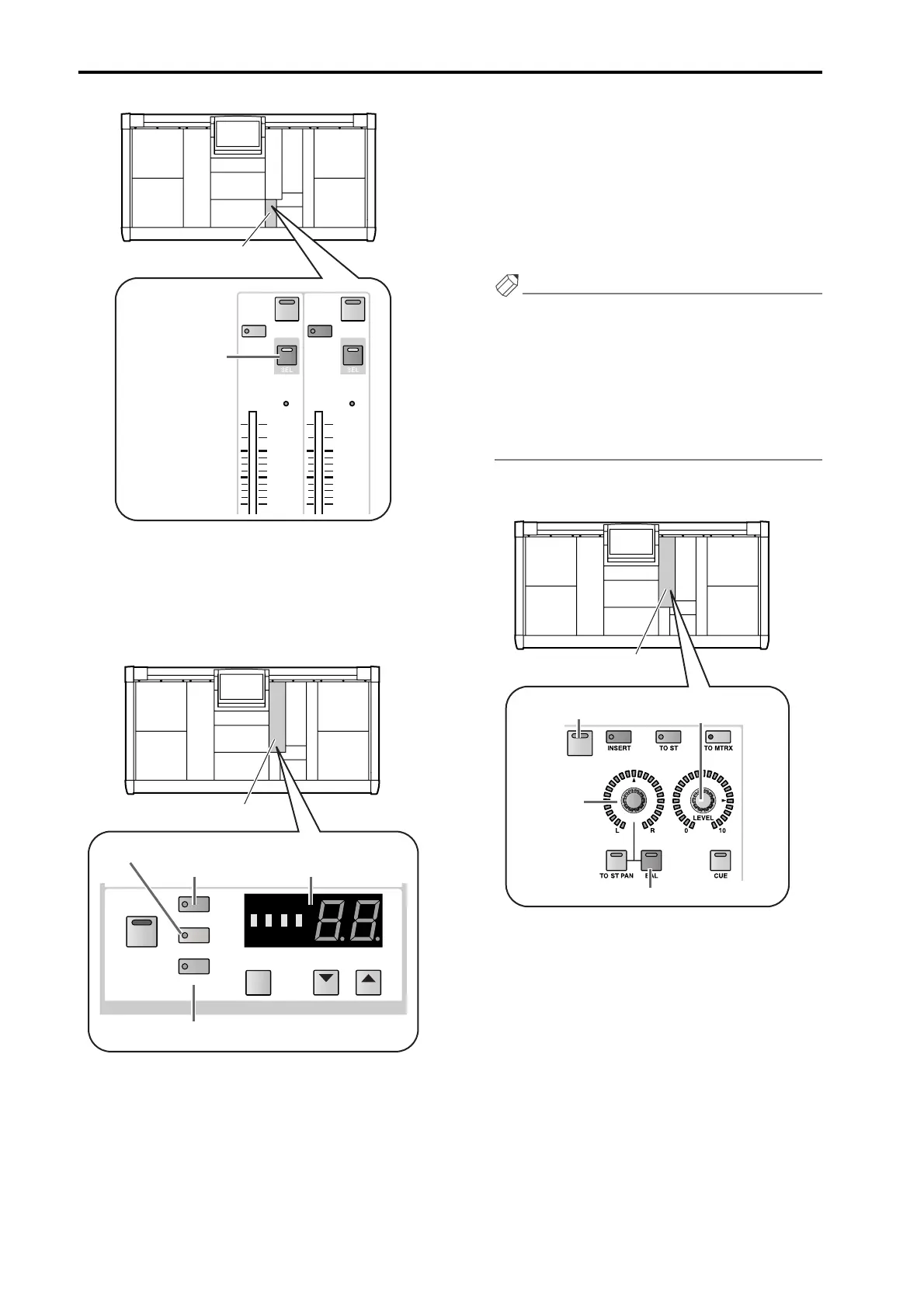
When you select a channel, the LEDs and indicators
of the SELECTED OUTPUT CHANNEL will show
the settings of the various parameters for that chan-
nel. The type, number, and short name are shown by
the switches and [NAME]/[NUMBER] indicator of
the CHANNEL SELECT section.
• When a STEREO A/B is selected
The [ST] switch LED will light, and the [NUM-
BER] indicator will show either AL (L channel of
STEREO A), Ar (R channel of STEREO B), bL (L
channel of STEREO B), or br (R channel of STE-
REO B).
• When a MATRIX channel is selected
The [MATRIX] switch LED will light, and the
[NUMBER] indicator will show a number in the
range of 1–24.
• When a MIX channel is selected
The [MIX] switch LED will light, and the [NUM-
BER] indicator will show a number in the range of
1–48.
Hint
It is also possible to select a channel by using the
SELECTED OUTPUT CHANNEL block CHAN-
NEL SELECT [▼/DEC]/[▲/INC] switches. For
details refer to “CS1D Reference Manual (Hard-
ware)” (→p.66).
By repeatedly pressing a [SEL] switch of the STEREO
OUTPUT block, you can alternate between the L
channel and the R channel.
2. In the SELECTED OUTPUT CHANNEL block
OUTPUT section, turn on the [ON] switch.
3. In the OUTPUT section, raise the [LEVEL] encoder.
The signal of the corresponding output channel will
be sent from the output unit patched to that channel.
4. If in step 1 you selected a STEREO A/B channel or
one channel of a pair of MIX/MATRIX channels,
use the OUTPUT section [PAN/BAL] encoder to
adjust the volume balance between the two chan-
nels.
If either channel of the STEREO A/B channel or of a
paired MIX/MATRIX channel is selected, the OUT-
PUT section [BAL] switch LED will light. This indi-
cates that you can use the [PAN/BAL] encoder to
adjust the balance between the two channels.
INS
SEL
TO MTRX
INS
SEL
MONO
10
5
5
0
10
5
5
0
ON ON
STEREO OUTPUT block
[SEL] switch
MIX
MATRIX
ST
CHANNEL
COPY
DEC INC
SHIFT
CHANNEL SELECT
SELECTED OUTPUT
CHANNEL block
[NAME]/[NUMBER]
indicator
[ST] switch
[MATRIX] switch
[MIX] switch
ON
SELECTED OUTPUT
CHANNEL block
[PAN/BAL]
encoder
[ON] switch [LEVEL] encoder
[BAL] switch



 To Next Page