Chapter 13. Graphic EQ
135
The following signal routes can be selected as a patch
destination.
• IN 1-48 INSERT OUT
Patch to the insert-out/insert-in of an input chan-
nel 1–48 or ST IN channel 1–4.
• IN 49–96 INSERT OUT {this button is not valid
for the 48 channel model}
Patch to the insert-out/insert-in of an input chan-
nel 49–96 or ST IN channel 5–8.
• MIX INSERT OUT
Patch to the insert-out/insert-in of a MIX channel
1–48.
• MATRIX INSERT OUT
Patch to the insert-out/insert-in of a MATRIX
channel 1–24.
• STEREO A (L/R)
Patch to the insert-out/insert-in of the STEREO A
channel (L or R).
• STEREO B (L/R)
Patch to the insert-out/insert-in of the STEREO B
channel (L or R).
Hint
If the short name of a channel is displayed on a red
background, this indicates that some other item (an
internal effect, input/output unit, or another GEQ)
has already been inserted into that channel. Be aware
that if you select such a channel as the patch destina-
tion for a GEQ module, the previously-inserted item
will be defeated.
5. In the top row of the screen, click either the 1-48
INSERT OUT button or the 49-96 INSERT OUT
button {this button is not valid for the 48 channel
model}, and then click one of the buttons in the
lower part of the screen to select the channel num-
ber.
When you click a number, you will return to the pre-
vious GEQ PARAMETER screen. Notice that the
module you selected is displayed at the right of the
INSERT button.
Hint
If one side of a stereo channel (or of two paired chan-
nels) is patched to one of two adjacent odd-num-
bered → even-numbered GEQ modules, the
remaining channel will automatically be assigned to
the other GEQ module.
If you turn on the LINK button of the GEQ PARAM-
ETER screen, adjacent odd-numbered → even-num-
bered GEQ modules will be linked.
6. Turn on the GEQ ON/OFF button located in the
upper middle of the screen.
Hint
The GEQ can also be switched on/off in the GEQ
ASSIGN 1-12/13/24 screens.
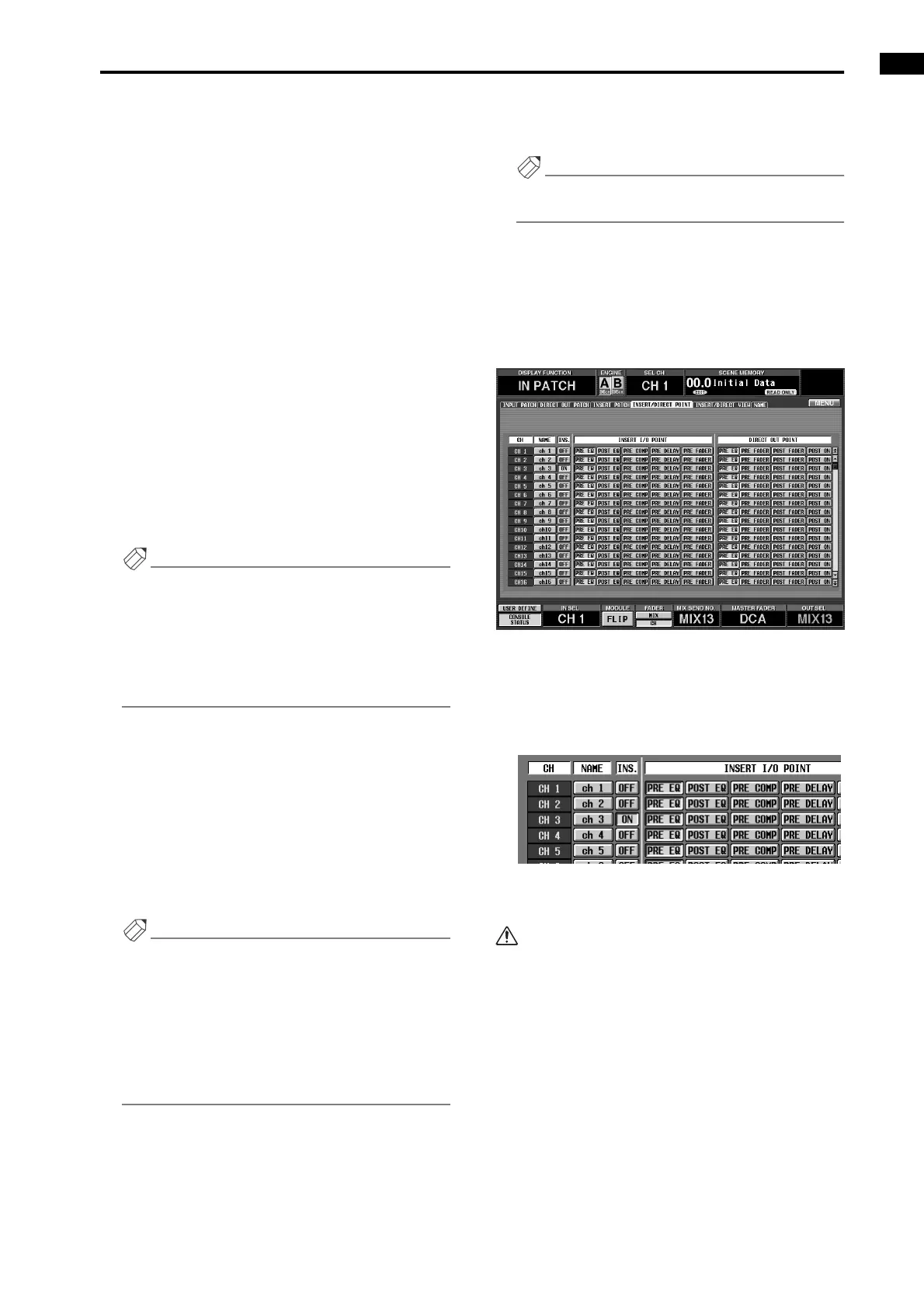
7. In the LCD FUNCTION ACCESS block, press the
INPUT [PATCH] switch several times to access the
INSERT/DIRECT POINT screen (IN PATCH func-
tion).
• INSERT/DIRECT POINT screen (IN PATCH
function)
If an input channel is selected as the GEQ insert, the
INS. button of the corresponding channel in the
INSERT/DIRECT OUT screen will automatically be
turned on.
• INSERT/DIRECT POINT
8. If necessary, change the INSERT I/O POINT.
• The INS. button will switch on/off only when you
select/cancel the insert destination in the GEQ
PARAMETER screen. Selecting/canceling the GEQ
insert destination in the IN PATCH/OUT PATCH
screen will not operate this function.
• In the INSERT/DIRECT POINT screen you can
always switch the INS. button on/off.
• If you insert a graphic EQ into an output channel,
press the OUTPUT [PATCH] switch several times to
access the INSERT POINT screen (OUT PATCH
function), and make the setting in the same way.
• If you defeat GEQ insertion in the GEQ PARAME-
TER screen, the INS. button of the corresponding
channel will automatically be turned off.



 To Next Page