Input functions
146
[Procedures]
Copying gates/compressors to an input chan-
nels within the same tab (Example: copying
from ch.1 to ch.2)
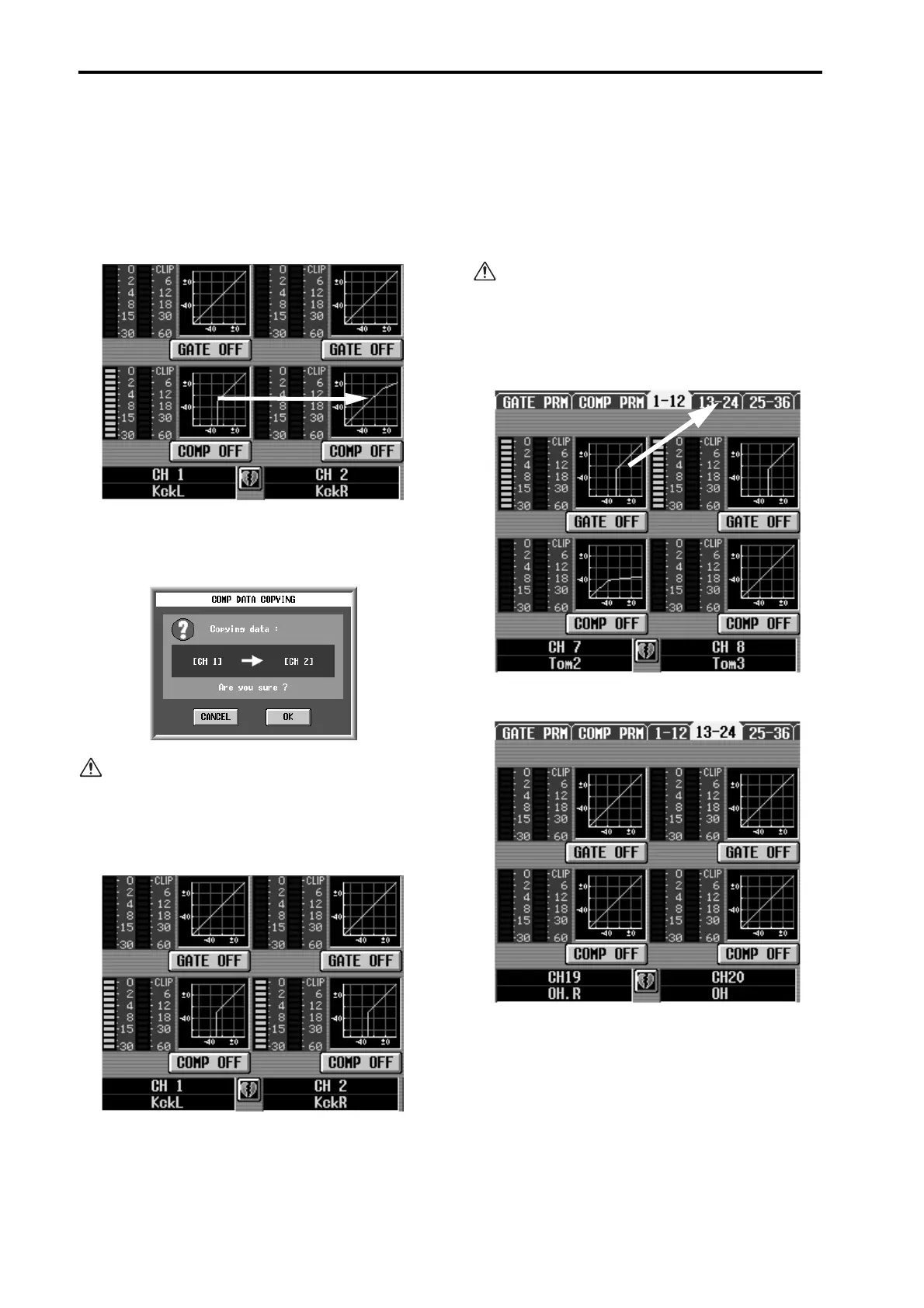
1. Drag the mini-graph from the copy source input
channel and drop it onto the copy destination input
channel.
A window will appear, asking you to confirm the
copy. To execute the copy, click the OK button. To
cancel, click the CANCEL button.
If you attempt to drag and drop a Gate mini-graph
to Compressor (or the reverse), a warning message
will appear, and the operation will not be executed.
2. Click the OK button, and the settings will be cop-
ied.
Copying gate/compressor settings to an input
channel located in a different tab (Example:
copying from ch.7 to ch.20)
1. Drag the mini-graph from the copy source input
channel onto the tab of the copy destination.
The screen for the copy destination tab will appear.
It is not possible to copy settings by dropping the
mini-graph in any screen other than the 1-12, 13-
24, 25-36, 37-48, 49-60, 61-72, 73-84, 85-96, ST IN
1-4, and ST IN 5-8 screens accessed by pressing the
LCD FUNCTION ACCESS block INPUT [GATE/
COMP] switch.
2. The copy destination tab screen will appear.



 To Next Page