Setting Up a USB Connection
This section describes how to set up a USB PC-to-Lynx communications via USB
connection to a Windows PC (Windows 2000, XP and Vista are supported). USB re
-
quires an RNDIS account in order to control the USB connection.
USB parameters, including RNDIS, must be set up using some other connection into
Lynx before the USB connection method may be used. These steps use the conven
-
tional IP network access for the Lynx administrator.
Refer to the Network options in the Lynx Menu for RNDIS features and assignments.
RNDIS and USB Driver
Install USB Driver Files, if needed
Note Some steps here may be needed only with Windows 2000 or if USB support
has been disabled or modified in your host PC. Skip if not needed.
1.
Connect the Lynx to your network. Log In to the Lynx as administrator.
2.
Access the Network option from the Lynx Menu.
3.
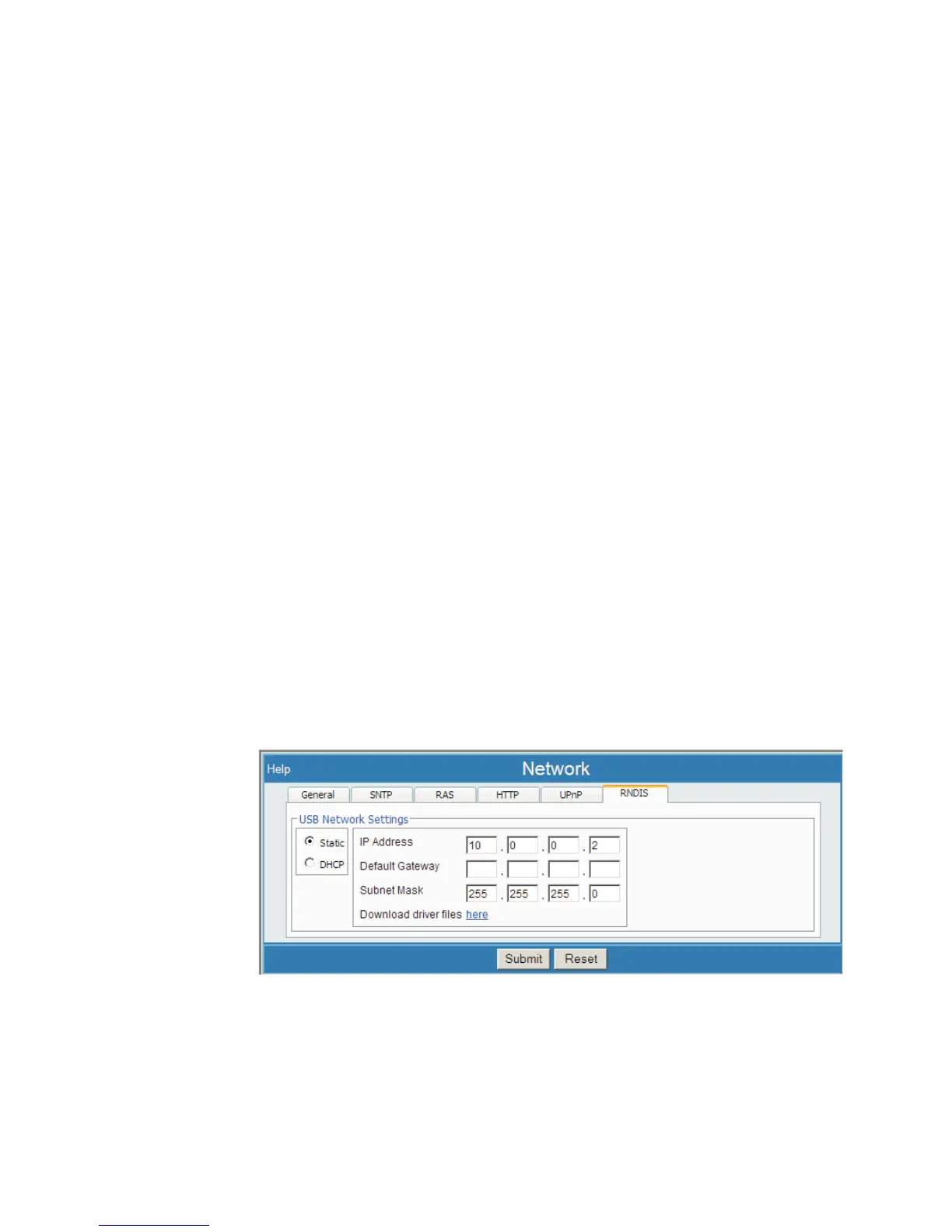
Select the RNDIS tab.
4.
Download the USB driver files from this page (click the 'here' link).
User’s Manual 165
Setting Up a USB Connection
Figure 110 - 'here' Link on RNDIS page to download USB driver files



 To Next Page