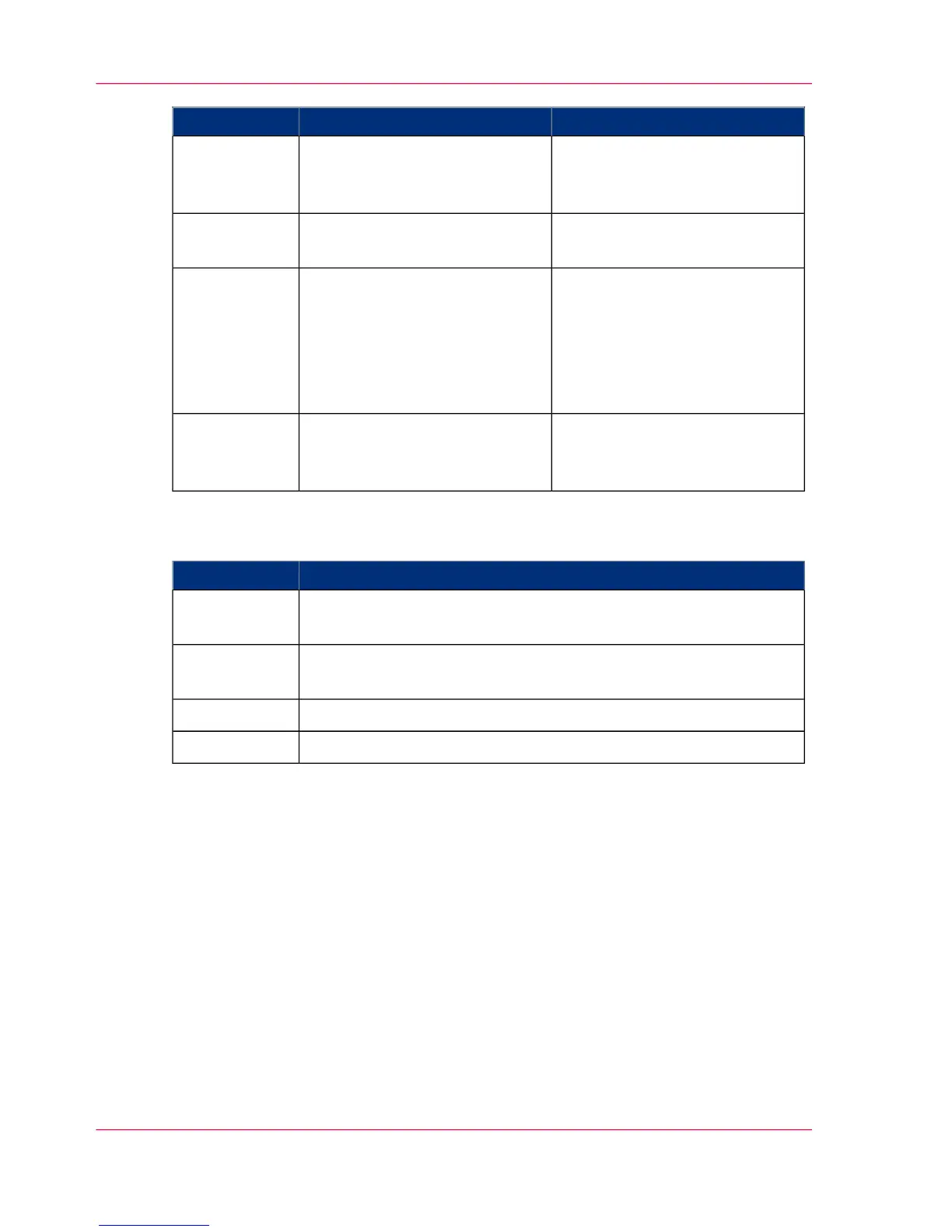
Settings on operator panelDescriptionTest sequence
'Configuration' -> 'Print param-
eters' -> 'Transfer optimization'
menu
Designation of passage behavior
at places printed on both sides.
4
'Configuration' -> 'Paper' ->
'Shift' menu
Designation of print image posi-
tioning on front and back pages.
5
'Configuration' -> 'Print param-
eters' -> 'Print image' -> 'Fusing
temperature' menu
'Configuration' -> 'Print param-
eters' -> 'Print image' ->
'Smoothing' menu
Determination of fusing level in
continuous print operation on
the full tone bars at right angles
to and in line with print orienta-
tion.
6
'Configuration' -> 'Color' ->
'Color plane shift' menu
Determination of color separa-
tion setting in longitudinal direc-
tion (register).
7
Visualization of certain settings:
#
DescriptionTest sequence
The graphics show the achievable color spectrum/the curve of the
four colors.
8a
The graphics show peaked light (reflection) and depth drawing
(structure in dark tone).
8b
The text field shows information on printer-specific settings.8c
The graphics in CMYK show the tone transfer curve (contouring).8d
Chapter 6 - Operating the Printing System206
'5C_PrintQualityInspection.600' Test Print Job



 To Next Page