Adjusting the Pressure Rollers
Introduction
If a paper web with a different width was inserted, the position of the pressure rollers in
the paper output must be checked.
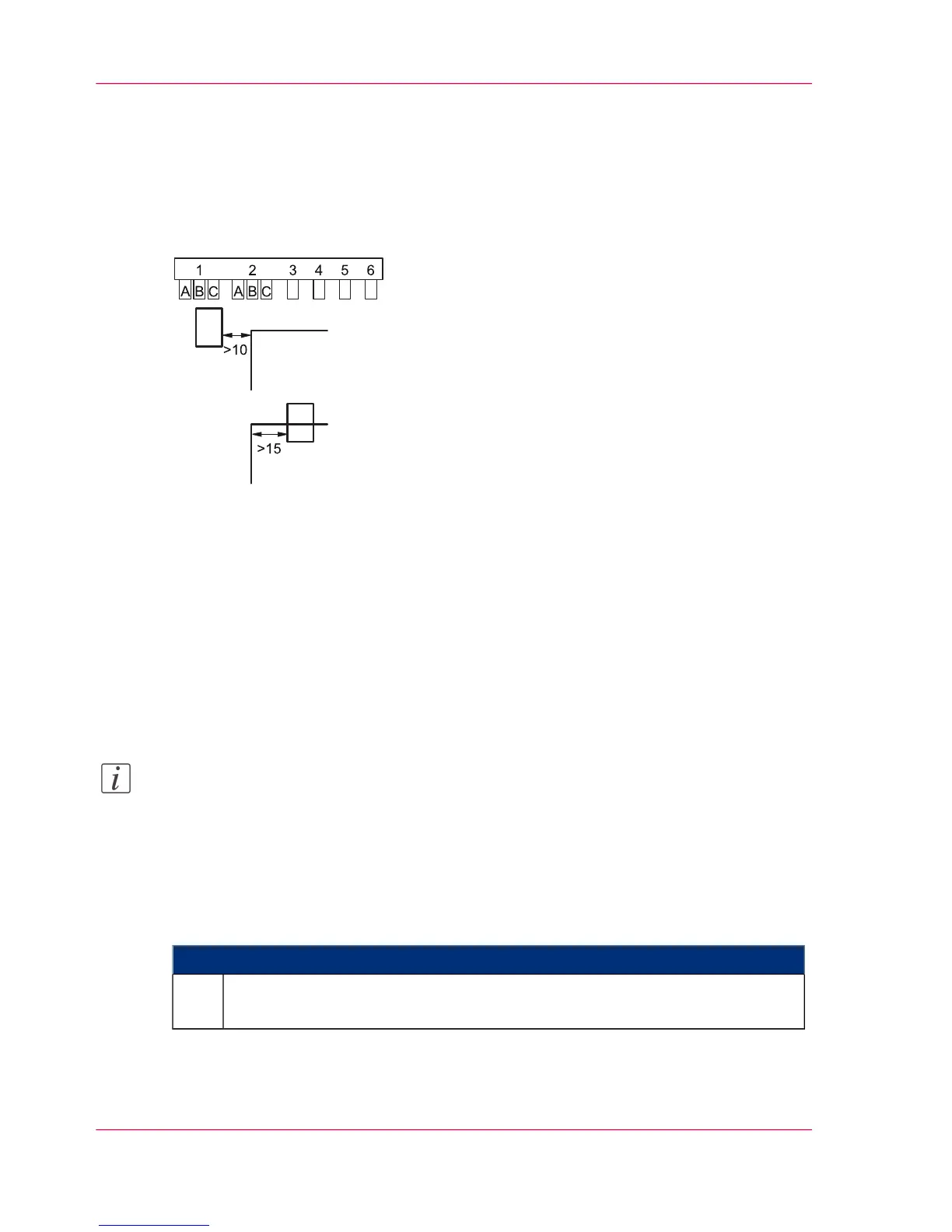
To avoid damage, the paper edge must not run directly along a pressure roller. To this
end, the two pressure rollers on the right-hand side in the paper path direction (1 and 2)
can each be moved to 3 positions (A), (B, (C). These positions are marked on the pressure
roller holder.
■
If a pressure roller runs outside of the paper web: This pressure roller must be moved
so that the distance between the paper web and the pressure roller is at least 10 mm
(0.39").
■
If a pressure roller runs on the paper web: This pressure roller must be moved so that
the distance to the edge of the paper web is at least 15 mm (0.59").
Note:
The position of the pressure rollers must be the same for both pressure roller holders.
If, for instance, pressure roller 1 is set to position B in the upper row, pressure roller 1
must also be set to position B in the lower row.
To Adjust the Pressure Rollers
#
Proceed as follows:
Select the following menu on the operator panel:
'Configuration' -> 'Special functions' -> 'Setting the pressure rollers'.
1.
Chapter 6 - Operating the Printing System148
Adjusting the Pressure Rollers



 To Next Page