Charts ECDIS-E User Guide
4-36 65934012
Chart Databases
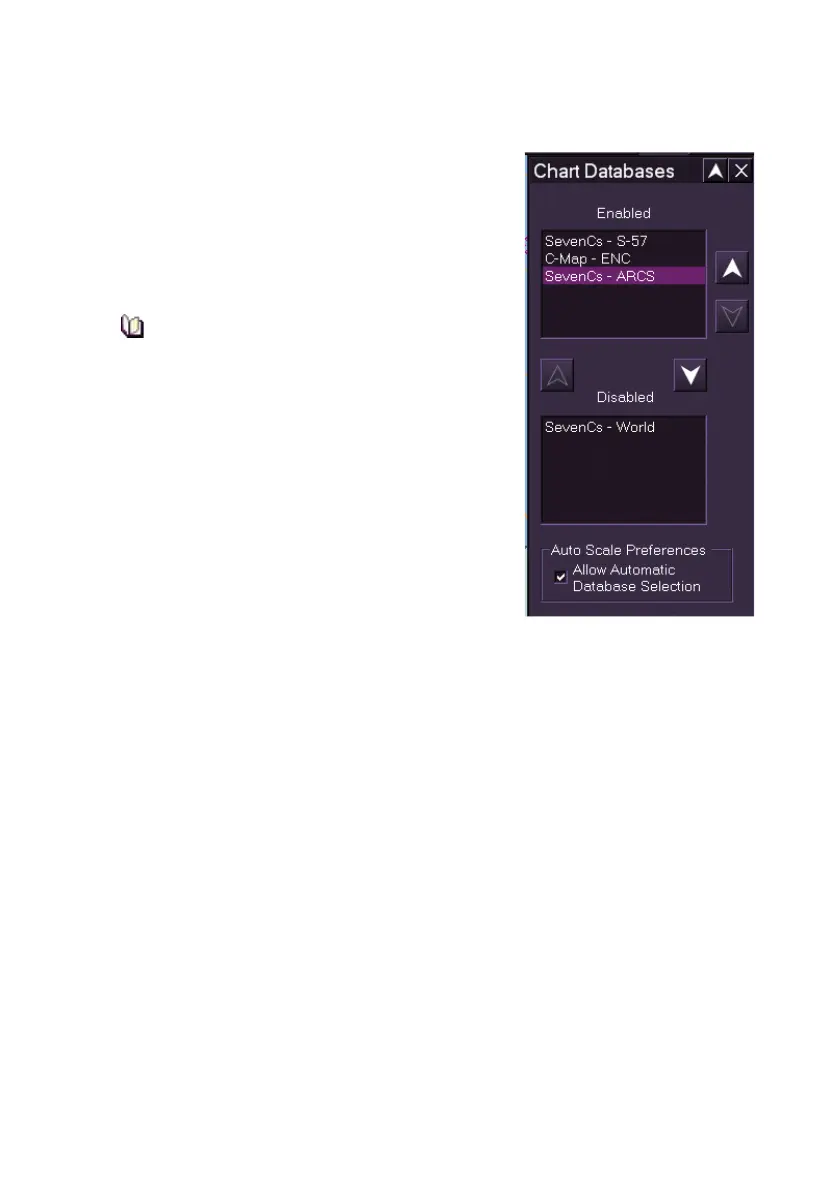
The Chart Databases window lists all chart
databases available to the system and allows
databases to be enabled or disabled.
Chart Databases also allows the selection of the
most suitable chart database based on automatic
database selection.
When the system is in its initial state, i.e.
the first time the system is run, all chart
databases that have been configured for
the system are listed as enabled.
Enabling and Disabling Chart Databases
The chart databases are listed in the Enabled
field in the order in which they will be used for
rendering chart data. The databases with the
highest priority are listed at the top of the
Enabled field and the lowest priority at the
bottom. The higher a chart database appears in
the enabled list the sooner it will be selected for
rendering.
To change the chart database priority, or to disable or enable a chart
database do the following:
To change the chart database order of priority:
1. Click on a chart database in the Enabled list, if the chart database
is neither at the top or bottom of the list then both the Up button
and Down button to the right of the list become available.
2. Click on the Up or Down button to move the position of the
database within the list.
To disable or re-enable a chart database:
1. To disable, click on the chart database in the Enabled list and click
the Down button between the Enabled and Disabled fields. The
selected chart database is moved to the Disabled field, and will not
be rendered or available for selection from the Chart Type & Sub
Menu Selection.



 To Next Page