System ECDIS-E User Guide
13-30 65934012
Shutdown
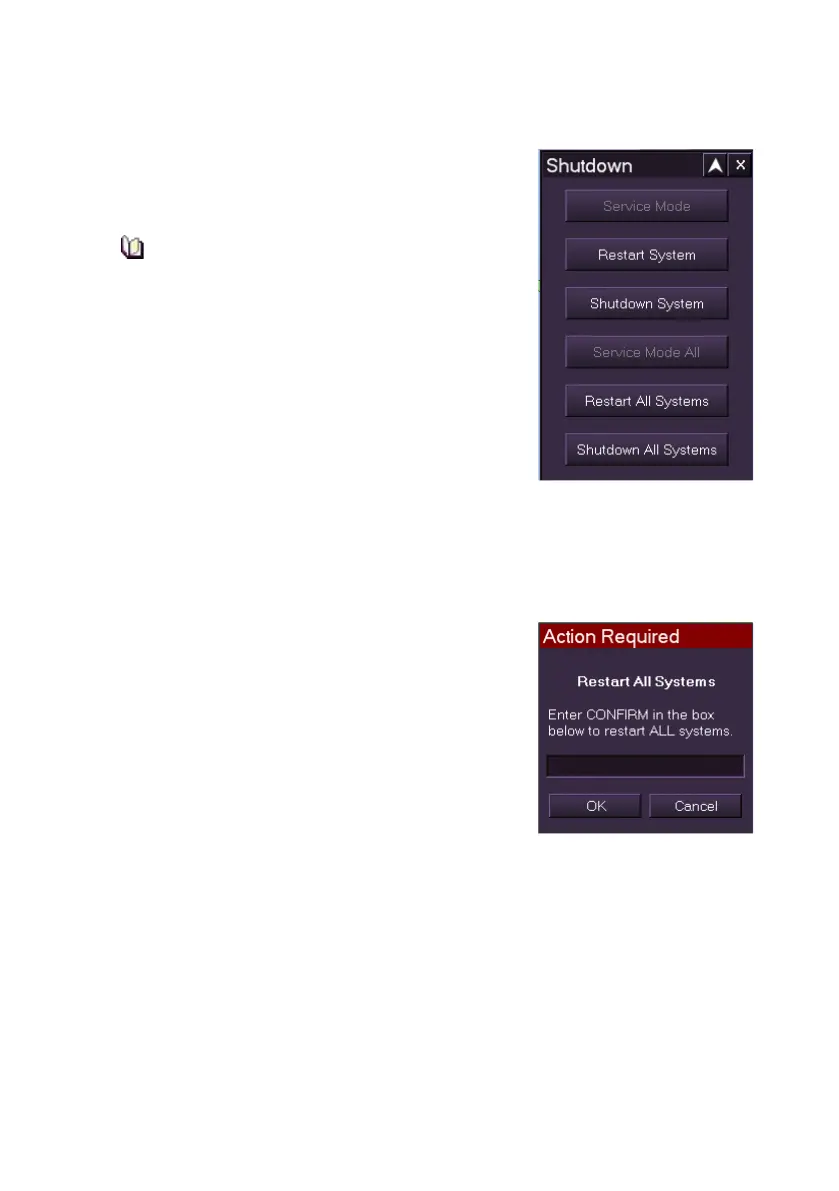
The Shutdown facility enables the operator to shut
down or restart a single node, or all nodes on the
system.
In Operator mode, the Service Mode and
Service Mode All buttons will be greyed
out. They will only be available if the
current operator is logged on as a Service
Engineer.
Restart System is selected if for whatever reason
the operator requires to restart their particular node
on the system. The node will first power down and
then restart. Other nodes on the system will not be
affected.
Shutdown System is only selected when the operator requires to shut
down their particular node on the system for a prolonged period of time.
Other nodes on the system will not be affected.
Restart All Systems is selected if for whatever reason the operator
requires to restart all the nodes on the system.
When Restart All Systems is selected an Action
Required message appears prompting to enter
CONFIRM in the box below. To proceed enter
CONFIRM (not case dependant) and click the OK
button. All nodes on the system will first power
down and then restart.
Shutdown All Systems is selected if for whatever
reason the operator requires to shut down all the
nodes on the system for a prolonged period of
time.
When Shutdown All Systems is selected the Action Required message
appears. Enter the same password as described above.
For information on fully shutting down the system, see System Shutdown.



 To Next Page