Sensor Management ECDIS-E User Guide
6-12 65934012
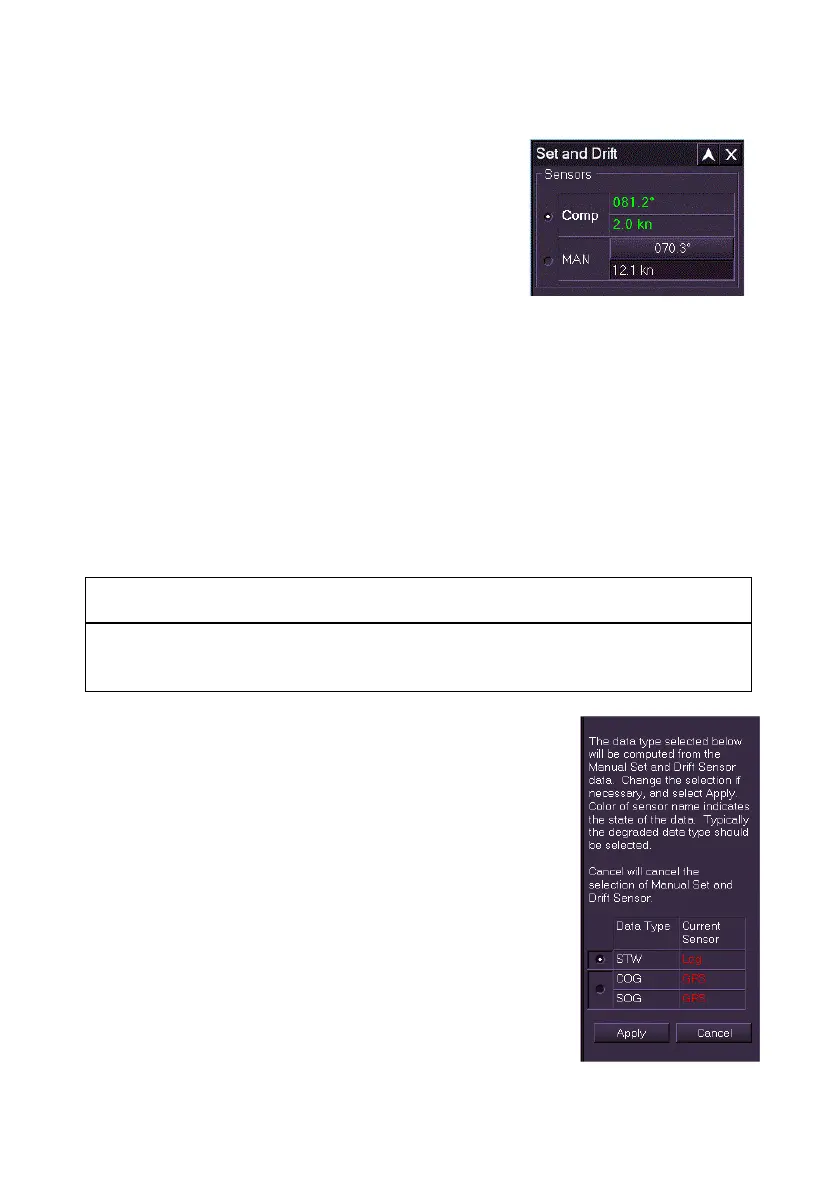
Set and Drift Values
The data for Set is shown in degrees; the data
for Drift is shown in knots (kn).
When Computed is selected for the sensor
data source for Set and Drift the system
continually computes the values based on other
active types of sensor data received
conventionally (via an interface).
When incorrect computed values are suspected they can be manually set
to zero or to an estimated manual value. The system will re-calculate
accurate Set and Drift values after accurate sensor data has been restored.
To change the Set and Drift sensor source or values do the following:
1. Tick the button next to the source. Whenever the sensor source is
about to be changed a window prompts to confirm the change.
2. To confirm click the Yes button, or to return to the previous sensor
source and value click the No button.
If no sensor source is currently available the user can enter manual sensor
data.
CAUTION: MANUAL SENSOR DATA
Using manual data is not the normal mode of operation. A sensor
device should be selected as soon as valid data is available.
1. To enter manual sensor data click in the
Manual Set and Drift fields, the text changes
to green (editable). Move the trackball left or
right to enter the required value and left click
to exit edit mode.
2. Click the MAN button to enter the value.
3. A window appears prompting to select the
data type (COG/SOG and STW) that will be
computed from the manual set and drift
sensor, with the data type's current sensor
source displayed. To update all click the
Apply button, or untick the boxes next to the
data type where the update should not apply.
To cancel all changes and revert to the
previous sensor source click the Cancel
button.



 To Next Page