ECDIS-E User Guide Navigation Tools
65934012 5-33
Distance Line
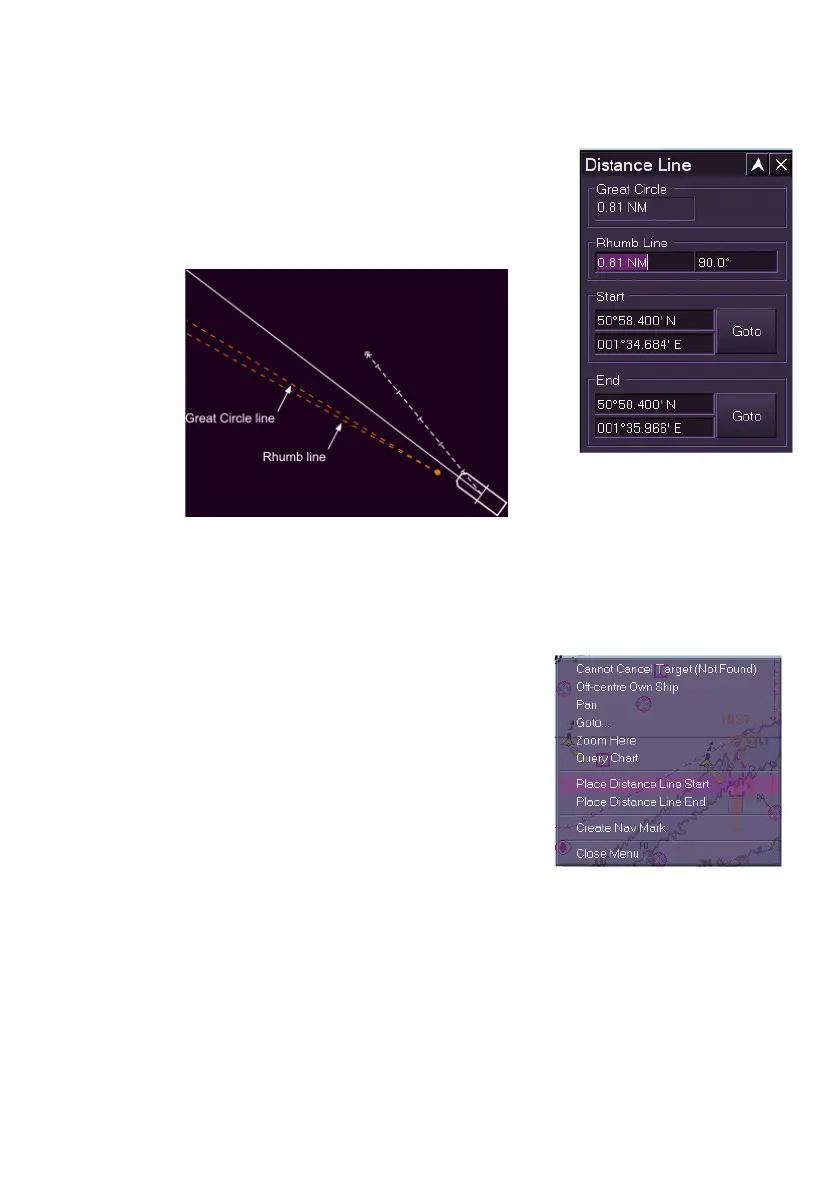
The Distance Line facility enables a Rhumb line to
be drawn with a start and end point at specified
locations. If the line covers a large distance, e.g. 75
NM or over, a Great Circle line is visible on the
display, in addition to the Rhumb line.
The start and end points of the distance line may be entered in one of two
ways:
1. From the Distance Line window, enter the required Start and End
LAT/LON co-ordinates and click the Goto buttons.
Or:
2. With the Distance Line window open,
right click at the required Start location on
the display and from the semi-
transparent context menu select Place
Distance Line Start.
3. Move the cursor to the required end point
(this may require re-scaling and
panning), right click again and select
Place Distance Line End.
The distance line is drawn as a dashed orange line with a dot at the start
and end.
When the distance line is displayed the line length (in nautical miles) and its
rotation angle (default 90
o
) may be changed by clicking in the Rhumb Line
fields and either entering the required values using the online keypad, or by
moving the cursor left or right when the text is in edit mode (green).
The position and length of the line may be changed directly on the display
by moving the cursor over the start and end dots.



 To Next Page