ECDIS-E User Guide Targets
65934012 9-35
Own Ship AIS Messages
The Own Ship AIS function includes tab folders for messages sent from
own ship (Message Tx) and messages received from other vessels
(Message Rx).
Message Tx
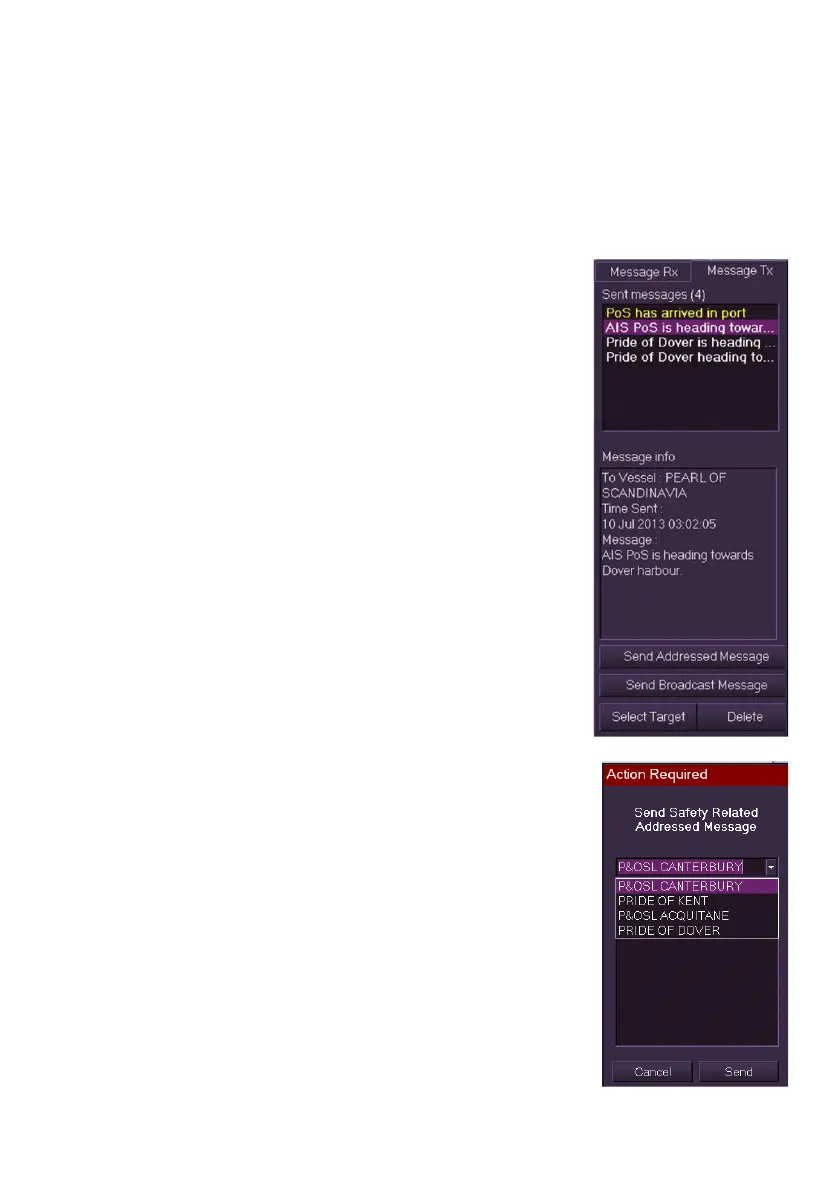
The Message Tx tab folder lists up to 50 safety
messages that have been generated by own ship
and sent to AIS vessels.
The Sent Messages field defines the number of
messages in brackets and shows the first line of
each message. Sent messages that have not been
selected in Message Tx are shown in yellow.
The Message Info field shows the message
recipient, the time the message was sent and the
full message content.
The following function buttons are included at the
bottom of the tab folder:
Send Addressed Message
Send Broadcast Message
Safety messages can also be created and sent in
the AIS Info tab of Selected Target.
To send additional safety messages do the
following:
1. Click the Send Addressed Message button. A message popup
window appears.
2. Click on the drop down arrow and select the
message recipient from the list of AIS vessels.
3. Click in the message field and compose a
message using the AIS MKD, for information
refer to `AIS Safety Messages' in AIS Info.
4. When the message is complete click OK and
then the Send button. A temporary prompt
`Message Sent' appears and the message is
listed in the Sent Messages field.



 To Next Page