Targets ECDIS-E User Guide
9-4 65934012
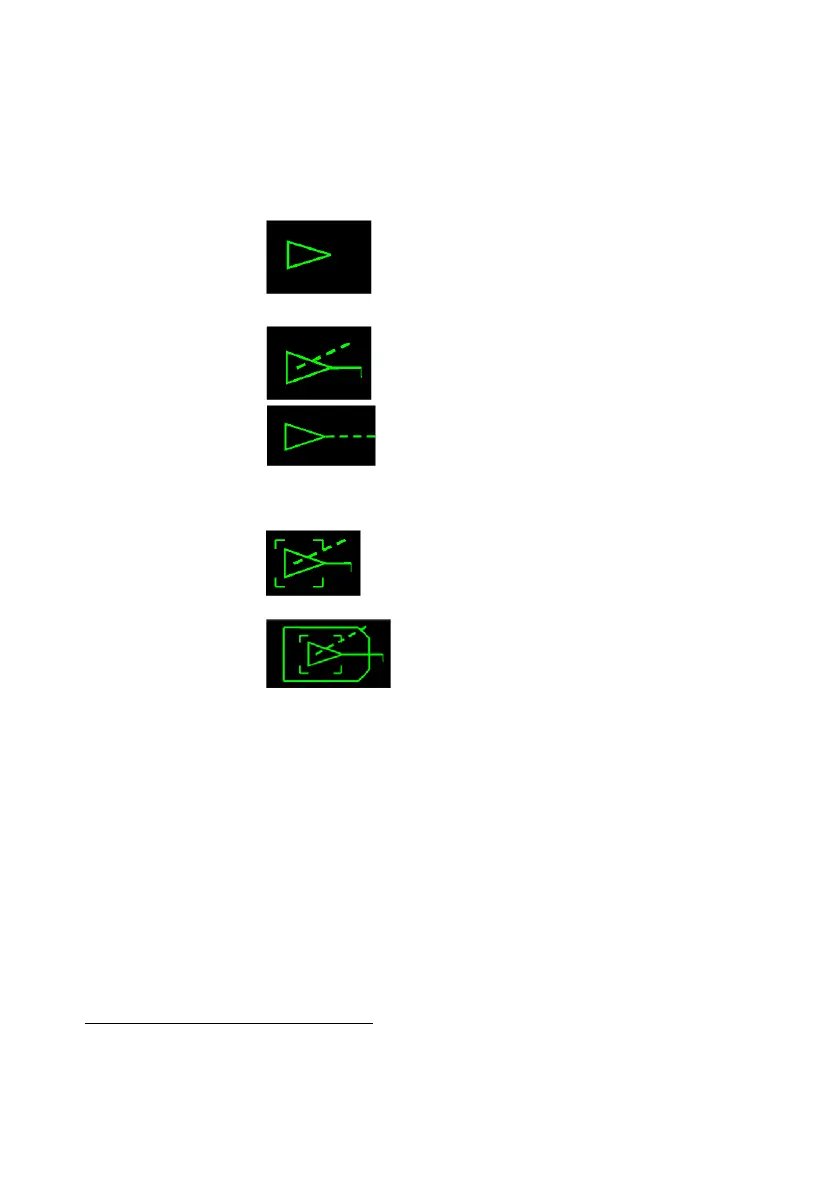
AIS Target States
AIS targets
15
are usually displayed on the chart display as triangles (unless
the AIS is a scaled ship symbol) and can be shown in one of the following
states:
Sleeping
A sleeping target is smaller in size than
an activated target and is never
displayed with vectors.
Activated
An activated target is displayed with
heading and speed/course vector. The
speed/course vector is a dashed line
originating from the centre of the
triangle, the length of line being
proportional to the vector time.
If heading data is missing or invalid the
course vector is shown in place of the
heading line.
Activated and
Selected
When an activated target is selected a
dashed square outline appears centred
on the target origin and information on
the target is shown in the AIS window.
When an activated AIS target’s length
and beam exceed the standard AIS
symbol triangle, the AIS triangle is
drawn with the ship’s outline around it.
The ships outline symbol is not
displayed if any of the following apply:
1. When the reference point of the
reported position is unavailable.
2. When the dimensions of the ship are
unavailable.
3. When the beam of the outline is less
than 7.5mm.
4. When the targets heading is not
reported
When the AIS ship's outline is selected
to display target tote information, the
dashed square outline appears centred
15
If the target has an AIS target associated with it and the AIS target has a name assigned,
this name will be used and may not be changed. Names assigned to targets will be distributed
across all nodes in the system.



 To Next Page