Navigation Tools ECDIS-E User Guide
5-10 65934012
Import/Export Parallel Index Lines
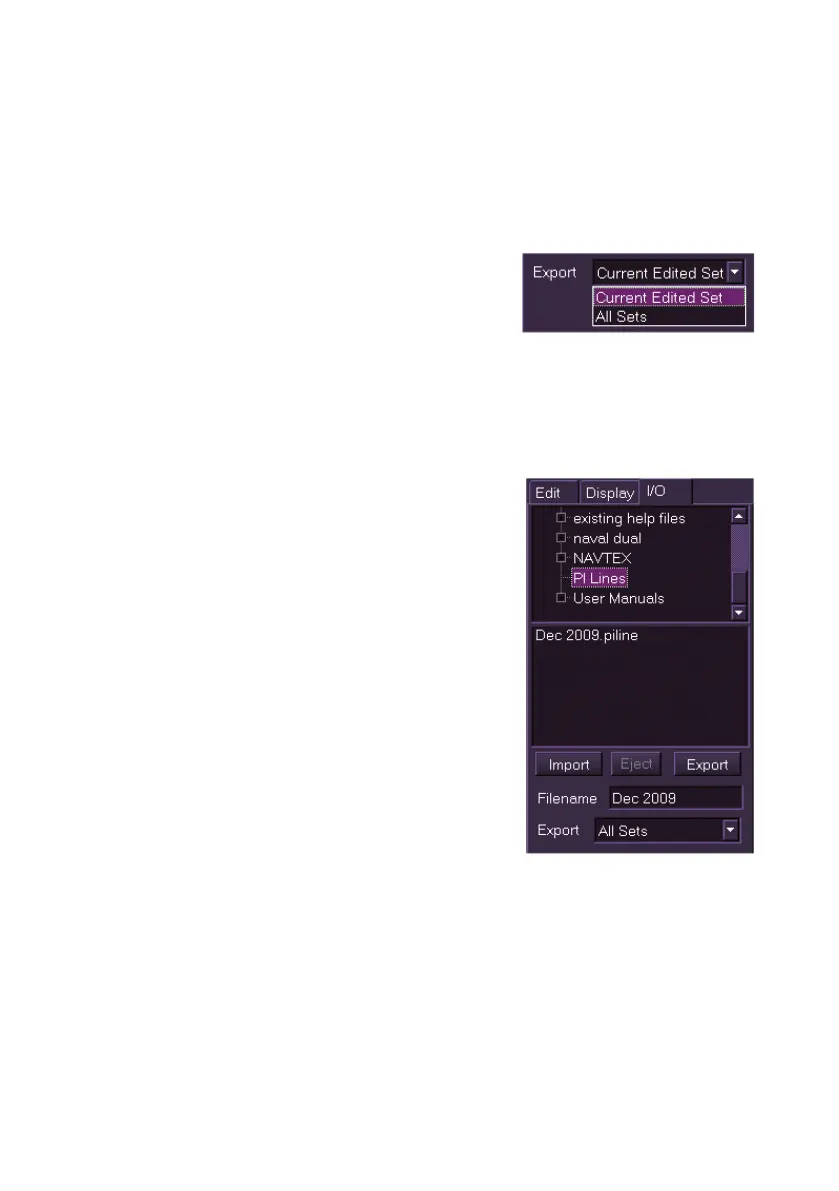
A set of named PI lines can be saved to an external device and imported or
exported via the import/export (I/O) tab.
To import or export a set of PI lines do the following.
To export PI lines:
1. Choose whether to export the currently
edited set, (i.e. the set selected in the
Edit tab folder), or all sets as listed in the
Display list, by clicking on the Export
drop down arrow and selecting from the two options.
2. Navigate to the directory folder where you want to export the files
to (this is usually an external device such as a USB memory stick).
3. Enter a filename for the PI lines in the Filename field using the
screen keypad.
4. Click on the Export button. The filename
entered appears in the field below the
directory tree as a .piline file and a
temporary prompt appears confirming the
exported file and folder name.
To import PI lines:
1. Navigate to the file in the directory tree,
the selected file appears in the field
below the directory tree.
2. Click on the Import button, the file is
imported and a temporary prompt
appears confirming the imported file and
folder name.
If the PI lines have been imported or exported
from an external device click on the Eject button
before removing the device.



 To Next Page