Conning Information Display ECDIS-E User Guide
12-6 65934012
CID Pages
The following sub sections describe the CID pages that may be available to
view from the ECDIS-E side panel.
To change the CID page tab through the options using the buttons.
Other CID pages will be available as popup windows from the CID button,
see `CID Popup Windows’.
Alphnumeric data for certain CID elements will not be available if the
source that supplies that data has not been configured (for example,
a Wind sensor). When this is the case, the data field will show a
series of short red dashes.
Default CID Page
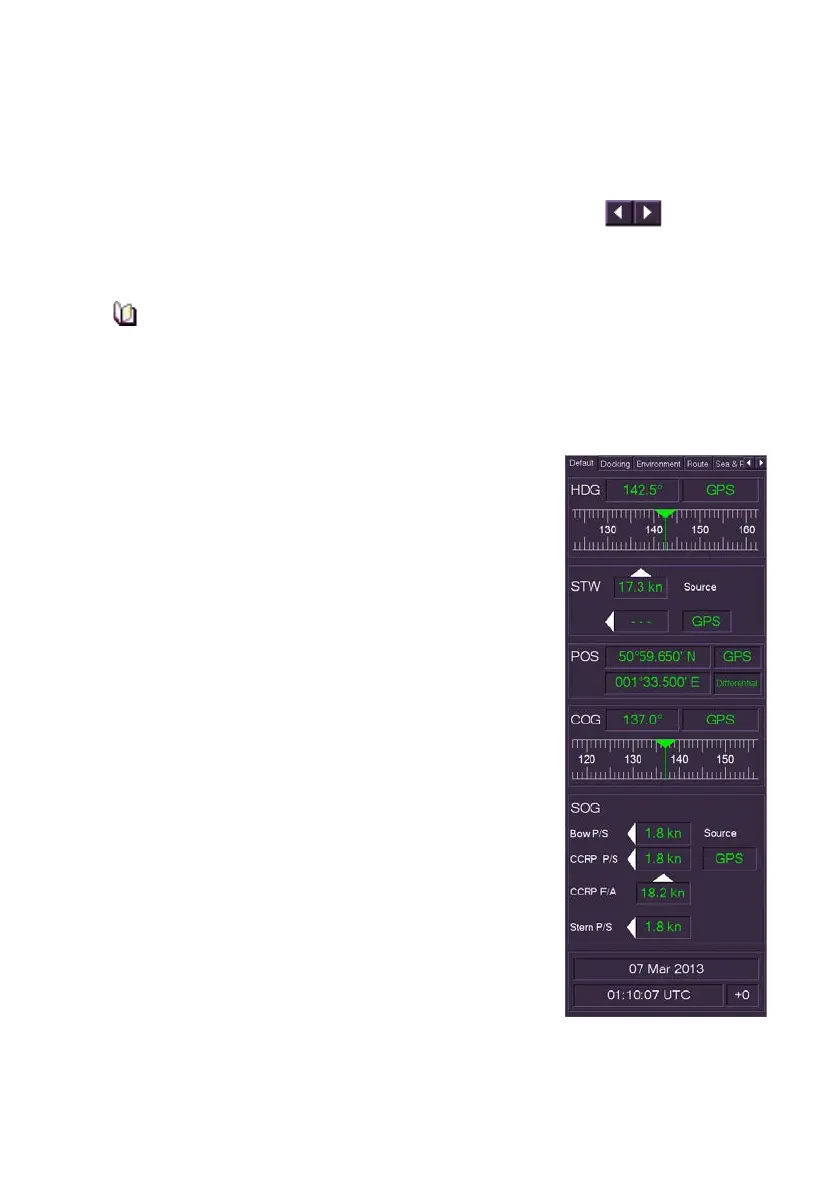
The default CID page will always be available on an
ECDIS-E. The default page includes the following
CID elements displaying real-time data for ownship:
• Heading (HDG)
• Ships current heading bearing
• The sensor source providing the heading
data
• A graphic element showing the ship’s
heading. The indication of current heading is
stationary and centred on the graphic, while
the heading tick marks and heading values
move as heading changes.
• Speed Through Water (STW)
• The water speed in kilometres
• The sensor source providing the STW data
• Position (POS)
• The current Lat/Lon position
• The sensor source providing the position
data
• The quality indicator used for the position
values (e.g. Differential)



 To Next Page