ECDIS-E User Guide Charts
65934012 4-21
Chart Index
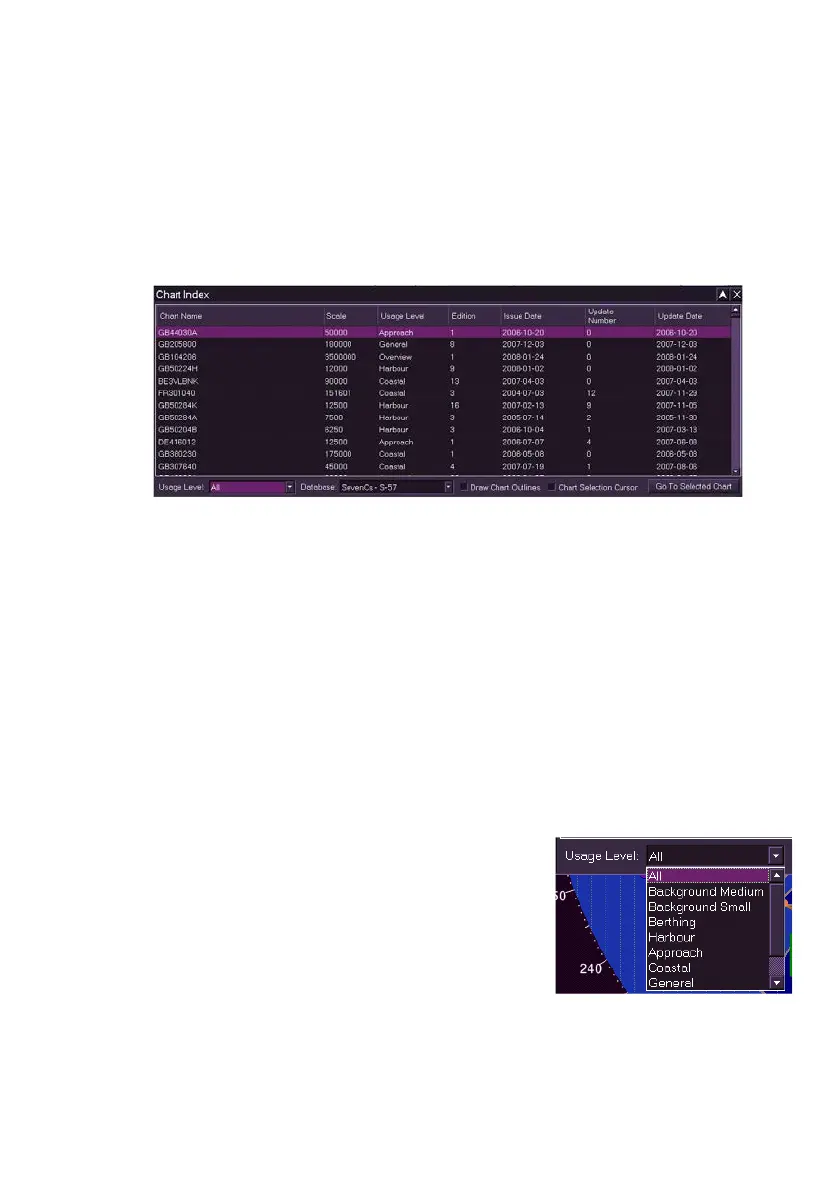
Chart Index catalogues each chart for all loaded chart databases. The
Index facility includes a number of display filtering options, the display of
chart outlines within the current display area and the option to move the
display location to a selected chart.
To access the Chart Index click on the Show Index button. A tabular chart
index window appears over the chart display
When the Chart Index table is first opened the charts are listed with the
chart names (based on their ENC alphanumeric code) in alphabetical
order. The names of raster charts (ARCS) will include a short description of
the location covered.
How the data is displayed may be changed by clicking on the column
headings. For example, clicking on the Scale heading will list charts
starting from the lowest compilation scale (see Chart Facility), or clicking on
the Issue Date column will list charts from the earliest date of issue.
Clicking on the column headings again will reverse the list to show the
highest scale or latest issue at the top of the column.
Chart Filtering Options
The chart Index table includes the following filter options: Usage Level and
Database.
All charts are defined with a usage level (e.g.
Harbour or Coastal) with each usage level
displayed in a particular colour. All the usage
types are listed in a Usage Level drop down list,
which defaults to displaying all. To display only
the charts with a specific type of usage level
select the level from the drop down list, the table
is re-drawn showing only those charts that conform to that usage level.



 To Next Page