ECDIS-E User Guide Routes
65934012 8-15
Description and Notes
To add a description of the route or create notes do the following:
1. Move the cursor inside the respective field and left click. A screen
keypad appears from where you can enter text.
2. With the required text entered click on the keypad OK button. The
text is saved in the Description or Notes field.
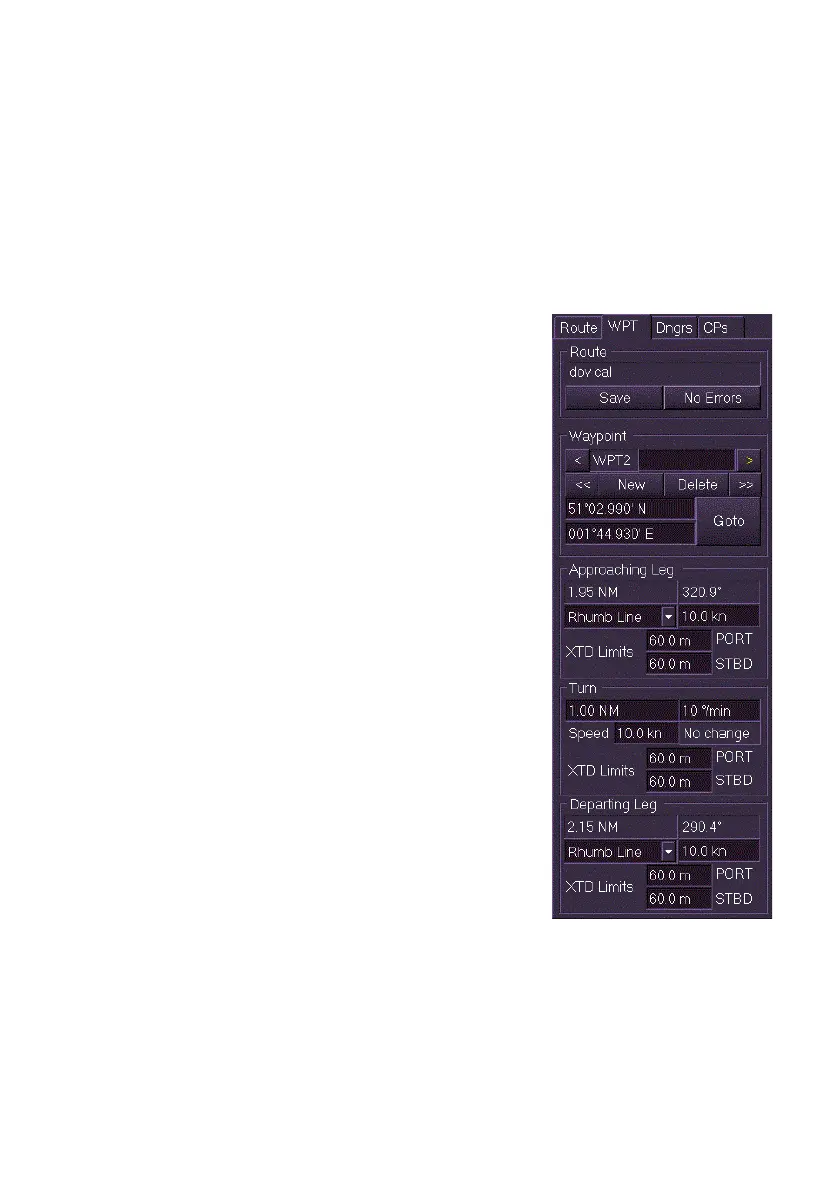
Waypoints Tab Folder
The Waypoints (WPT) tab folder displays all the
waypoint and leg attributes for the route being
edited. The folder is divided into the following
areas:
Route
Waypoint
Approaching Leg
Turn
Departing Leg
Route
The Route area enables the currently monitored
route to be saved and validated. When a route
has been saved its name is displayed above the
Save and No Errors buttons.
The Save and No Errors/Errors functions in the
Waypoints tab folder are the same as described
previously in the Edit Route - Route Tab.
Waypoint
The Waypoint area enables you to quickly
navigate between waypoints and includes the
following editing functions:
create a new waypoint
delete an existing waypoint
enter a waypoint label
change the Latitude/Longitude position of a waypoint



 To Next Page