ECDIS-E User Guide System
65934012 13-17
View Sensor Status Details
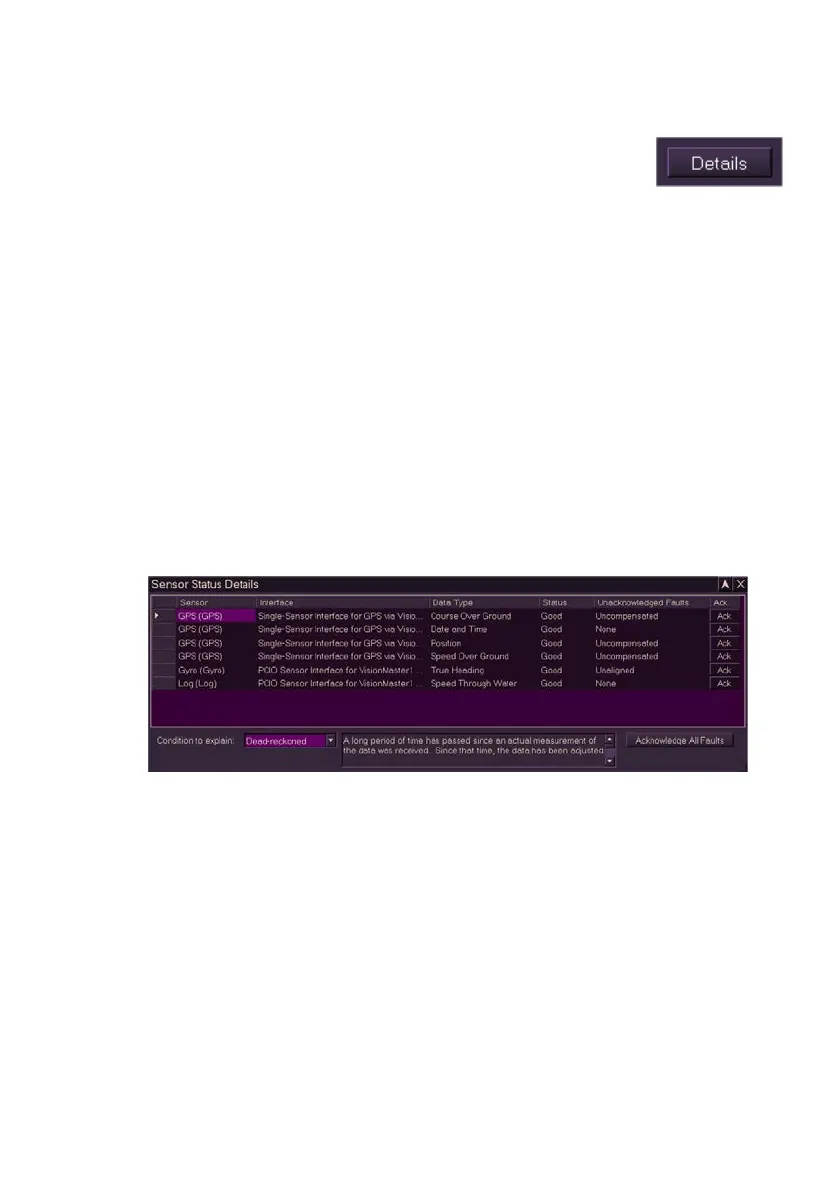
To view details on the sensor status click the Details button
at the bottom of the window. A separate window displays the
following sensor status details:
Sensor abbreviation and its description, e.g. DBT (Depth)
Interfaces, including port ID, used to receive the sensor data
Type of data received by the sensor (e.g. Heading data from a
Gyro)
Current status of the sensor data, i.e. Good, Nearly Available,
Dead-Reckoned or Unavailable.
Unacknowledged Faults - any unacknowledged faults on the
sensor data, e.g. Uncompensated, Unaligned etc. See
`Description of Sensor Data States' for a description of all fault
conditions.
Acknowledge button (Ack), which enables faults relevant to that
sensor to be acknowledged.
Acknowledge All Faults button. Click this button to acknowledge
all outstanding sensor faults on the system.
Description of Sensor Data States
The Sensor Status Details window also includes the option to view an
explanation for all types of data states. To use this feature click the
Condition to explain drop down button and select a data state from the
list. The window parallel to the list gives an explanation of the selected data
state.



 To Next Page