Machine Management Tools 10
Remote control with the software VNC 10.3
426
10.3.2 Configuring the remote control VNC on the machine
✔ The remote control VNC is activated on the machine.
✔ The "Machine Management Tools" window is displayed.
1. Tap on the "Remote operation - settings" switch.
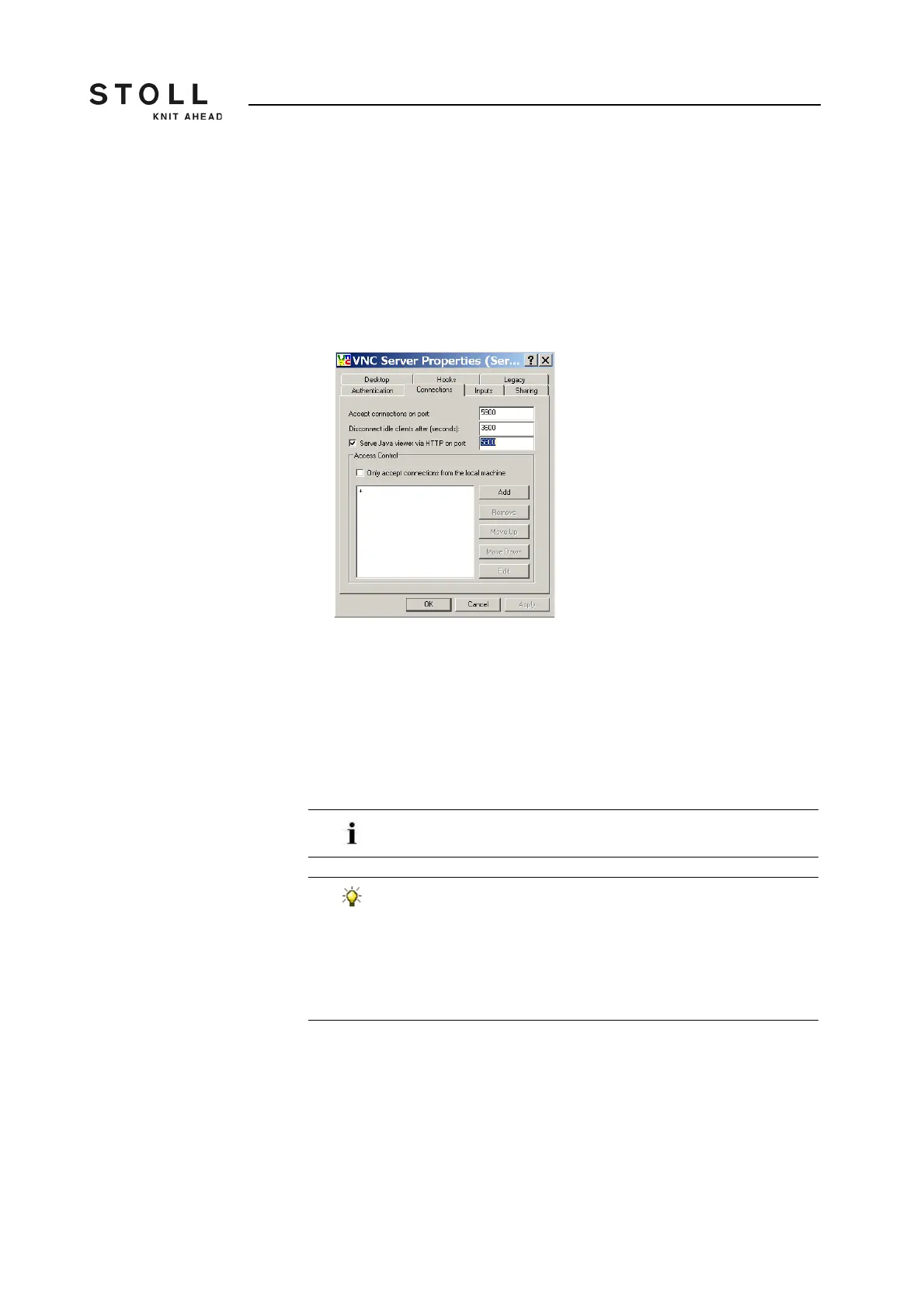
The "VNC Server Properties (service mode)" window opens with
different tabs.
"VNC Server Properties (service mode)" window with the "Connections" tab
2. Activate "Connections" tab.
Here all the fields are set to their default values.
3. Should another port be activated as the standard port5900 the number
of the port is to be entered in the "Accept connections on port:" field.
4. If the machine has to be controlled remote also via a web browser,
activate the check box "Serve Java viewer via HTTP on port:" and enter
5800 as port.
Any other adjustments on the various tabs are not necessary.
The value in the "Disconnect idle clients after (seconds):"
field causes the automatic disconnection of a VNC
connection when the value entered here is exceeded and
within the mentioned time no operation is carried out.
Thereafter, the connection can be established again without
any problem. By default one hour = 3600 seconds is
adjusted.



 To Next Page