Adjusting knitting machine 4
Basic settings 4.1
136
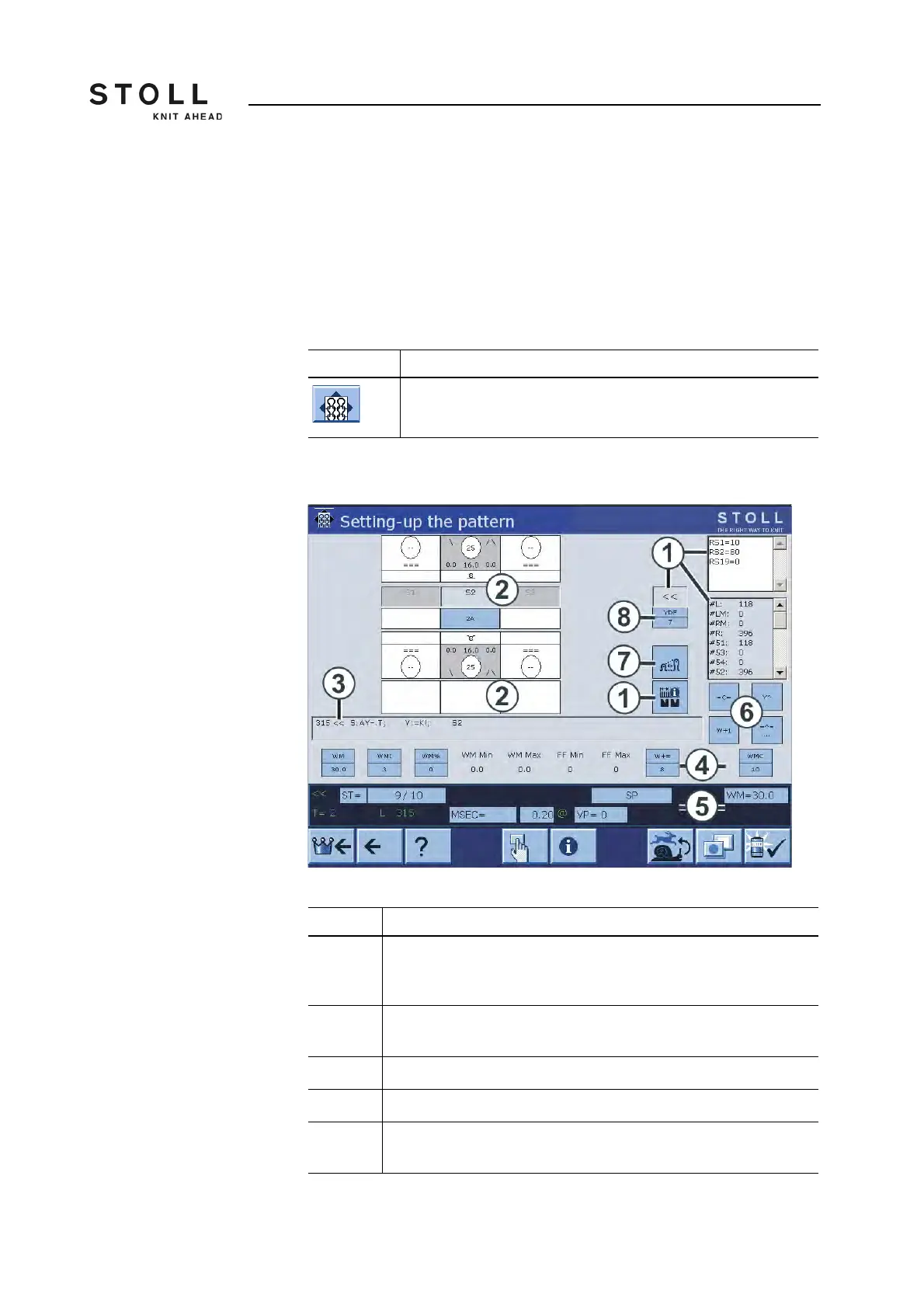
4.1.16 Setting up the pattern
This menu can be used for fine adjustment of a pattern at the knitting
machine. While the machine is knitting, the corresponding data of the
knitting program are displayed for every carriage stroke. If required,
changes can be carried out directly in this menu via setting windows, or the
corresponding menu is opened for your input. To do so, touch the
corresponding field.
The window is structured into various areas:
"Setting up the pattern" window
Key Function
Call up the "Setting up the pattern" menu
Key for calling up the "Setting up the pattern" menu
Area Explanation
1 Display of: Carriage direction, cycle counters, SEN area, coupling
width (for tandem machine), counters. The active cycle counter is
highlighted. The values cannot be modified.
2 Setting up of the knitting systems: Needle action, stitch tension, yarn
carrier, jacquard line.
3 Current Sintral line
4 Fabric take-down values or fabric take-down function
5 Status line: Here the individual values can be changed or the
corresponding setting menu called up.



 To Next Page