99
3 Producing with the knitting machine
3.5 Eliminating errors in the fabric
3.5.1 Starting again after pressing off fabric
For machines without a
comb take-down
After pressing off fabric, a problem arises where stitches are pressed off
and therefore further knitting is not possible. To be able to continue, we
recommend calling up the "Picking up after pressing off" function. It allows
you to begin knitting even without fabric.
Normally, each knitting program includes the "Picking up after pressing off"
function. With older knitting programs, this function is found from line 950
on; with the pattern workstation M1, it is activated via "#90".
The machine detects which pattern workstation was used to generate the
pattern. A knitting program of M1 contains the ID "<M1>" on line 1. Likewise,
program point "P.aft. press-off" in the "Machine start" window is adapted
automatically.
"Picking up after pressing
off" function with older
knitting programs (e.g.
SIRIX)
1. If threads are broken, thread them up again.
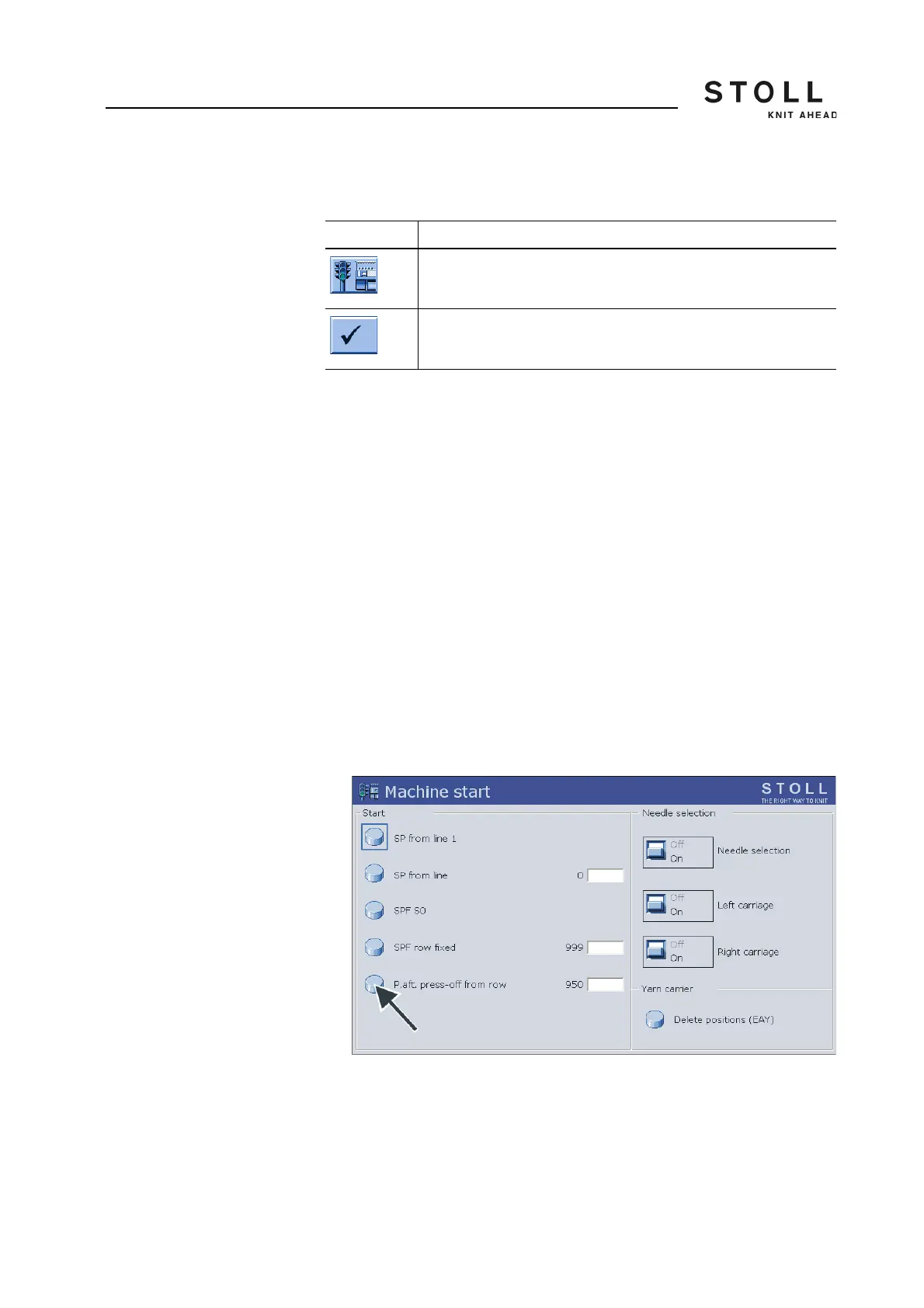
2. Call up "Machine start" window.
3. Call up the "Picking up after pressing off" function. Tap the "P.aft. press-
off from row" key for this purpose.
"Machine start" window
4. Start the machine with the engaging rod.
Key Function
Call up "Machine start" window
Confirm entries
Keys for starting again after pressing off fabric



 To Next Page