OnAir 2500/OnAir 3000 Digital Mixing Consoles
Conguration 6-83
Date printed: 22.07.08
SW V3.0
6.5.33 User GUI
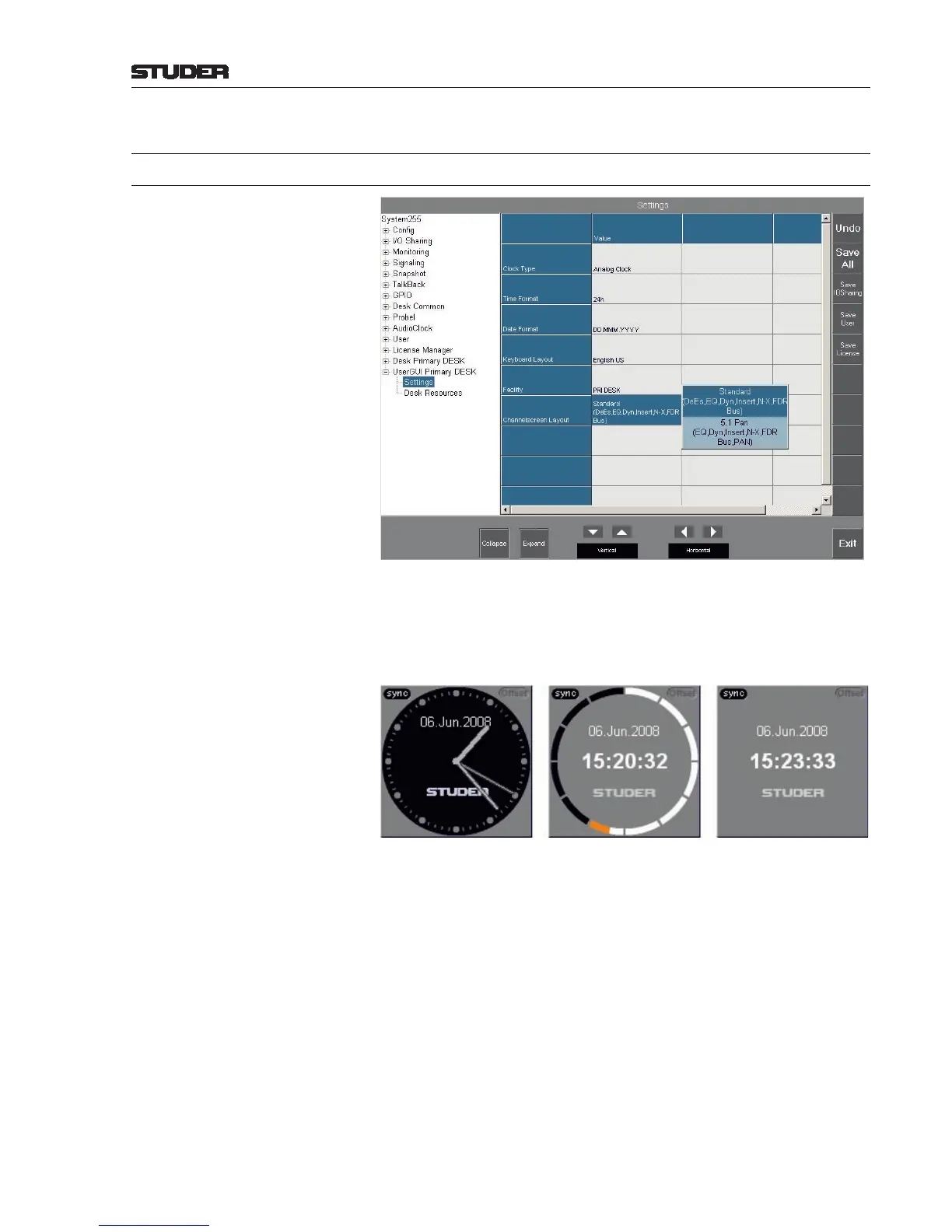
6.5.33.1 Settings
This page is used for settings concerning the whole console at once.
Clock Type Selects the type of the real-time clock displayed in the upper left corner of
the central/main screen.
Available selections: Analog Clock, Radio Clock, or Digital Clock (left
to right).
Time Format Selects 12 hours AM/PM, or 24 hours time display format (shown in the center
and right-hand side examples above).
Date Format Selects the date display format. Selections: DD.MMM.YYYY (shown in the
examples above), or MMM-DD-YYYY.
Keyboard Layout Selects the national character set of the pop-up keyboard; currently, English
US or Danish are available.
Facility When touching this eld, the keyboard appears for entering a facility ID
used for displaying labels imported from a router control system and/or
for communication with the Studer Call Management System. Also refer
to External Router Destination and External CMS Fader in chapter
6.5.1. In addition, the corresponding settings in the ProBel.xml and
probel_contr_ext.ini les or in the cms_contr_ext.ini le
must be entered, respectively.



 To Next Page