OnAir 2500 Digital Mixing Console
Operation 5-47
Date printed: 18.07.08
SW V3.0
5.5 Monitoring, Talkback
The following description refers to the monitoring/TB part of the desk’s cen-
tral section. All functions on this module may also be handled from the GUI,
refer to chapter 5.3.5.
5.5.1 Control Room Monitoring
In the control room, three possibilities are provided for monitoring signals:
Control room (CR) loudspeakers, DJ headphones and Guest headphones.
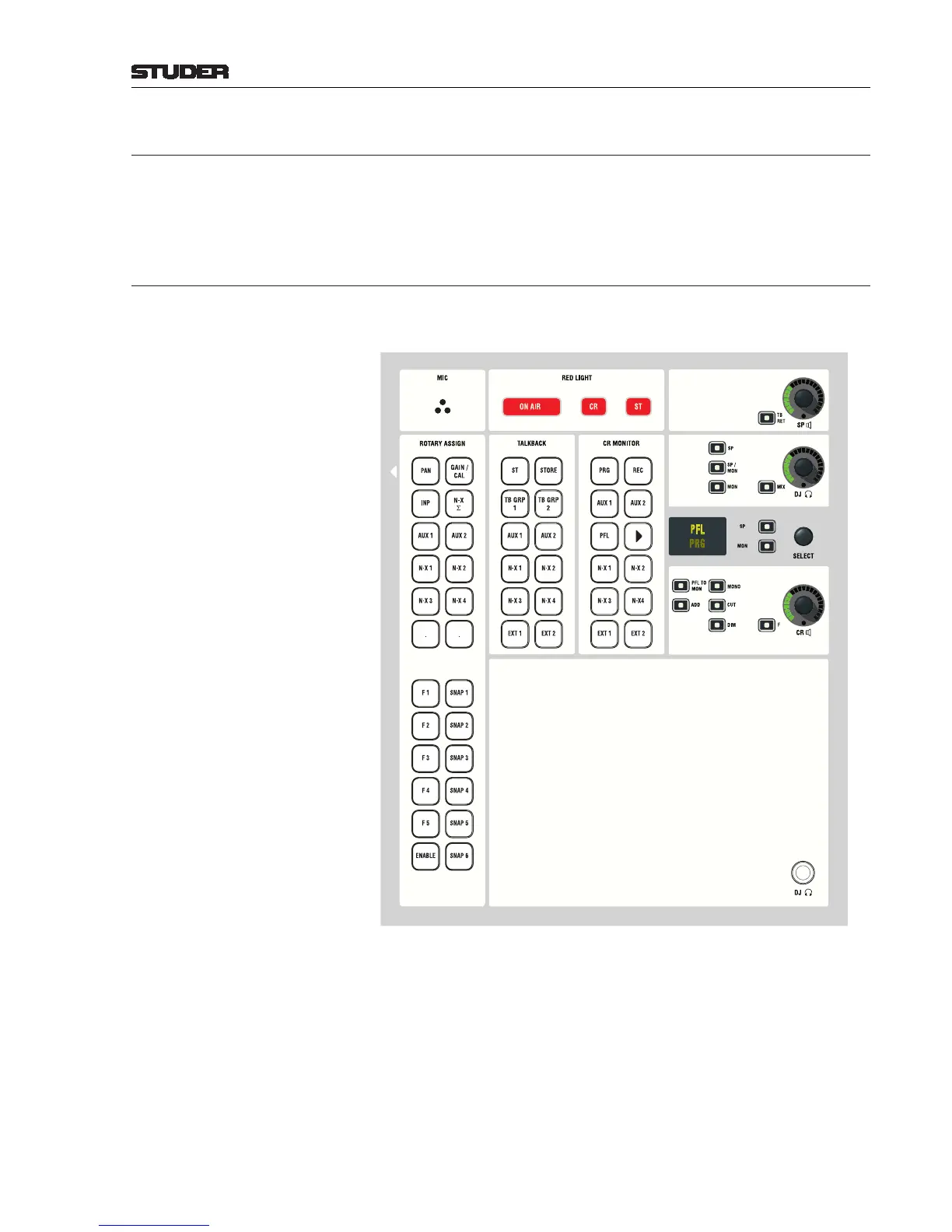
Center Module:
The CR MONITOR source selector has 12 keys for quick selection of the most
important sources. The picture above shows the standard configuration. The
key of the selected source is illuminated. Only one source can be selected at
a time unless
ADD is active. Every input, every master sum, N–X and PFL
signal as well as every output can be assigned to the keys for monitoring via
the configuration tool.
Pressing the u key selects the source indicated by the OLED display. With
the SELECT rotary encoder its right, each configured source can be directly
selected and immediately listened to with the CR monitor speakers (
MON key
is active). If a source different from “u” is selected, the display is half-lit, but
rotary pre-selection is possible still.



 To Next Page