317
Corrective Maintenance
Media Hanger
8/9/07 ZM400/ZM600 Maintenance Manual 14207L-001 A
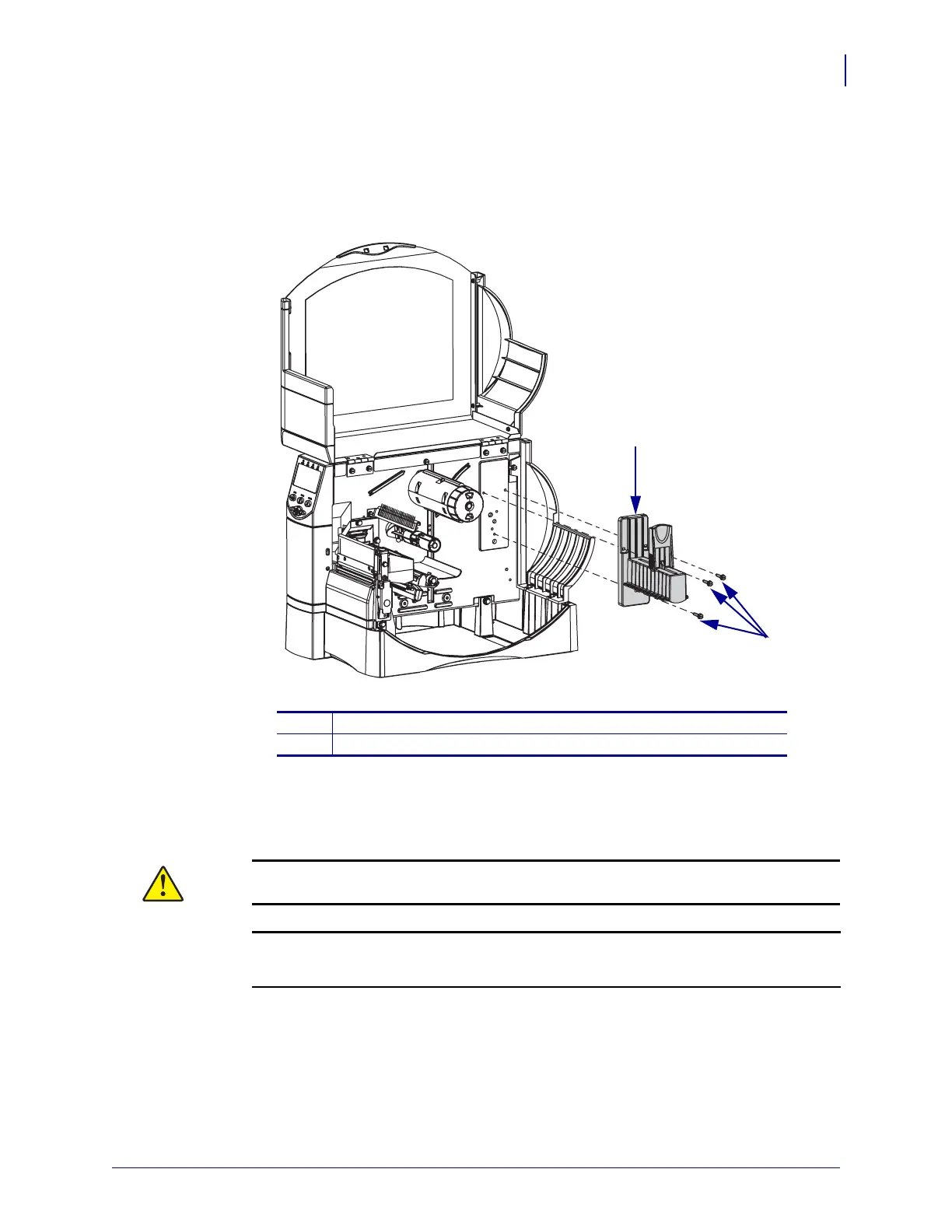
3. See Figure 179. Locate the media hanger assembly.
4. Remove and discard the three mounting screws securing it.
Figure 179 • Remove and Install the Hanger Assembly
5. Remove the new media hanger assembly from the kit.
6. Align the media hanger assembly with the mounting holes and then install the three
mounting screws supplied in the kit.
7.
8.
Reconnect the AC power cord and data cables and then turn on (l) the printer.
1
Media hanger assembly
2
Mounting screws (3)
Caution • Use the screws supplied in the kit to avoid damaging the peinter.
1
2
Caution • When you are loading media or ribbon, remove all jewelry that could come
into contact with the printhead or other printer parts.
Reinstall the media and ribbon.


 To Next Page
 Loading...