892-0000010B OM
152
3.14.4 Procedure for programming the tachospeedometer of the dashboard with a
molded panel.
3.14.4.1 Tachospeedometer control console
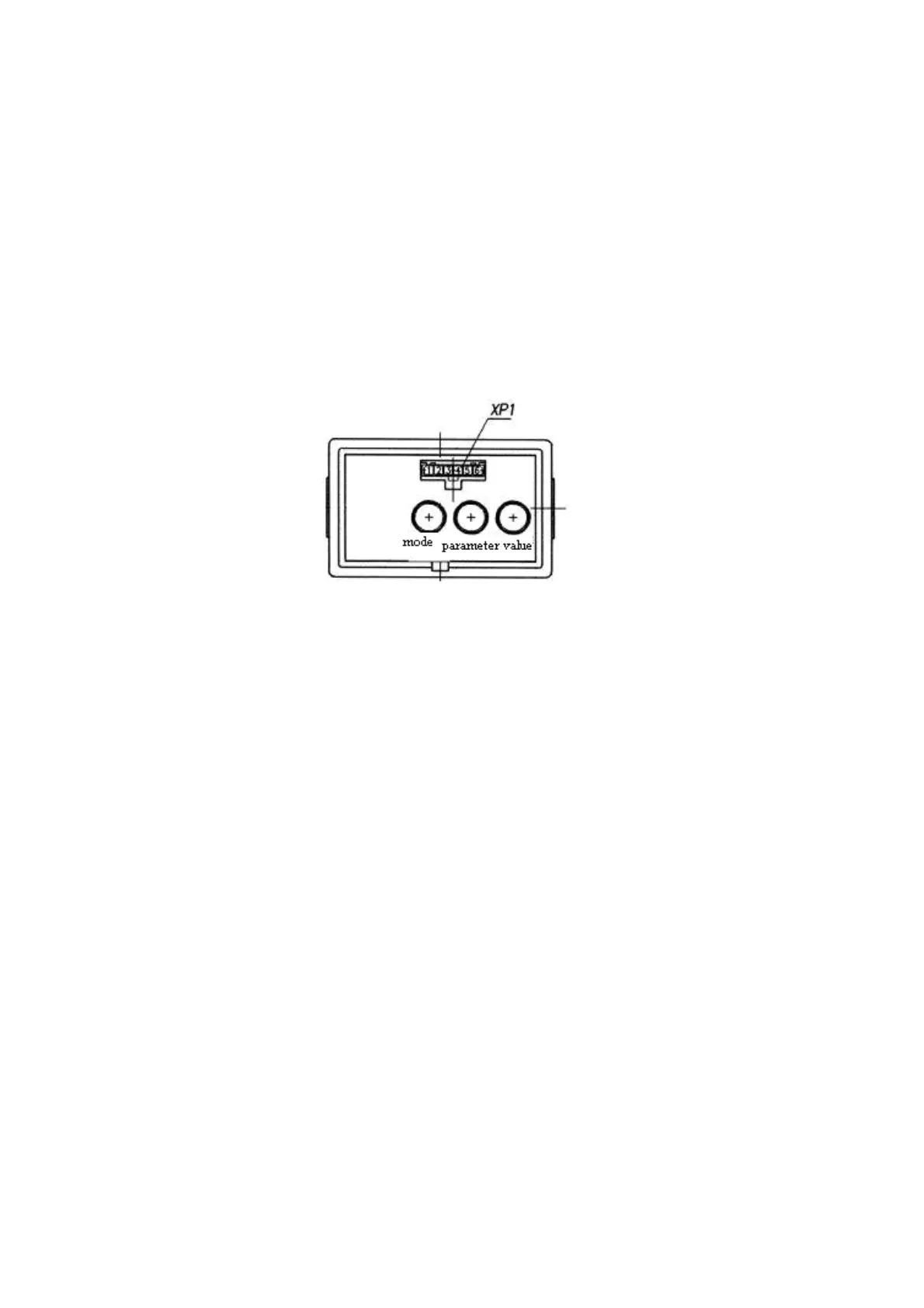
Programming console 7 (Figure 2.23.1) allows to perform manual programming of the
indicator by means of “Parameter” and “Value” buttons (Figure 3.14.2) and to change the mode
of displaying the parameters to be shown on the LCD.
Note - A diagnostic connector ХР1, located on the front surface of the control console,
makes it possible to perform automatic programming (reprogramming) of the integrated indicator
by means of a special device (if available). Should such a device be unavailable, the program-
ming shall be performed by means of the above
mentioned buttons. On the BELARUS-892/892.2
tractors, the ХР1 connector is not enabled.
Figure 3.14.2 – Programming console of integrated indicator
3.14.4.2.Algorithm of programming of the tachospeedometer
1. For selecting a fixed value of programming parameter:
1.1 When the “Parameter” button is pressed for the first time (see Figure 2.14.2), the LCD
switches to the mode of viewing the programmed parameter and its numerical value. When
the button is pressed repeatedly, the parameters are alternated cyclically.
1.2 When the “Value” button is pressed repeatedly (see Figure 2.14.2), the numerical value
of the set programmed parameter is changed.
1.3 When neither the “Parameter” nor “Value” button is pressed for 7.0 seconds, the mode
is exited automatically.
As you exit the mode, the parameter values selected with the “Value” button are stored.
2. For inputting an unfixed value of programming parameter:
2.1 Press the “Parameter” button to select the parameter, the value of which is to be set;
2.2 Twice press the “Mode” button, the low-order digit will start blinking on the LCD screen;
2.3 To change the blinking digit of the parameter, press the “Value” button;
2.4 To transfer to the high-order digit, press the “Parameter” button;
2.5 To exit the programming mode of an unfixed value of any parameter, press the “Mode”
button twice;
2.6 After the said mode is exited, the digits of the input value of the parameter stop blinking.
2.7 The newly set value is put the last in the list of allowed ones for programming the pa-
rameter values;
Notes:
- as you press the “Mode” button only one time in the programming mode, input of an
arbitrary parameter value is not possible;
- when none of the “Mode”, “Parameter”, “Value” buttons is pressed for seven sec-
onds in the mode of unfixed value input, the integrated indicator will automatically switch to
the main LCD mode, and all set parameter values will be stored.



 To Next Page