892-0000010B OM
170
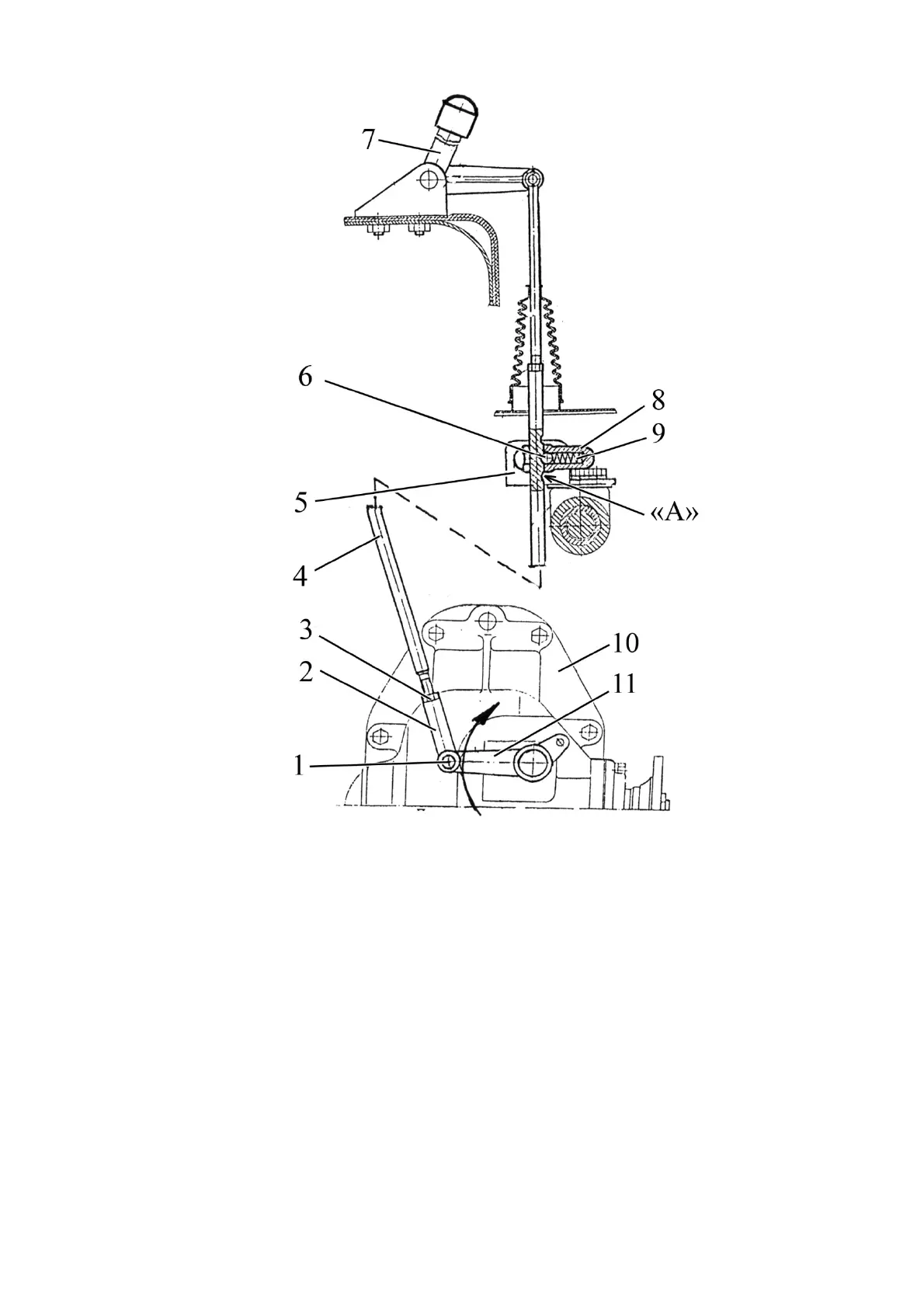
1 - pin; 2 - fork; 3 - locknut; 4 - link; 5 - bracket; 6 – lock ball; 7 - lever; 8 – guide;
9 – spring; 10 – transfer box; 11 - lever.
Figure 3.16.9 – Control of the FDA drive transfer box
3.16.3.3 Adjustment of the control link of the FDA drive transfer box
To adjust the link proceed as follows:
- set lever 7 (Figure 3.16.9) to the position “FDA positively engaged” (upper fixed
position, lock ball 6 is in the lower slot “A” of link 4).
- unscrew locknut 3 2…3 turns, unlock and take out pin 1.
- turn lever 11 clockwise until transfer box 10 switches on fully, that is toothed coupling
is engaged with the outer and inner rings of the free travel coupling.
- rotating fork 2, adjust the length of link 4 so, that the pin goes freely into the hole of
the fork and lever 11, which is turned clockwise against the stop.
- tighten locknut, install and forelock the pin.



 To Next Page