MAP and VFR GPS Navigator Operation
5-44 SkyView HDX Pilot’s User Guide – Revision B
the intended destination point. Note, however, this indicator is a “future value”, giving the
pilot advance notice of the vertical speed which will be necessary once the aircraft intersects
that calculated path at its current altitude and ground speed. If the pilot were to immediately
start descending at a VSI equal to the blue tick mark indication, the aircraft would descend well
prior to the intended point.
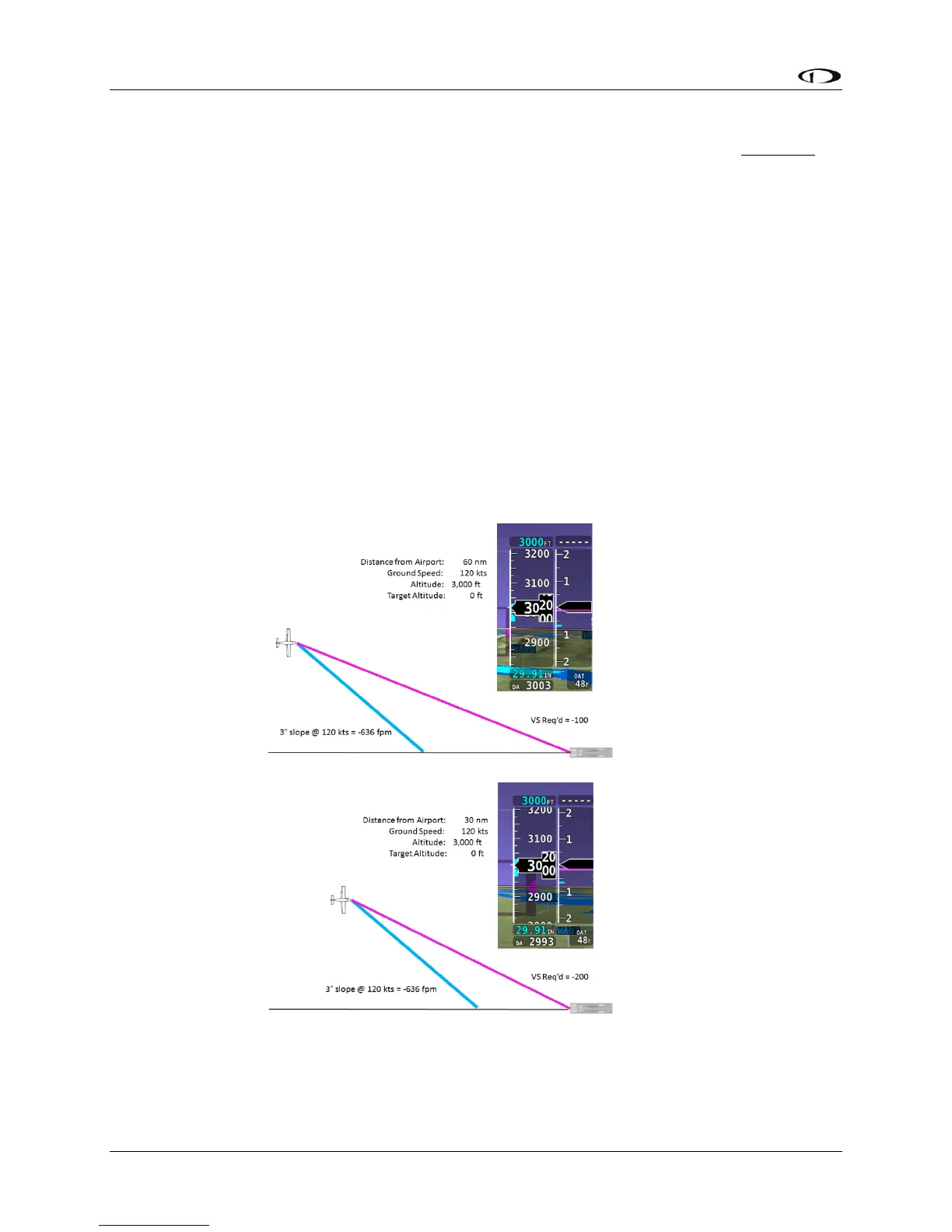
In contrast, the magenta line on the VSI indicates is a “current value” indicating the vertical
speed which will take the aircraft along a straight descent path from its current position to the
selected runway threshold (or specified height above).
If the aircraft maintains is current altitude until the magenta line descends to match the blue
tick mark, the aircraft will have intercepted the calculated descent path, similar to intercepting
a glideslope. If properly armed in the VNAV mode, the autopilot would sequence to that mode
and navigate down the calculated descent path.
The following sequence of figures illustrates an aircraft’s approach to an airport, together with
screenshots of the vertical speed indicator showing both the magenta VS REQ’d reference line
and the blue calculated descent path indicator.
Figure 142
Figure 143




 To Next Page