PFD Operation
4-6 SkyView HDX Pilot’s User Guide – Revision B
shown here, the Vne is configured to be based on a TAS of 190. However, because the aircraft is
at altitude, that TAS occurs at a lower IAS. In this case, you can see that the red range has been
lowered to an IAS of 173, which is where the TAS has reached its limit of 190.
Airspeed Bug
The airspeed bug is displayed in cyan (light blue) on the airspeed tape and its associated digital
readout is displayed at the top of the Airspeed Indicator.
To set the airspeed bug:
1. Enter the Knob Function Menu.
2. Rotate the knob to move the cursor up or down to highlight (IAS).
3. Push the knob to close the menu (this is optional; the menu will close after
approximately 5 seconds). This step assigns that knob to IAS BUG.
(IAS) will now display just above that knob. The airspeed bug setting on the PFD will be outlined
to signal that it is selected. Turn that knob to adjust the airspeed bug. Note that while the
airspeed bug is changing, its display window lights up in cyan to draw your attention to it.
An alternate method of setting the Airspeed bug is to synchronize the bug to
current airspeed by pushing the knob for ½ second. After the bug is synchronized
an “IAS SYNC” message will appear above the knob.
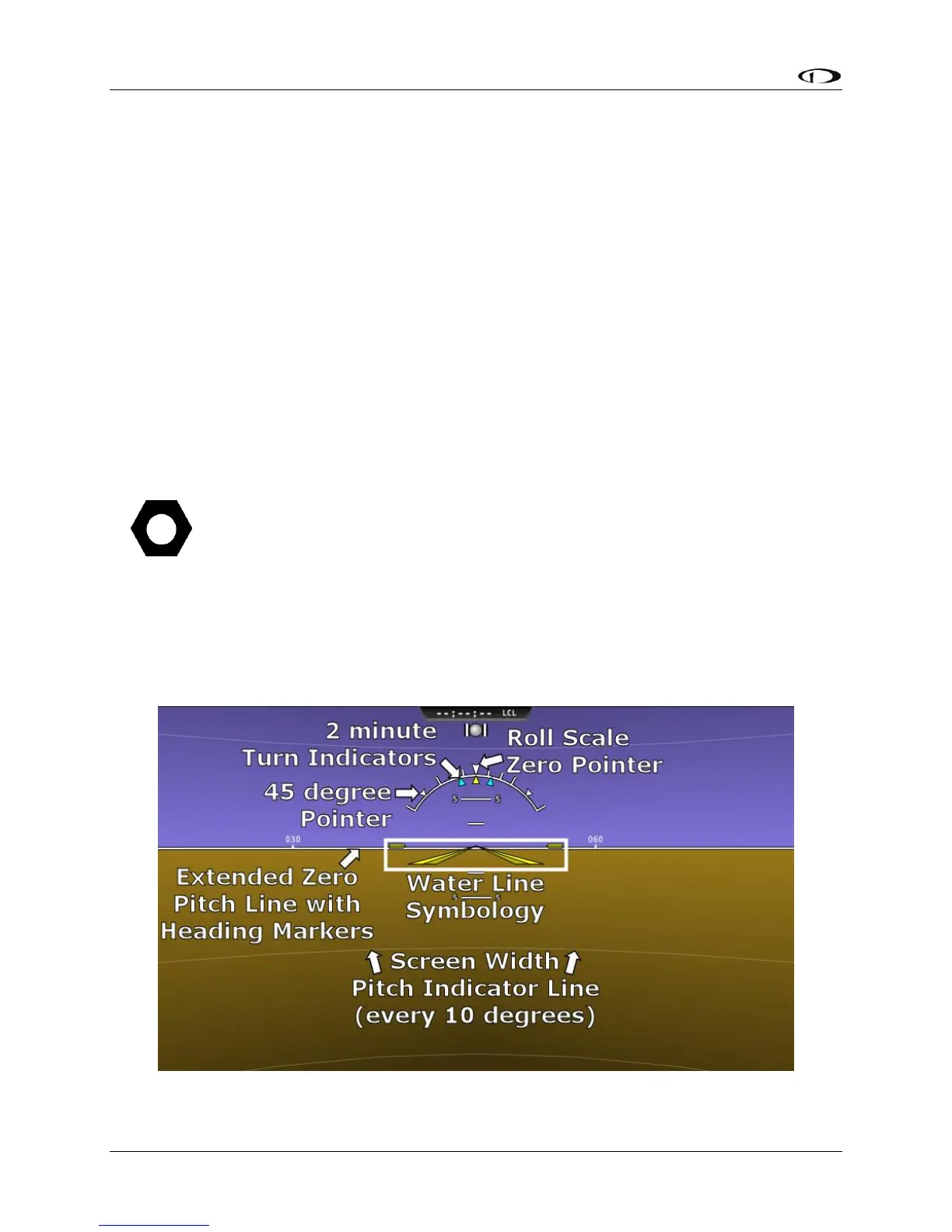
Attitude Indicator
Attitude indicator symbology is displayed on PFD and incorporates a roll scale with roll pointers
and a zero bank angle reference, pitch scale with horizon lines, and water line symbology.
Figure 34 is an example SkyView attitude indicator.
Figure 34 – Example Attitude Indicator





 To Next Page