MAP and VFR GPS Navigator Operation
5-78 SkyView HDX Pilot’s User Guide – Revision B
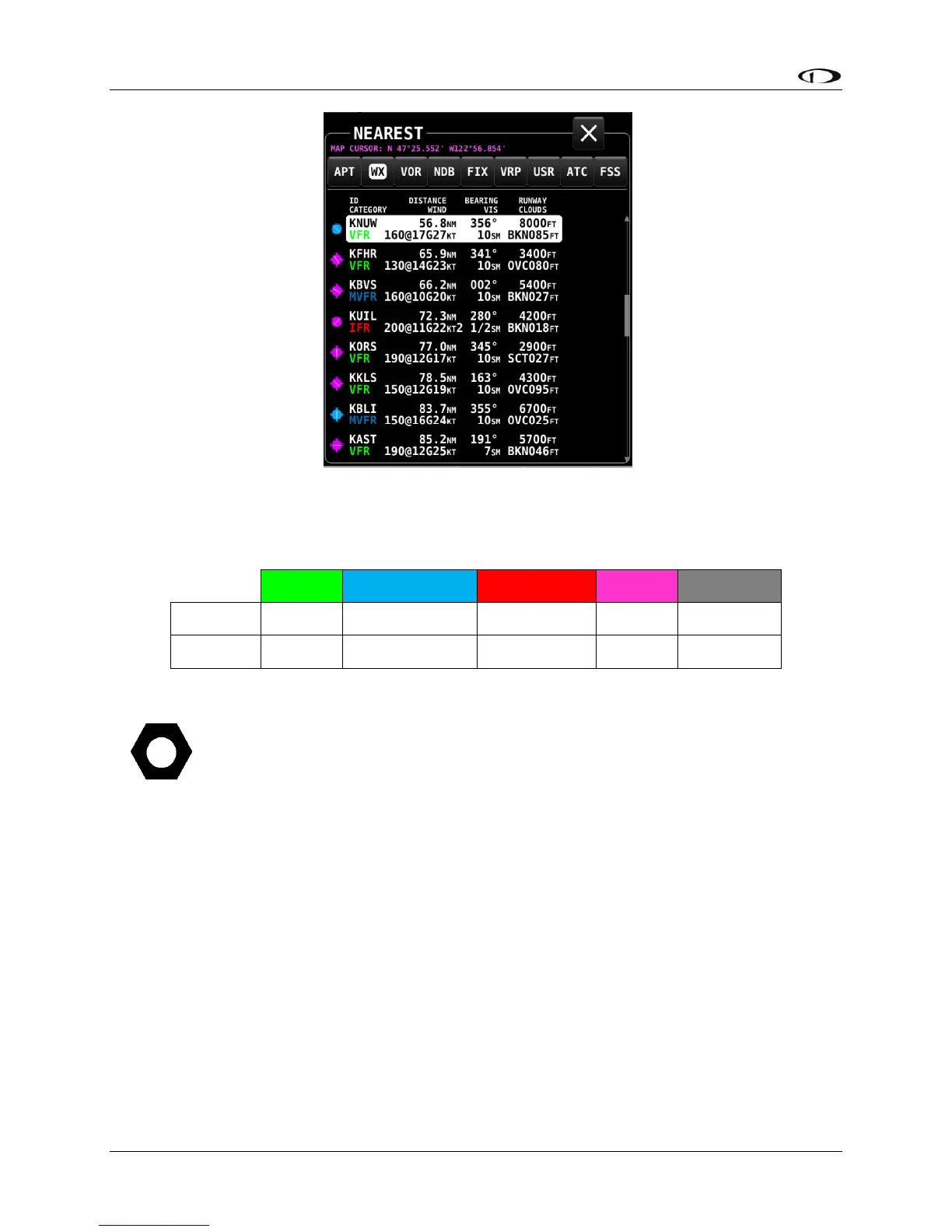
Figure 183 – Nearest WX
The flight category below the airport identifier indicates the weather conditions at the airport.
Possible flight categories are:
The flight category is determined based on the lowest of either Visibility or Ceiling. For
example, if the airport has 5NM visibility but only 800FT ceilings, it is categorized as IFR.
Individual Airport METARs / TAFs / Winds Aloft Forecast
When METAR and/or TAF and/or Winds Aloft Forecast weather reports are available for an
airport, they are accessed by selecting the WX tab the INFO window for that airport. Those
reports can also be displayed as colored icons for the airport icons on the moving map and in
the nearest window (MENU > WEATHER > [MAP CONTENTS] METAR ICONS).
Alternatively, pressing INFO when the list of NRST WX is being shown will also bring you directly
to the WX tab of the airport’s INFO PAGE.
Depending on the setting chosen in MENU > WEATHER > [METAR/TAF TEXT], the METARs and
TAFs on the WX page can be in raw or decoded form:




 To Next Page