PFD Operation
SkyView HDX Pilot’s User Guide – Revision B 4-29
Six-Pack Presentation
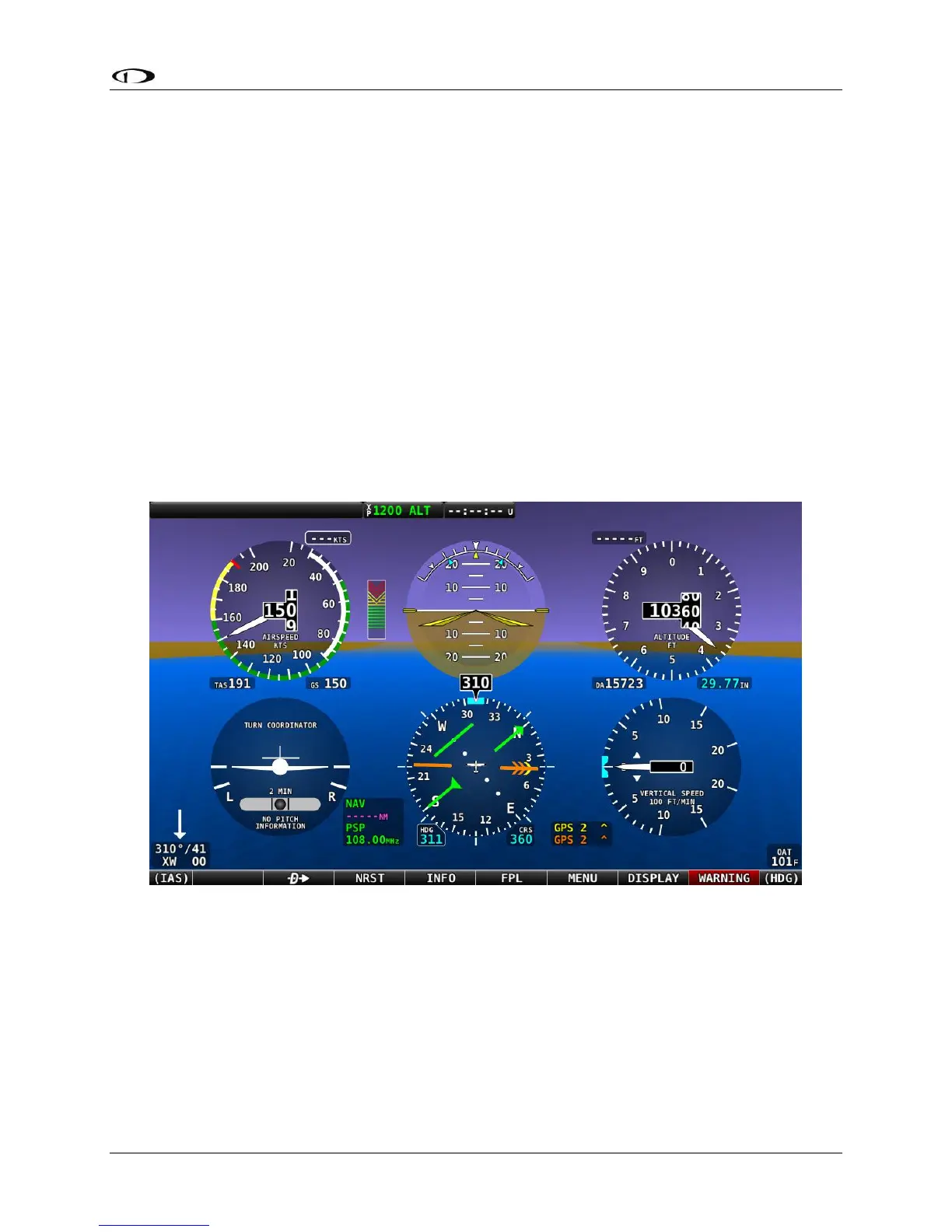
As an alternative to the EFIS tape-based display, SkyView HDX can display a traditional Six-pack
analog presentation of flight instruments. If you’re new to flying with a “glass panel”, SkyView
HDX’s Six-Pack presentation on the PFD lets you fly the gauges you’re used to. After flying in the
Six-pack presentation, try out the “EFIS” style as you get comfortable: changing the
presentation is just a few buttons away.
With the exception that the Flight Path Marker is not displayed on in the Six-Pack presentation,
the EFIS presentation and the Six-pack presentation display the same information on the PFD –
only the presentation style is different. The Six-pack presentation respects all settings used to
configure the EFIS presentation – units, etc. All information boxes for Density Altitude, True
Airspeed, Autopilot alert banners, Flight Director, and bugs, etc. appear the same as in the EFIS
presentation.
Figure 76 below illustrates the Six-pack presentation with Synthetic Vision enabled (in the
background).
Figure 76 – Six Pack PFD Presentation, Synthetic Vision Enabled




 To Next Page