Transponder Operation
SkyView HDX Pilot’s User Guide – Revision B 6-7
The Fuel Remaining info item (displayed as FUEL REM) displays the current amount of fuel
computed on board, based on your input of the aircraft’s starting fuel state and the amount of
fuel that has the fuel flow sensor has seen flow through it.
The Fuel Used info item (displayed as GALS USED) displays the amount of fuel that has been used
during your flight. Note that Fuel Used resets itself when the unit detects that oil pressure has
exceeded 15 PSI for the first time after being powered on. This allows you to view the fuel used
value from your last flight before engine start.
The Time Remaining info item (displayed as TIME REM) displays how much time is estimated
remaining before the aircraft is out of fuel.
The Fuel Efficiency info item (displayed as NM/GAL) displays how efficiently the aircraft is using
fuel with respect to the speed it is traveling over the ground (this also can be displayed as
MI/GAL, KT/GAL, KM/LTR).
The Fuel at Waypoint info item (displayed as WPT GAL) displays how much fuel will remain at the
next waypoint. This info item uses the current HSI navigation source for waypoint information,
and only displays information when there is a waypoint being navigated to. It assumes you are
flying directly at the waypoint and does not adjust for non-direct flights.
The Fuel Range info item (displayed as RANGE) displays the distance the aircraft can travel at its
current GPS ground speed before it is out of fuel.
Fuel Menu (Adjusting the Fuel Computer)
To obtain accurate data, you must reset the fuel computer every time you add fuel
to the aircraft. SkyView HDX can assist with this through the Fuel Auto Detect
setting described in this section.
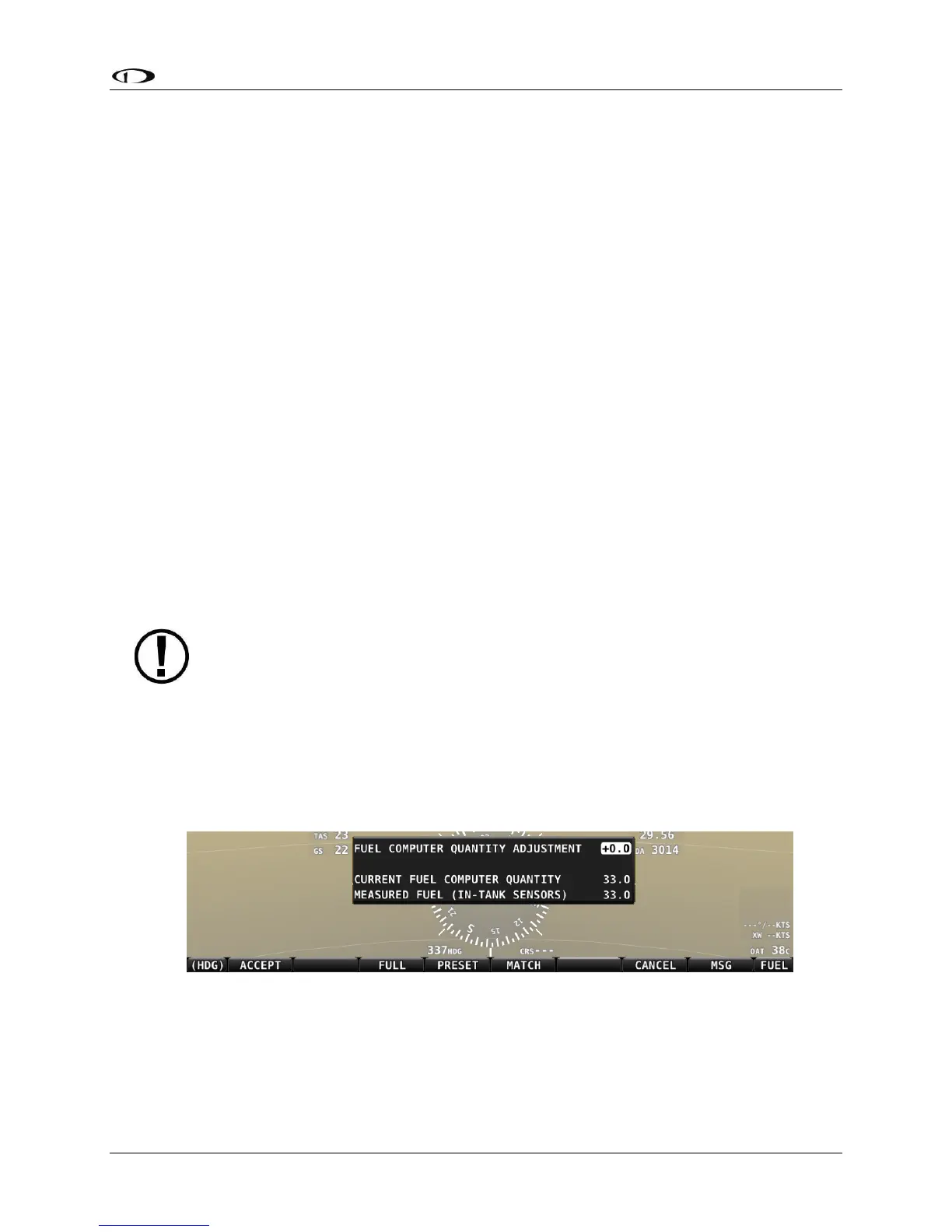
Fuel computer adjustments are made by selecting the FUEL icon on the ENGINE menu. When
FUEL is selected, a pop-up window will appear near the bottom of the screen, and the bottom
bar menu will change to present options for changing the current fuel state in the fuel
computer. Refer to the figure below.
Figure 200 – Fuel Computer and Fuel Menu
• “Fuel Computer Quantity Adjustment” is the amount of fuel that you have told the fuel
computer to presently add or subtract from the previous total fuel state.





 To Next Page