Com Radio Operation
SkyView HDX Pilot’s User Guide – Revision B 10-3
the SkyView Classic / SE / HDX System Installation Guide for more information configuring the
weight and balance calculator.
Accessing the Weight and Balance Calculator on your SkyView Display
Once the Weight and Balance Calculator has been properly configured in System Setup, it is
available for viewing on your SkyView HDX display. During installation you will have entered
basic information about your aircraft, including empty weight, its arm and moment, defined
various loading stations, specified the aircrafts CG limits, and whether they are metric values.
To view the calculator on screen, Select MENU (Button 6) from the Main Menu, then select the
WEIGHT BAL icon in the bottom row.
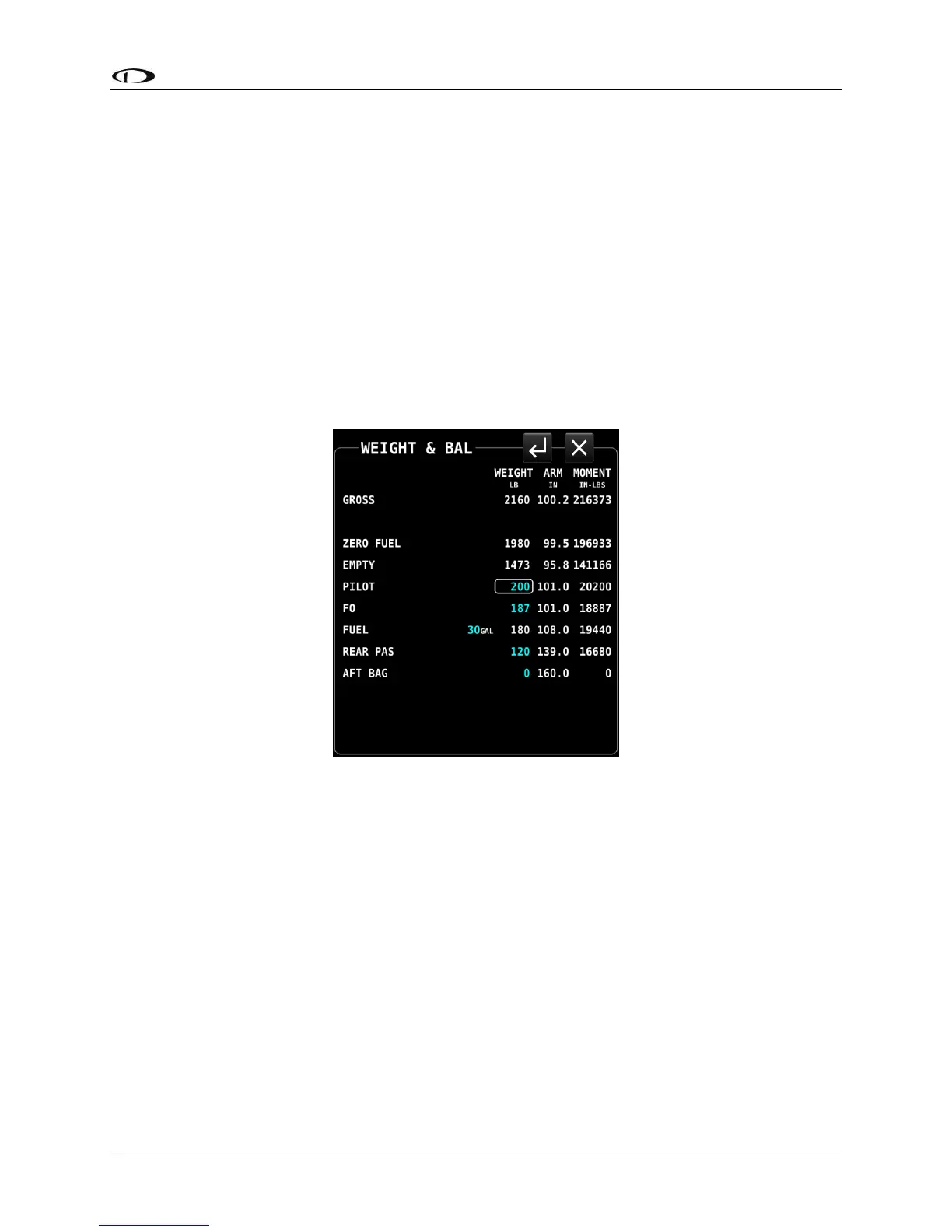
Figure 240 – Weight and Balance Calculator
With the Weight and Balance page displayed, you can then enter actual weights for each
station for the current flight. The page dynamically recalculates the aircraft’s total weight and
CG status as you enter new values. The zero fuel line shows the predicted weight and CG status
when your fuel is empty. Notice that the CG moves forward in this plane when the fuel is
exhausted.
Weight and Balance supports metric units, as well.
MAINT LOG – Maintenance Log
The Maintenance Log page is list of various maintenance and other time-based items to assist
with managing your aircraft, pilot currency requirements and virtually any other items with
expirations based on calendar dates or aircraft system times.




 To Next Page