SkyView HDX Display Operation
3-10 SkyView HDX Pilot’s User Guide – Revision B
Cockpit Role of Each Display
A thorough understanding of this section is critical to using a single or multiple
HDX displays effectively in the cockpit. Please read this section carefully!
Establishing the screen layout for SkyView HDX displays begins with the pilot choosing a cockpit
role for each display in the system. The cockpit role assigned to the display will define the
content of the 100% page when that layout is selected. The cockpit roles from which you may
choose are:
• PFD: Primary Flight Display
• MAP: GPS Moving Map
• ENGINE: Engine Monitoring System
You will also choose whether to present engine instruments in a horizontal band across the
bottom of the display, referred to as the Engine Bottom Band, a key distinguishing
characteristic of the HDX display compared to earlier SkyView systems.
Defining the Default Screen Layout
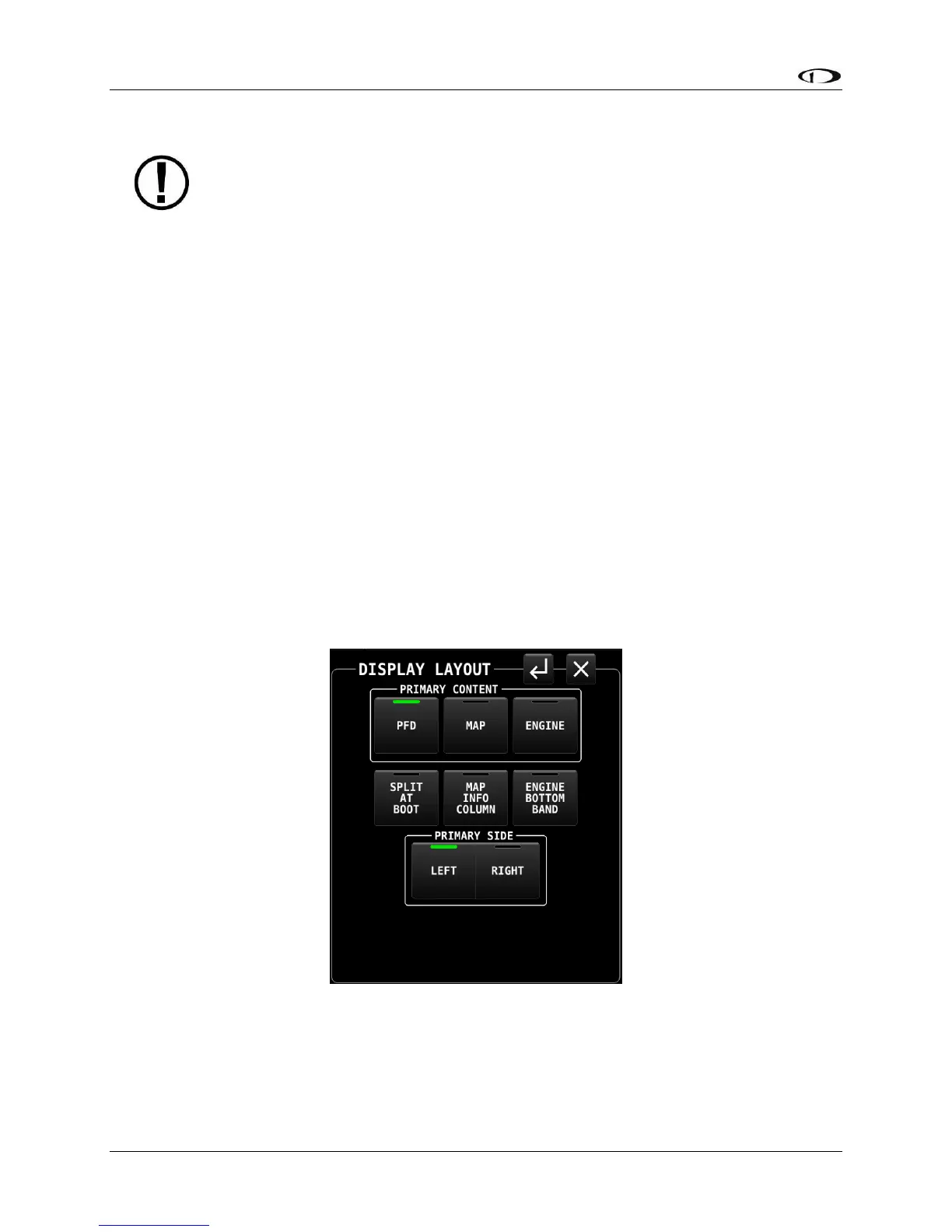
To define the default layout of a SkyView HDX display (that is displayed when powered up),
select DISPLAY (Button 7) on the Main Menu. Next, tap the SETUP icon at the lower right corner
of the DISPLAY page. The DISPLAY LAYOUT page will appear, as shown below.
Figure 6 – DISPLAY LAYOUT page
The cockpit role for the display, also referred to as Primary Content, is selected in the top row
of buttons on the DISPLAY LAYOUT page. A white box with the title “PRIMARY CONTENT”





 To Next Page