Com Radio Operation
10-2 SkyView HDX Pilot’s User Guide – Revision B
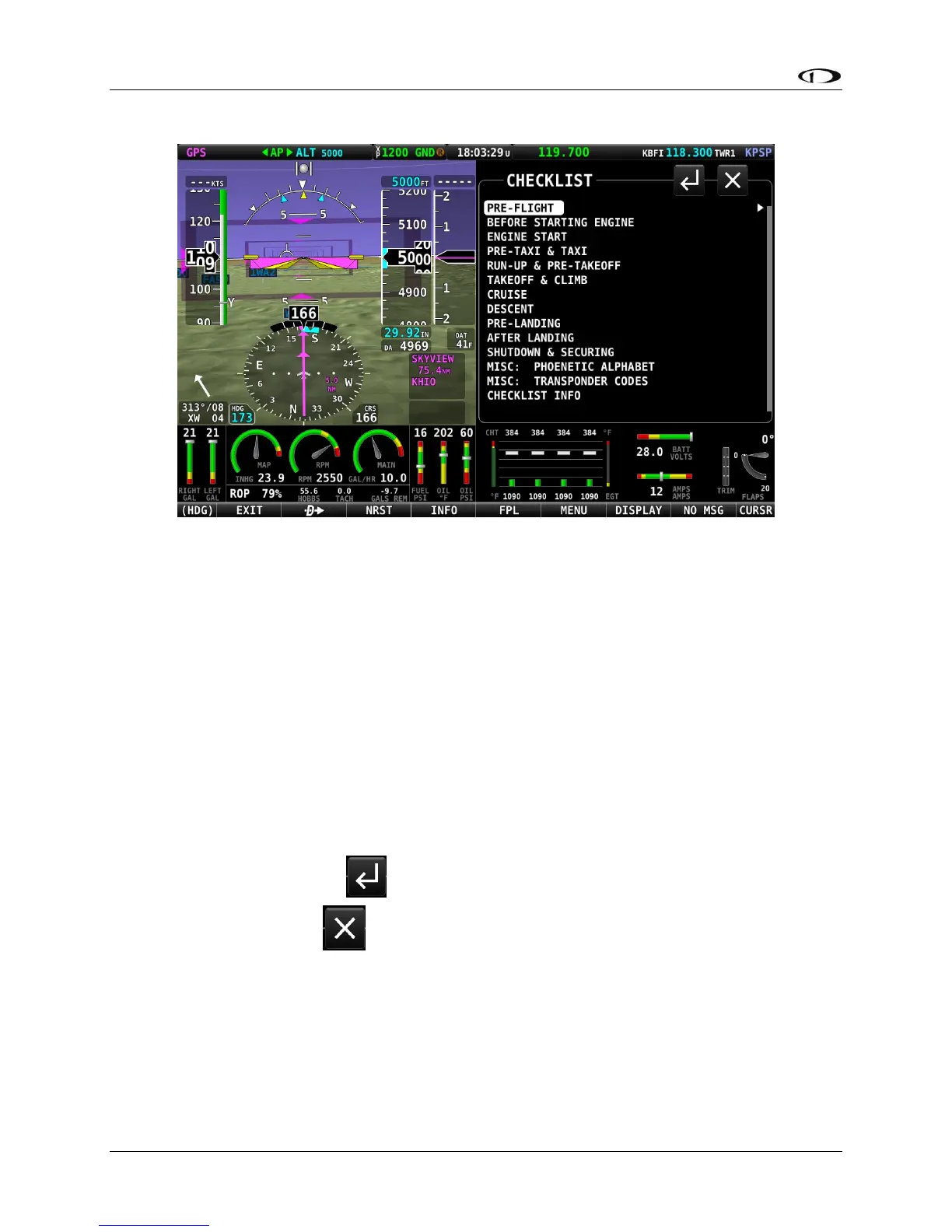
Figure 239 – (Example) List of Checklists Available
The page initially shows a master list of all available checklists. Select an individual list by
touching the list name twice: the first touch relocates the highlight cursor to that list name; the
second touch displays the contents of the selected list.
Alternatively, lists may be selected by moving the cursor to the list name using the CURSR knob,
the pressing the knob to select the list and show its contents.
You can scroll through the checklist items by touching the item or using the CURSR knob.
Your selected checklist will continue to be displayed until one of the following actions is
performed:
• Select EXIT (Button 1) on the Main Menu, to close the CHECKLIST page and return to the normal
display.
• Select the RETURN icon to return to the master list.
• Select the EXIT icon to close the CHECKLIST page and return to the normal display.
WEIGHT BAL – Weight and Balance
The Weight and Balance page provide an interactive calculator customized for your aircraft. To
be available in SkyView HDX, the calculator must first be configured in System Setup. Navigate
to SETUP MENU > SYSTEM SETUP > AIRCRAFT INFORMATION > WEIGHT & BALANCE. Refer to





 To Next Page