SkyView HDX Pilot’s User Guide – Revision B 3-1
3. SkyView HDX Display Operation
After reading this section, you should be familiar with basic SkyView HDX display operation. For
details regarding specific procedures, refer to the PFD, EMS, and Moving Map operation
sections.
The SkyView SV-HDX800 and SV-HDX1100 displays are identical in functionality and
presentation. The only difference between the two units is the size of the screen.
Display Layout
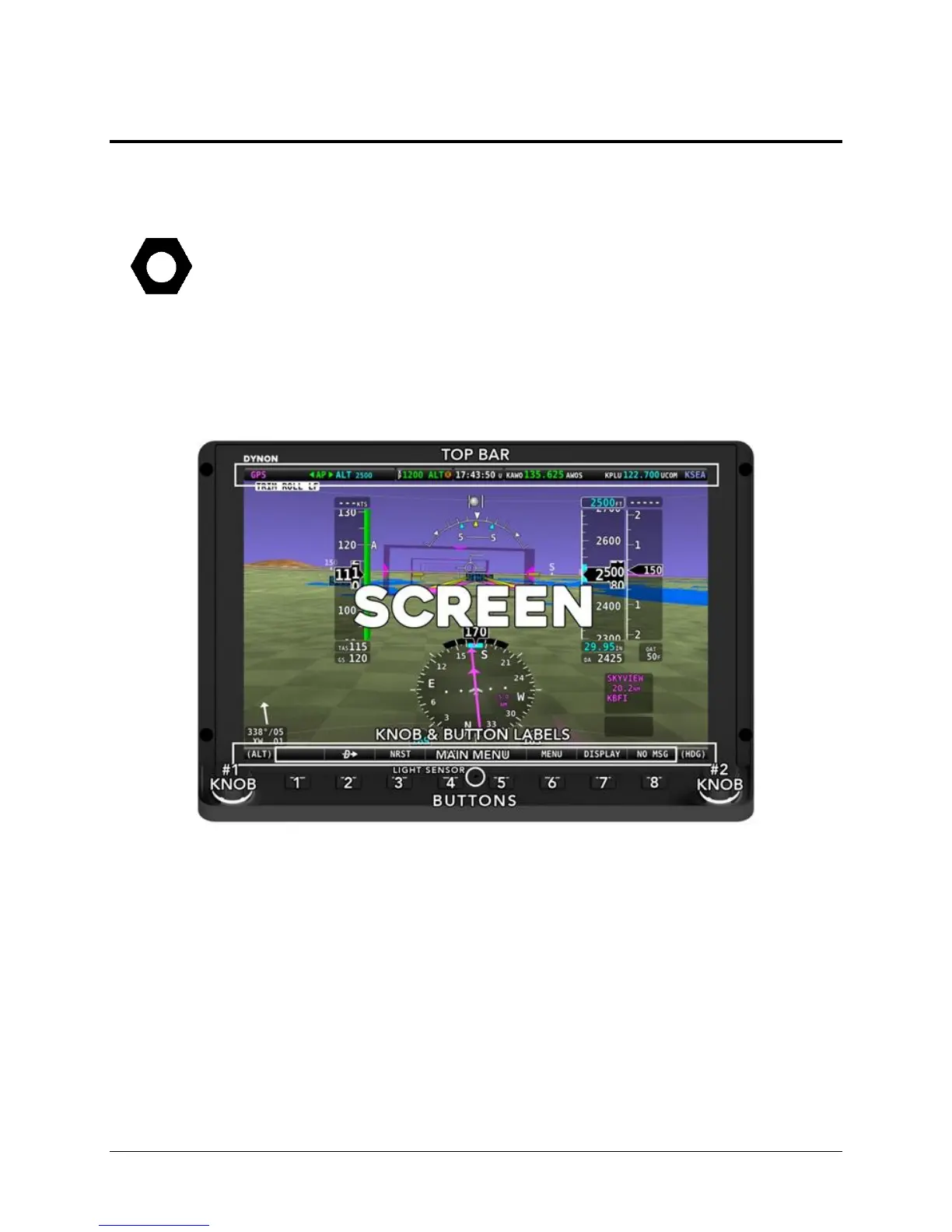
The following image shows the front of a SkyView SV-HDX1100 10” display and its important
parts. Note that the layout of the SkyView SV-HDX800 7” display is the same, just scaled down
for the smaller size of the display.
Figure 1 – SkyView HDX Display Front Bezel Layout (SV-HDX1100 shown)
The structure surrounding the lighted LCD screen itself is referred to as the bezel. All tactile
controls for the system are located on the tilted shelf at the bottom of the bezel. On that shelf
are located 8 buttons, two knobs and an integrated light sensor, whose functions are described
below.
The LCD screen contains three main regions, described from top to bottom:
• The Top Bar – also referred to as the status bar – is user configurable and displays
important contextual information. The status bar will display clock time or a timer
(when running), autopilot status, battery status (when an issue requiring attention is
detected), transponder status, and Com Radio status.




 To Next Page