SkyView HDX Pilot’s User Guide – Revision B 9-1
9. Com Radio Operation
The SV-COM-C25 and SV-COM-X83 integrate with your SkyView HDX system in a novel way,
allowing you to “load” airports to it to enable quick, single button-push frequency tuning via
the dedicated TWR, ATIS, GND, and ATC buttons. You can also send individual frequencies to
your SkyView Com radio from SkyView HDX’s airport info pages. And of course, you can also
spin frequencies in the “old fashioned way” when you’re feeling nostalgic (or are following ATC
instructions).
The airport lookup, loading and reverse lookup features of the SV-COM-C25 and SV-
COM-X83 require a connected SkyView with a GPS signal, SkyView HDX’s Moving
Map, and an aviation database.
Com Control Panel Overview
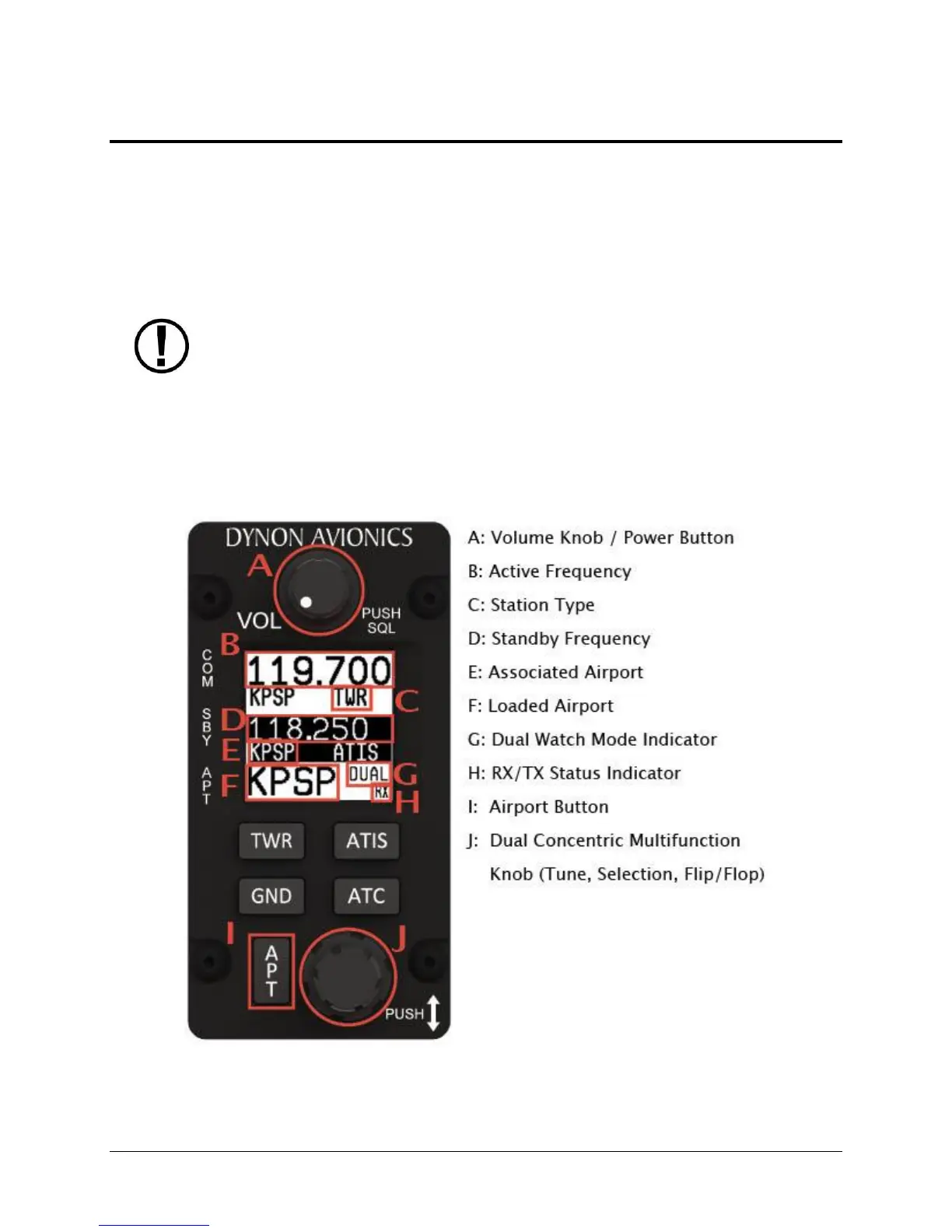
The SV-COM-C25 and SV-COM-X83 have a dedicated control panel that contains full status
information about the radio:
Figure 235 – Com Radio Control Panel




 To Next Page