The Extreme Pitch Warning Indicator Arrows (Figure 74 above) can only be
displayed when the EFIS presentation is enabled on the PFD.
If you have the Six-Pack presentation enabled on the PFD, the Extreme Pitch
Warning Indicator Arrows (Figure 74 above) will not be displayed.
G Meter
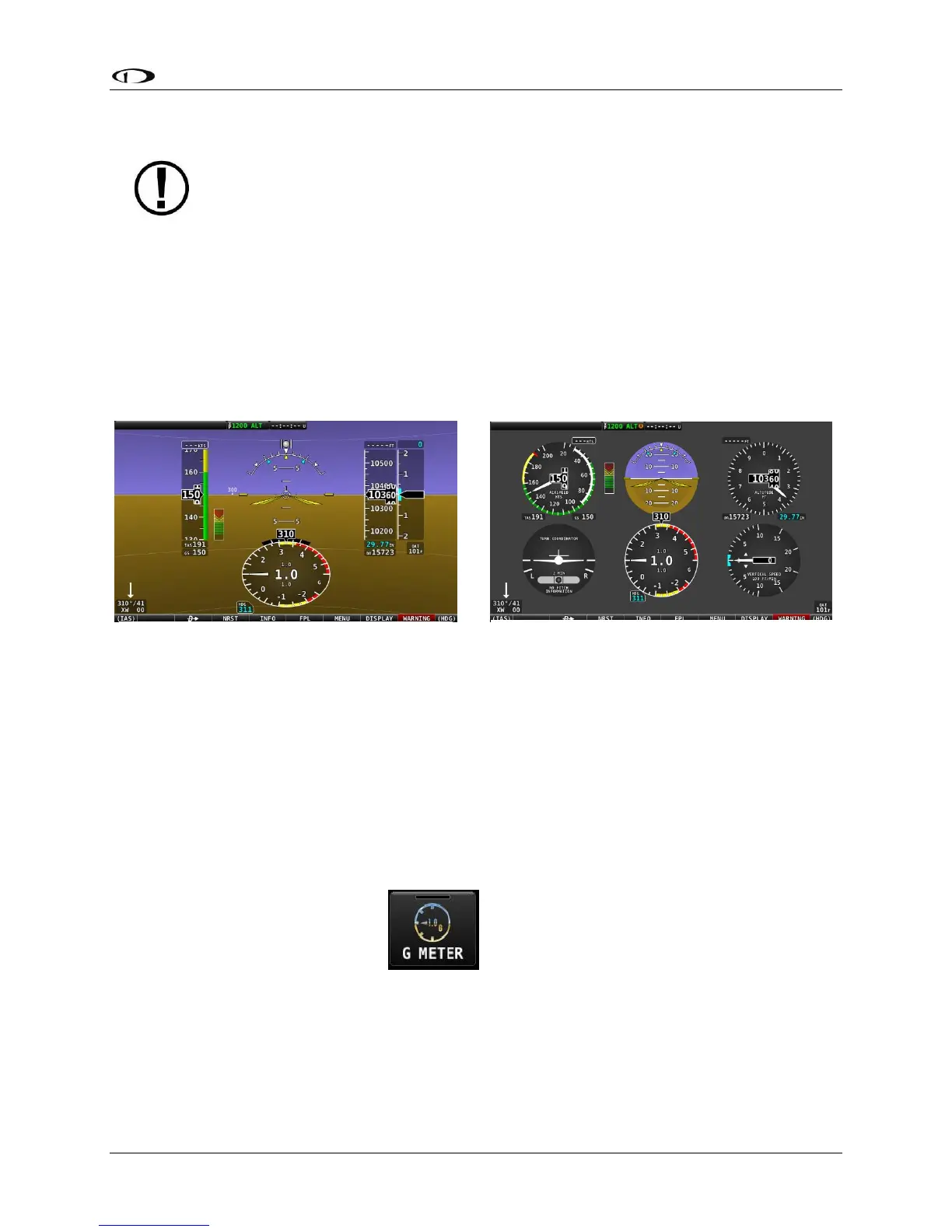
A G Meter can be displayed on the PFD. When enabled, the G Meter replaces the HSI / Compass
Rose in both the PFD presentation (Figure 77 below) and the Six-pack presentation (Figure 78
below) of the PFD. Note that when the G Meter is displayed, the numerical magnetic heading
above the HSI area remains displayed.
The G Meter shows an analog needle that indicates the instantaneous G loading of the aircraft.
Depending on how the G Meter is configured, the analog range may have yellow and/or red
caution ranges configured to visually indicate aircraft G limits are being approached.
Instantaneous G information is also shown digitally in the center of the gauge.
As shown in Figure 79 at right, display of the G Meter in place of the HSI / Compass Rose on the
PFD may be enabled or disabled at any time by selecting MENU (Button 6) on the Main Menu,
then selecting the PFD TOOLS icon, then the G METER icon.
The smaller digital numbers above and below the larger instantaneous G number are the
maximum and minimum Gs that the aircraft has experienced since the G Meter was last reset.




 To Next Page