MAP and VFR GPS Navigator Operation
SkyView HDX Pilot’s User Guide – Revision B 5-69
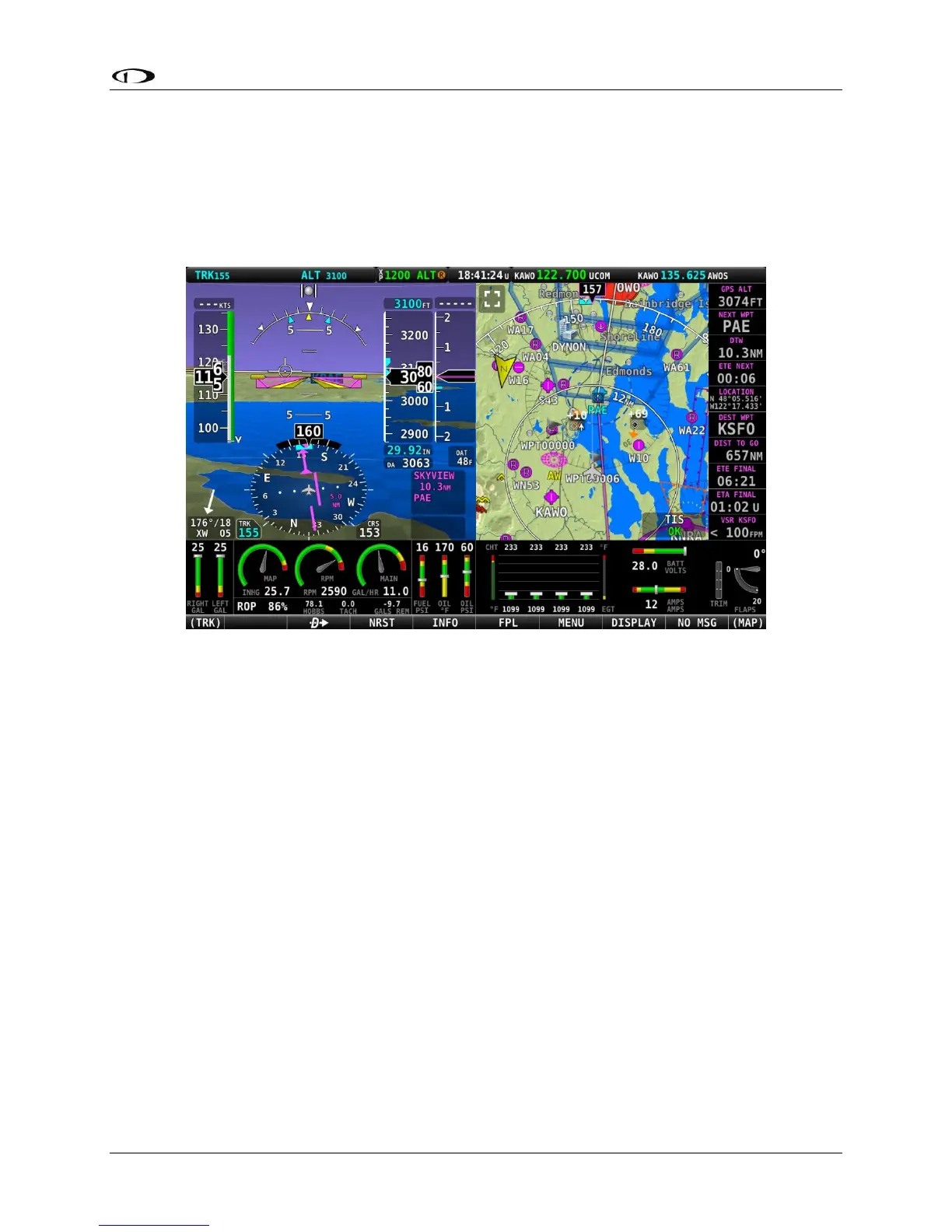
When the MAP INFO COLUMN is displayed, it contains up to 10 separate information items
derived from SkyView’s VFR GPS Navigator. Each of the items in the list below can be selected
for display in one of the 10 positions in the vertical data column. The positions are numbered 1
through 10 from top to bottom.
The following figure shows an example of the MAP INFO COLUMN displayed together the PFD
(Primary Content) and Map (Split Content).
Figure 172 – MAP INFO COLUMN displayed on right side of screen
The contents of each position in the MAP INFO COLUMN can be selected by accessing MAP
SETUP > INFO ITEMS.
• Off: (no data will be displayed)
• BEARING TO WPT - Bearing to Waypoint: bearing from the aircraft’s current position to
the next waypoint in the active flightplan.
• COURSE: Course designated by the active leg.
• CROSS TRACK: This is the aircraft’s lateral displacement from the current course line,
measured as the perpendicular distance from the aircraft’s current location to the
course line.
• CURRENT LOCATION: Lat/Long position of the aircraft.
• DESTINATION WPT – Destination Waypoint: Identifier of the final waypoint in your
flight plan.





 To Next Page