SkyView HDX Display Operation
SkyView HDX Pilot’s User Guide – Revision B 3-15
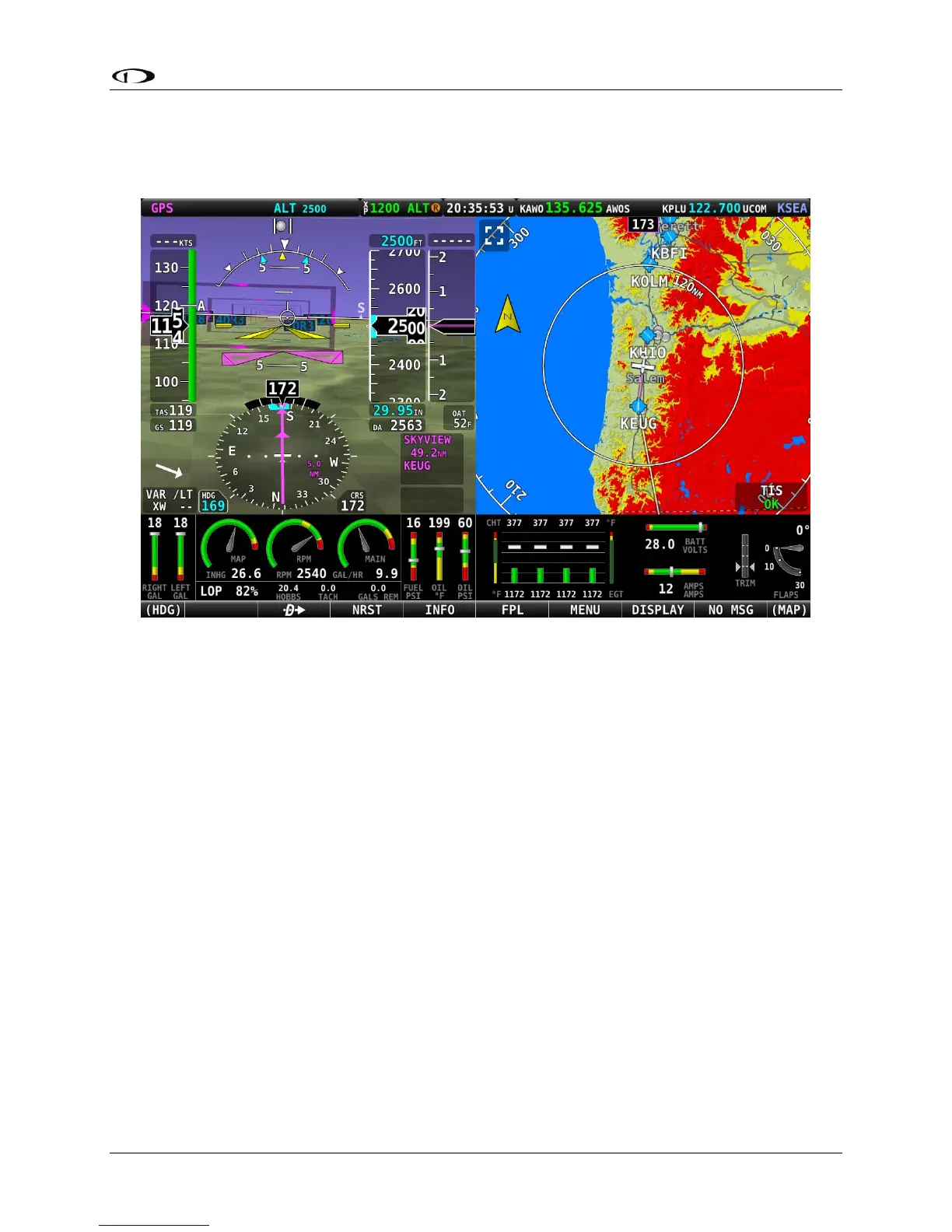
With PFD as the Primary Content of your display, select the MAP icon in the SPLIT CONTENT on
the DISPLAY page to add a 50% wide map page to your screen, as shown below.
Figure 14 – 50% PFD / 50% MAP with ENGINE BOTTOM BAND
On the DISPLAY menu page, four items are grouped together in a white box titled SPLIT
CONTENT. The items available in the SPLIT CONTENT box include:
• PFD
• ENGINE
• MAP
• VIDEO
• VP-X
The first three items are not selectable (greyed out) if the same item is already designated as
Primary Content on that display. VIDEO is only selectable if an optional USB Video Adapter is
installed and a properly configured video source is connected. VP-X is only selectable if VP-X is
licensed and installed.
When ENGINE is selected as the SPLIT CONTENT, a 50% engine page is presented. By default,
this page will show engine and aircraft system instruments not already presented on the
ENGINE BOTTOM BAND. An example of the 50% ENGINE split content is shown in Figure 15.





 To Next Page