PFD Operation
4-4 SkyView HDX Pilot’s User Guide – Revision B
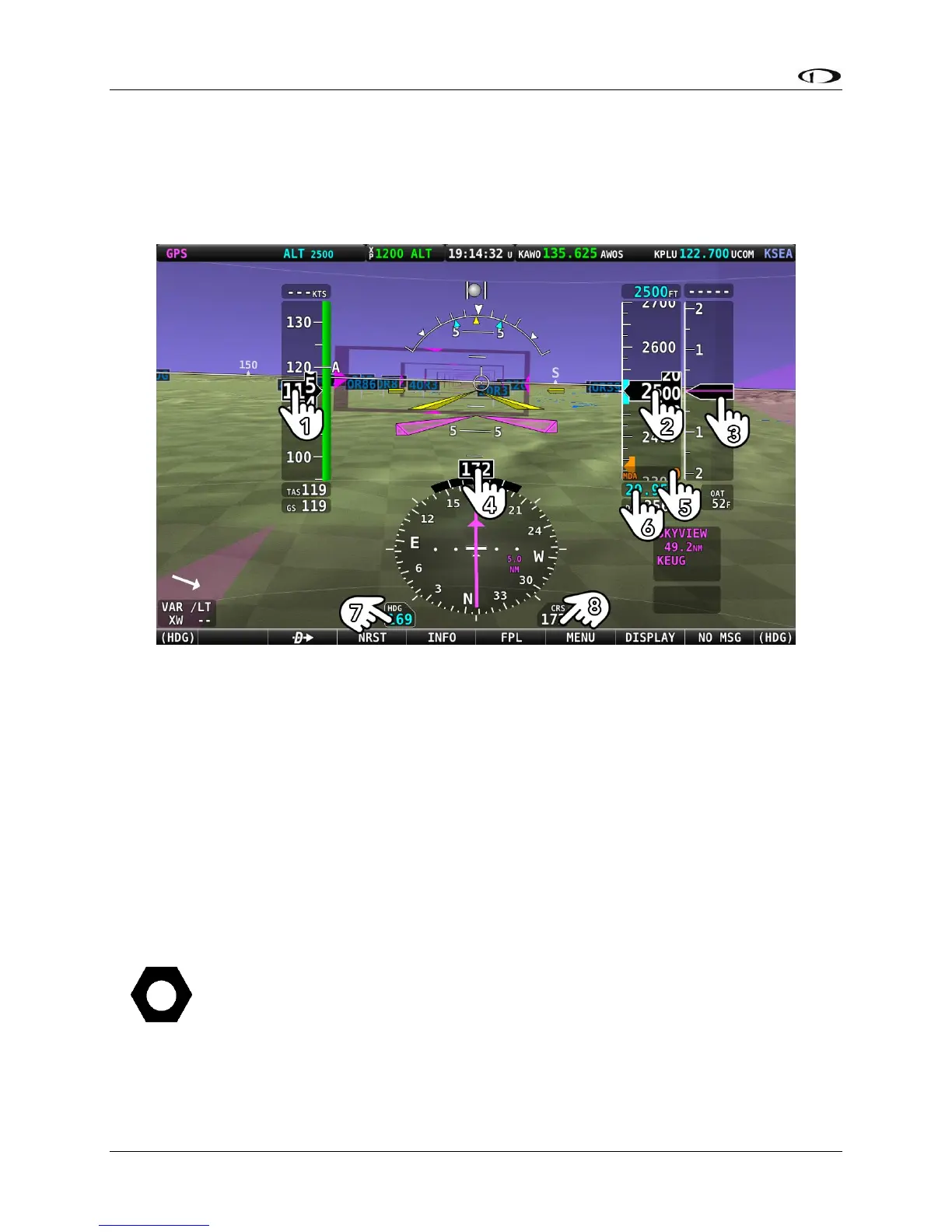
To change the function of a knob using touch, merely tap the element on screen for which you
wish to assign function control to the knob. For example, to change the knob function to BARO
bug, touch the BARO window on screen to re-assign the knob function to BARO bug. Touching
the bug value box will only have effect if that bug is active in the KNOB function list.
Figure 30 – Touchable on-screen regions that change Knob BUG Function; See Below for Legend
Legend for Figure 30 – Touchable on-screen regions that change Knob BUG Function; See Below
for Legend:
1 – IAS (Indicated Air Speed)
2 – ALT (Altitude)
3 – VS (Vertical Speed)
4 – HDG (Heading; same as 7)
5 – MDA (Minimum Descent Altitude)
6 – BARO (Barometer)
7 – HDG (Heading; same as 4)
8 – CRS (Course)
When the 100% PFD window is used, touching the screen element will change the
function of the Left knob. When a 50% / 50% window is used, the function of the
knob on the side of the PFD is changed.




 To Next Page