PFD Operation
SkyView HDX Pilot’s User Guide – Revision B 4-23
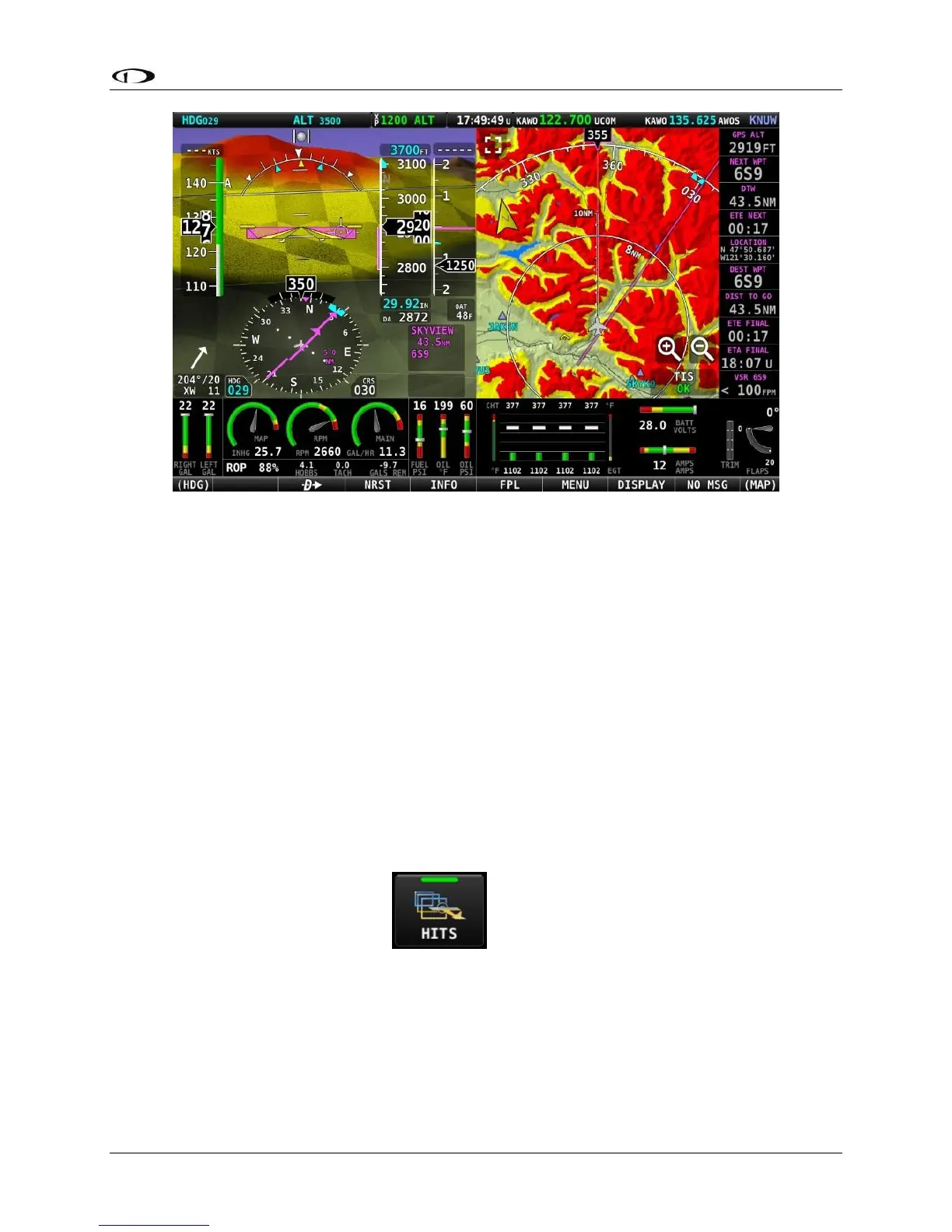
Figure 65 – SkyView HDX Synthetic Vision – Terrain Alert
Highway In The Sky (HITS) on Synthetic Vision
In software version 15.0 or later, when a Flight Plan is engaged, either with, or without
Autopilot, Highway In The Sky (HITS) indicators (rectangles) can optionally be displayed in
Synthetic Vision of the PFD. HITS is most useful for “hand steering” a Flight Plan when Autopilot
is not installed or not engaged.
HITS will show the (VFR-oriented) Vertical Guidance that SkyView generates. All other altitude
guidance is at the altitude bug, even when an external flight plan is being shown. HITS is
intended to be used for enroute flight and during SkyView-generated Vertical Guidance.
Display of HITS can be toggled on and off at any time by selecting MENU (Button 6) on the Main
Menu, then selecting the PFD TOOLS icon, then the HITS icon, shown below. Note that SYNVIS
must be enabled to display HITS.





 To Next Page