MAP and VFR GPS Navigator Operation
5-6 SkyView HDX Pilot’s User Guide – Revision B
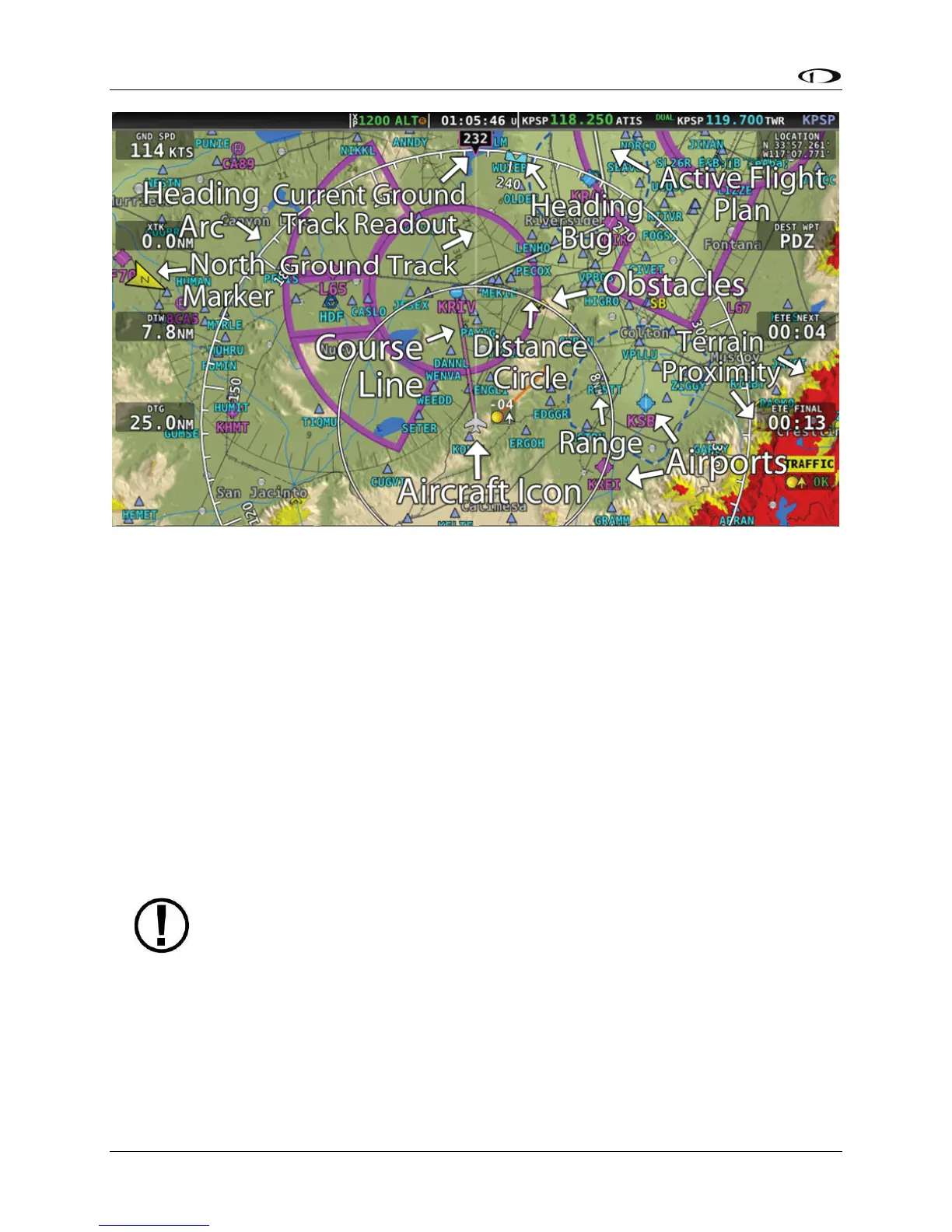
Figure 90 – SkyView Moving Map
The following items are displayed on the Moving Map Page shown in Figure 90:
• Topography (terrain and bodies of water) with Terrain Proximity Alerting
• Default Aircraft Icon with Ground Track Line
• Distance Circle and Range
• Heading Arc, Current Ground Track, Heading Bug, True North Marker
• Configurable Info Items. Examples include GPS Ground Speed (SPEED), GPS Altitude
(ALTITUDE), Distance to Waypoint (DTW), and Bearing to Waypoint (BTW).
• Course line (only displayed when actively navigating to an aviation waypoint)
• Airports with runways (if known)
• Obstacles
• Airspace (with floors/ceilings)
• Navigation aids, such as VORs, NDBs, and Fixes
• Active Flight Plan
SkyView HDX uses a map projection that does not distort distance. This means that
the courses – which are the ideal “great circle” routes – appear as straight lines on
the screen.





 To Next Page