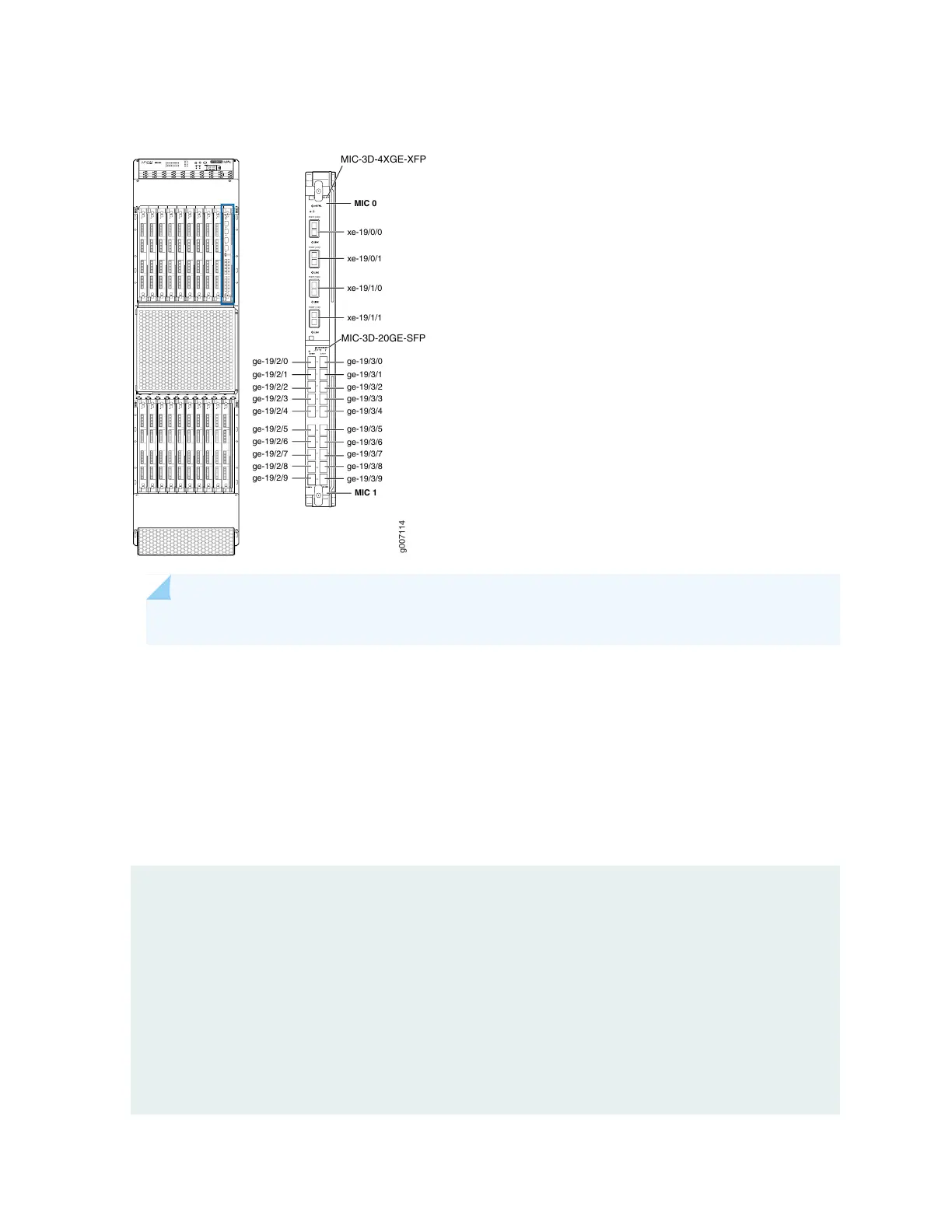
Figure 34: MX2020 Interface Port Mapping
g007114
PORT [0/2]1
PORT [0/2]0
PORT [1/3]1
0
1
2
3
4
5
6
7
8
9
5
6
7
8
9
1
2
3
4
0
PORT [1/3]0
MIC 1
MIC 0
xe-19/0/0
xe-19/0/1
xe-19/1/0
xe-19/1/1
ge-19/3/0
ge-19/3/1
ge-19/3/2
ge-19/3/3
ge-19/3/4
ge-19/3/5
ge-19/3/6
ge-19/3/7
ge-19/3/8
ge-19/3/9
ge-19/2/0
ge-19/2/1
ge-19/2/2
ge-19/2/3
ge-19/2/4
ge-19/2/5
ge-19/2/6
ge-19/2/7
ge-19/2/8
ge-19/2/9
MIC-3D-4XGE-XFP
MIC-3D-20GE-SFP
NOTE: The slot number will be different depending on which slot the MPC and MIC is installed.
The show interfaces terse command displays the four 10-Gigabit Ethernet interfaces, xe-19/0/0, xe-19/0/1,
xe-19/1/0, and xe-19/1/1 that correspond to the four ports on the MIC card that is installed in slot 0 of
the MPC, and twenty Gigabit Ethernet interfaces, ge-19/2/0, ge-19/2/1, ge-19/2/2, ge-19/2/3, ge-19/2/4,
ge-19/2/5, ge-19/2/6, ge-19/2/7, ge-19/2/8, ge-19/2/9 (left side), and ge-19/3/0, ge-19/3/1, ge-19/3/2,
ge-19/3/3, ge-19/3/4, ge-19/3/5, ge-19/3/6, ge-19/3/7, ge-19/3/8, ge-19/3/9 (right side) that correspond
to the twenty ports on the MIC card that is installed in slot 1 of the MPC.
user@host>show interfaces terse
...
lc-19/0/0 up up
lc-19/0/0.32769 up up vpls
pfe-19/0/0 up up
pfe-19/0/0.16383 up up inet
inet6
pfh-19/0/0 up up
pfh-19/0/0.16383 up up inet
xe-19/0/0 up down
89



 To Next Page