2N8/2N7
1-5-25
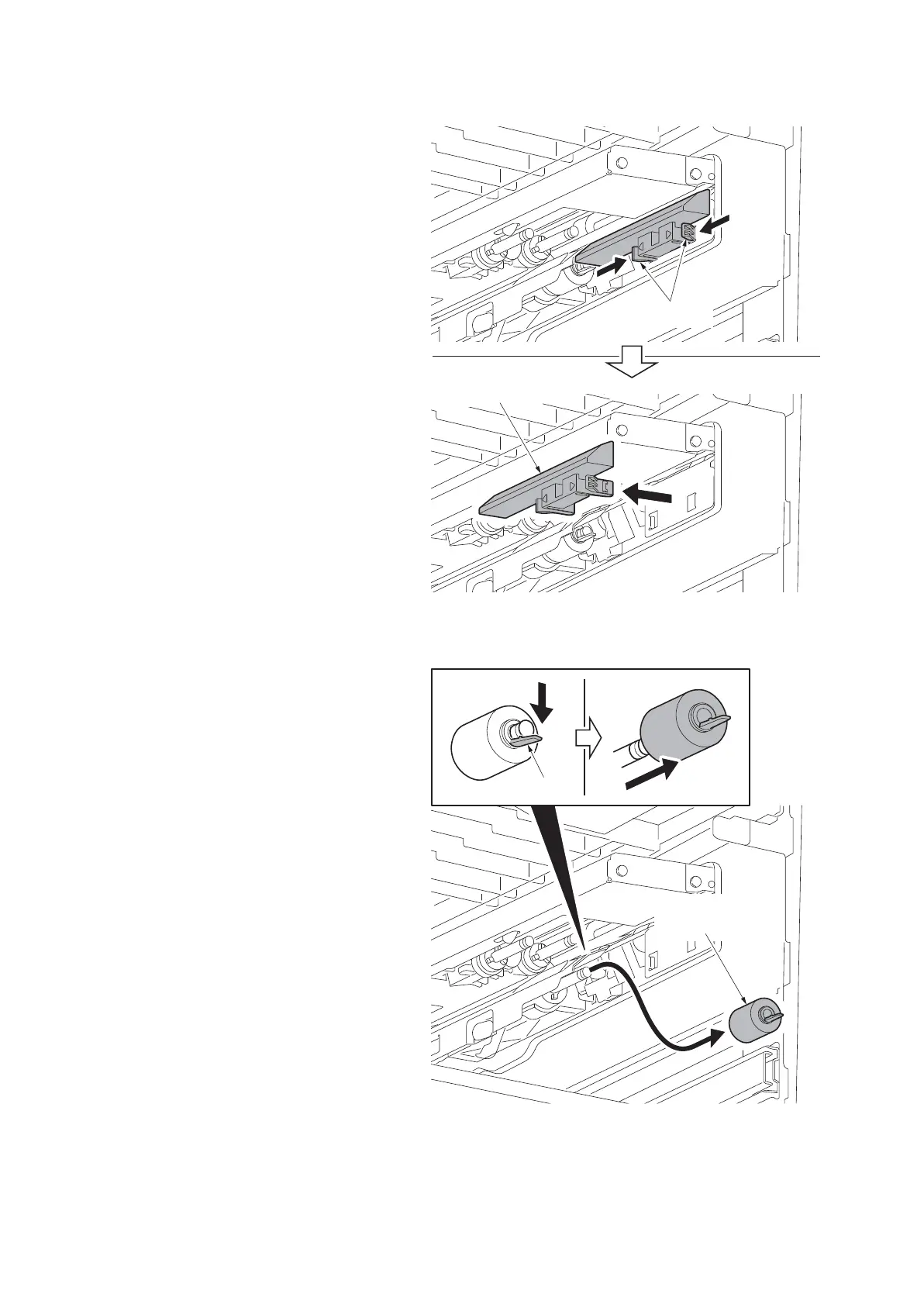
5. Unhook the two hooks and then remove
the cover.
Figure 1-5-40
6. Unhook the hook and remove the sepa-
ration pulley (right) from the axle.
*: Confirm that the nipping between the
feed roller and separation roller is
released.
7. Clean or replace the forwarding pulley
(right), paper feed pulley (right) and
separation pulley (right).
8. Refit the forwarding pulley (right), paper
feed pulley (right) and separation pulley
(right) to the primary paper feed unit.
*: Make sure that the collars are properly
installed by checking its color.
Forwarding pulley (right) (Collar is
white.)
Paper feed pulley (right) (Collar is
white.)
Separation pulley (right) (Collar is
black.)
9. When the forwarding pulley (right),
paper feed pulley (right) or separation
pulley (right) is replaced, perform main-
tenance mode U903 (clearing the jam
counter) (see page 1-3-186).
Figure 1-5-41
Execute Maintenance Counter - Cassette - Counter Clear of U251 (Maintenance counter limits/clear)
(see page 1-3-133).
Hooks
Cover
Hook
Separation
pulley (right)











 To Next Page