2N8/2N7-1
1-2-47
1-2-4 Installing the key card MK-2 (option for Japan only)
Key card installation requires the following parts:
Supplied parts of tray mount set (302LF94291):
Procedure
1. Press the power key on the operation
panel to off. Make sure that the power
indicator and the memory indicator are
off before turning off the main power
switch. And then unplug the power
cable from the wall outlet.
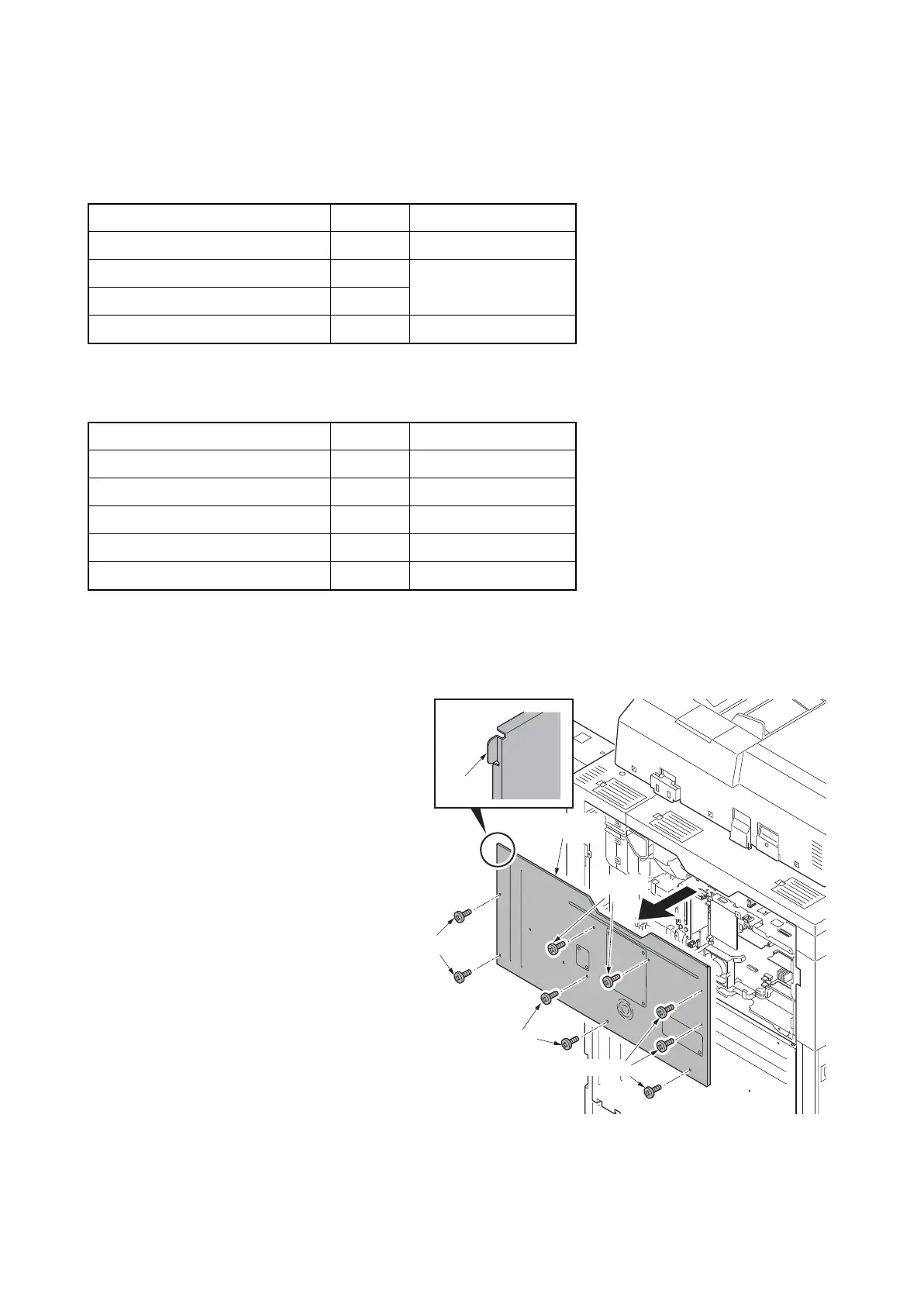
2. Remove nine screws and then remove
the rear upper cover.
*: To fix a cover, insert the hook at the left
top first by bowing the cover.
Figure 1-2-73
Parts Quantity Part.No.
Key card MK-2 1 8J272002 (option)
MK-2 mount 1
Supplied with MK-2
M4 x 16 screw 2
Tray mount set 1 302LF94291
Parts Quantity Part.No.
Tray cover 1 302LC04600
Tray mount 1 -
Tray film 2 -
M4 x 20 tap-tight S screw 4 7BB100420H
M4 x 8 tap-tight S screw 2 7BB700408H
Screws
Screws
Screws
Screws
Rear upper
cover
Hook












 To Next Page