2N8/2N7
1-5-102
1-5-10 Drive section
(1) Detaching and refitting the drum drive unit
Procedure
1. Remove the developer unit (see page
1-5-56).
2. Remove the drum unit (see page 1-5-
57).
3. Remove the rear upper cover and the
rear lower cover (see page 1-5-3).
4. Remove the feed PWB 1 assembly (see
page 1-5-105).
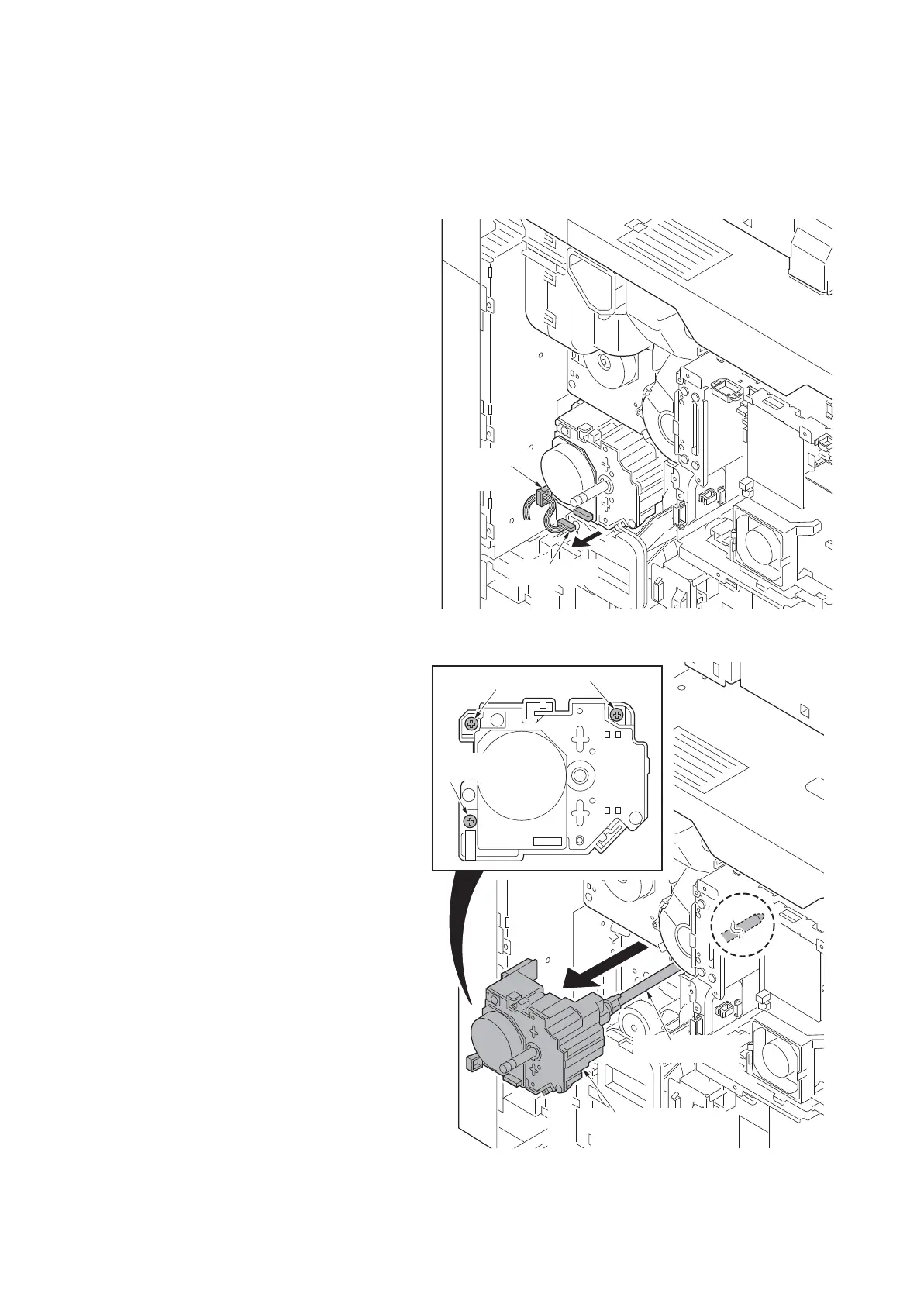
5. Remove the connector.
6. Release the wire saddle.
Figure 1-5-162
7. Remove three screws.
8. Remove the drum drive unit.
*: Do not have a shaft part alone when
you carry drum drive unit. (Have the
housing.)
*: Put support on the tip of the shaft so
that the shaft may become the horizon-
tal when you put drum drive unit on the
table etc.
Figure 1-5-163
Screw
Screw
Screw
(Shaft portion)
Drum drive unit
(housing portion)












 To Next Page