2N8/2N7
1-5-56
(2) Detaching and refitting the developer unit
Procedure
1. Remove the inner unit (see page 1-5-
53).
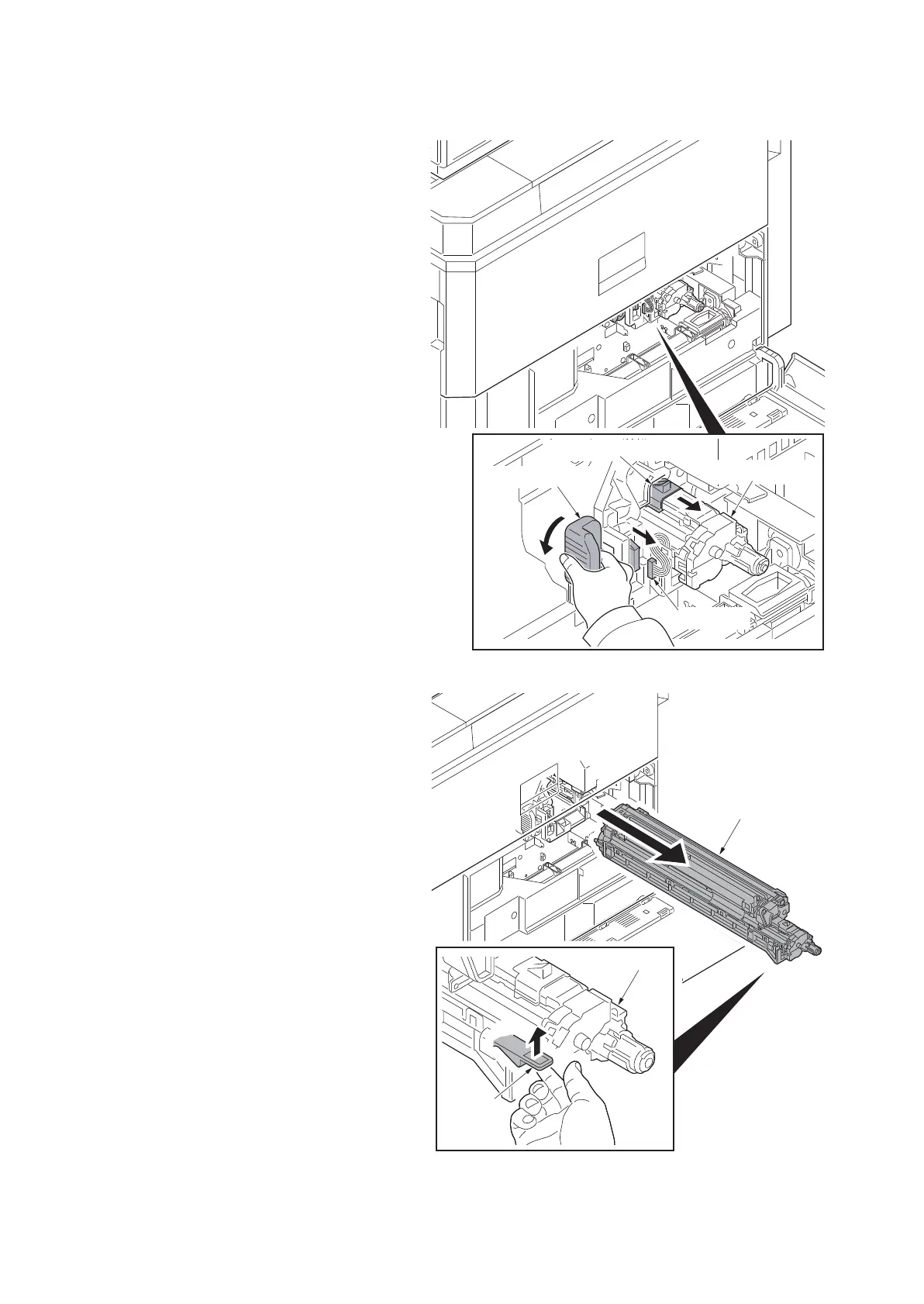
2. Close the toner supply shutter.
3. Remove the connector.
4. Turn down the DLP rail lever.
Figure 1-5-94
5. Release the lock lever at lower side of
the developer unit and then pull out the
developer unit.
6. Check or replace the developer unit and
refit all the removed parts.
7. When replacing the new developer unit,
proceed as follows:
1) Perform maintenance mode U140
(AC calibration) (see page 1-3-83).
2)Perform maintenance mode U464
(Calibration) (see page 1-3-175).
3)Perform maintenance mode U410
(Adjusting the halftone automatically)
(see page 1-3-151).
Figure 1-5-95
DLP rail lever
Toner supply shutter
Developer unit
Connector
Developer unit
lock lever
Developer unit











 To Next Page