2N8/2N7
1-2-36
Procedure
1. Press the power key on the operation
panel to off. Make sure that the power
indicator and the memory indicator are
off before turning off the main power
switch. And then unplug the power
cable from the wall outlet.
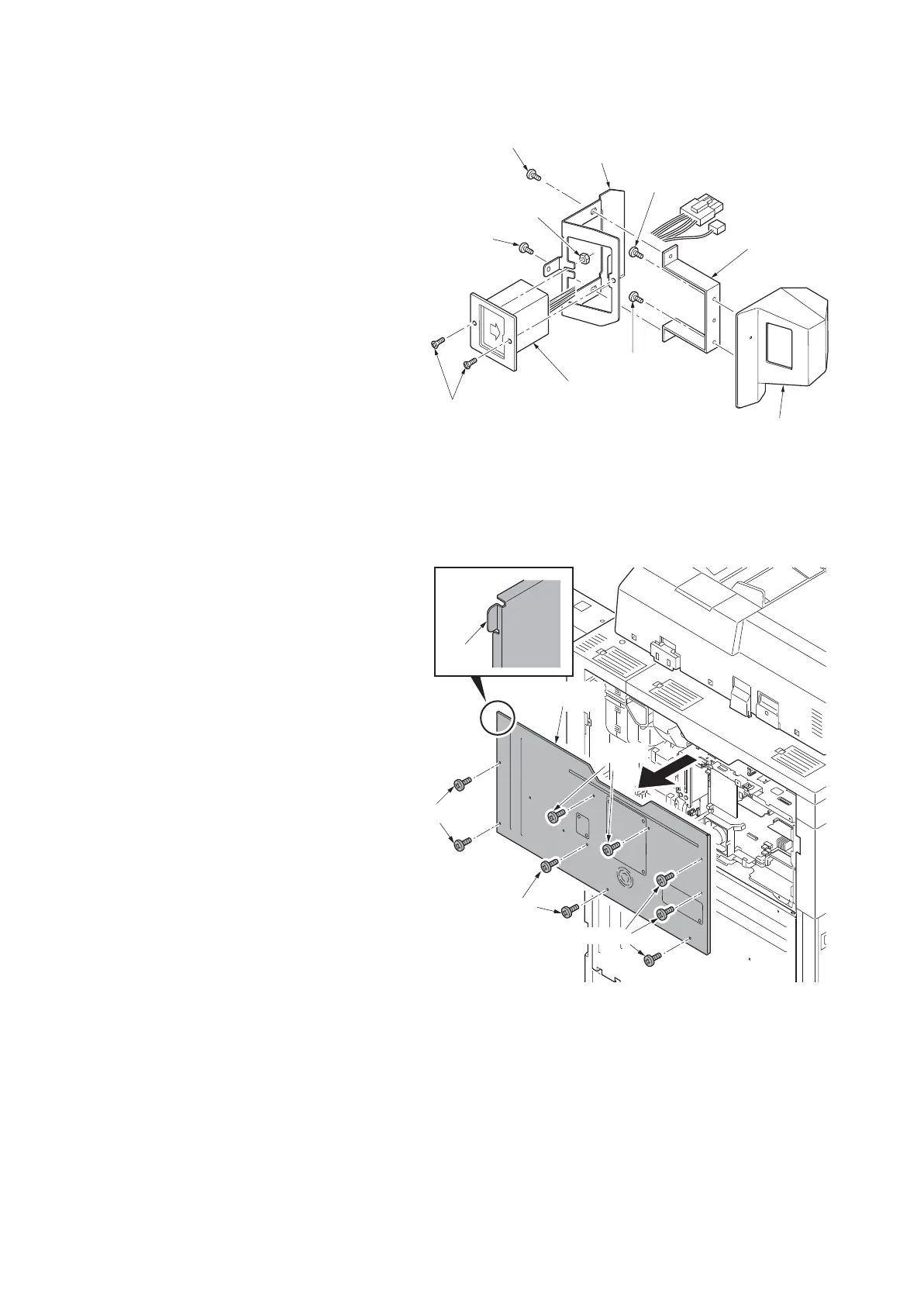
2. Fit the key counter socket assembly to
the key counter retainer using two
screws and nut.
3. Fit the key counter mount to the key
counter cover using two screws.
4. Fit the key counter retainer to the key
counter mount using two screws.
Figure 1-2-54
*: For the 120V model, proceed to step 24.
Pass the connector of the key counter
wire through the aperture in the operation
mount cover B.
And then proceed to step 28.
5. Remove nine screws and then remove
the rear upper cover.
*: To fix a cover, insert the hook at the left
top first by bowing the cover.
Figure 1-2-55
M3 x 6 flat-head
screws
Key counter
mount
Key counter cove
M4 x 6 screw
M4 x 6 screw
Key counter
socket assembly
M4 x 6
screw
M3 nut
Key counter
retainer
M4 x 6 screw
Screws
Screws
Screws
Screws
Rear upper
cover
Hook











 To Next Page